I was a young man in my late 30s (I was always late) and doing a class featuring 3D modeling and animation. I acquired a Dell Precision Workstation 410 (I believe) with dual Pentium CPUs and a high-end GPU for the time. I had 3D Studio Max 2.5 installed on it. I did that because I wanted to be able to work at home rather than have to go to the lab. People are now trying to resurrect “antiquated” computer equipment, out of nostalgia maybe. I remember the PDP 11 and the Sun workstations. We ran Unix at my university on a system with little memory, which gave the message “Not enough swap space to fork.”
1 Like
Just a short question (i am not using the Comfyui Iclone plugin because Iclone runs here on a GTX1080ti)
How does Comfyui render the Iclone Output, single image wise ? In which resolution ? how many month will you need to wait for a 20sec. 2k movie to finish  I have a 3080 on another machine and any video render failed miserably . The most i get is a few seconds in e.g 5125x512, upscaling is ajoke quality wise.
AI models are trained for a certain resolution. You cannot change it arbitrarily without degrading the quality but often it works if you don’t change it too much. For example Stable Diffusion 1.5 renders normally at 512×512, Stable Diffusion XL at 1024×1024, Flux recommends between 0.1 and 2.0 megapixel, Qwen Image about 1.6 megapixels, Wan Video renders at 480p or 720p, Hunyuan Video at 544p or 720p, LTX-2 can support up to 4k (it’s brand new), and so on.
A 2K movie isn’t possible with nearly all of these models. You definitely need upscaling and frame interpolation for better looking results.
Movies aren’t rendered per image, but the complete sequence is rendered at once on the GPU similar to sprite sheets in video games. That’s why they take so much VRAM because you basically render a 9 by 9 1280×720p image at once, which is then converted to 81 frame animation.
If you don’t really like ComfyUI I recommend Wan2GP, which is a Github project that tries to super optimize all these models, to make video generation possible on GPUs with 6+ GB of VRAM, and put them into a unified user interface.
So bigger models might run fine on your RTX 3080 (albeit slower than on a RTX 3090). Wan2GP has a browser based Gradio user interface, so no complex ComfyUI networks. And you can easily switch between image generation or video generation models.
You can install this via tools like Pinokio which automatically install all dependencies in a localized environment. There are also other one click installers like Dione or Visions of Chaos (which is a more complicated to use as it requires you to manually install Python and certain Build Tools first).
New models are coming out all the time, and the current AI Render is not up-to-date in that regard. My hope is that AI Render will be flexible so that newer models can be plugged in as they become availble.
In my experiments, I take an iClone render and then create a stylized image from that. That image is then input to a video creation option.
I have a subscription to freepik (which I use for stock images and videos), which has expanded into AI. I can chose from different models and they are good at adding new models as they become available. Availble resolutions for the video are now 720p and 1080p.
I use VirtualDub to convert the video into an image sequence which I then upscale using Upscayl. Upscayl is an AI upscaler, but you can run it locally for free. The quality is quite good and it is fast.
I havent’t really tried working with ComfyUI myself. I followed the RL webinars, but I didn’t really understand them.
A model called LTX-2 just became Open Source and there are various YouTube videos on how to run it on relatively modest hardware. Running locally means that you don’t need credits, which can add up.

There is so much being released that it is hard to keep up, but there is also a huge interest on running these things locally on affordable hardware.
One thing to add for AI render: I hope RL will decide to allow 24 fps as framerate option. I find it a good framerate for my work and it avoids the need for upscaling to that framerate.
LTX-2 sadly still requires too much vram but i am in hope there will be a condensed model soon. BTW: LTX-1 is such a crabbbbb, downt even bother with downloading it, it produces rediculous outputs. Tanks for all the informations, still it looks like a awful amount of GPU time to put into a few seconds of film. and Yes ! → Upscayl is really good, better then everthing ive tested on comfyui so far.
The problem is, that not all models support the same control videos like Wan Fun Control. Some only take a starting image. So, it’s not that easy to create a general Comfy Workflow for all different kinds of models.
Wan2GP is extremely up-to-date with new models. Simply check their GitHub for news. New models are usually included in just days after release.
This is from Wan2GP:
After much suffering I have managed to reduce by at least 1/3 the VRAM requirements of LTX 2, which means:
10s at 720p can be done with only 8GB of VRAM
10s at 1080p with only 12 GB of VRAM
20s at 1080p with only 16 GB of VRAM
10s at Full 4k (3840 x 2176 !!!) with 24 GB of VRAM. However the bad news is LTX 2 video is not for 4K, as 4K outputs may give you nightmares
1 Like
I for one , am very happy that there are alternative approaches that do not involve complicated setups like comfyUI.
I personally have zero intention of investing a single dime in an expensive GPU and I’m more than happy to pay Elon Musk a reasonable monthly subscription fee for Grok to handle the computing of my AI animations going forward.
I already have a suitable GPU and I’m just exploring at the moment. Overall, I’m very pleased that my foray thread has sparked and still sparks interesting discussions and contributions!
2 Likes
Dont give me wrong, but in a bit more then a year (assuming you pay $30 a month) you would be able to buy a used 3080. BTW: i was abit lucky in this concern, i bought a used 12700k, water cooled, RTX3080, 32GB Ram,2TB HD, ect ect for just 1000 Euros from adude who thougt AMD would perfom better on his Shooter game PS: Comfyui is very easy to use , there are portable versions available that dont need any setup, you only have to download the models, but this is very easy too, once you start one of the delivered workflows you get a message with a download link , cant be easier. Hint: Flux schnell is extremly fast on a 3080, only about 15-20 seconds for a 1920x1080 image and delivers very good results (depending on you prompt of corse)
1 Like
Hi,
a 3080 GPU is already two generations behind.
Logically, it makes zero sense for me to throw money at an already depreciated asset that’s only going to depreciate even more so, as time goes on and become less and less useful as the AI models become more complex requiring more computational processing power.
Everyone’s individual situation is a bit different.
I’m retired with quite a bit of disposable income.
For me, it makes more sense to simply pay a reasonable monthly fee and not have to be concerned that the latest updates to the frequently updated, AI generation models are going to lock me out of the hardware requirements because I’ve thrown away a few $1000 on a local GPU.
Understand this, going forward the only reason I need local computing power is for video editing in DaVinci resolve and maybe some image editing in photoshop.
My current 5-year-old Dell pc is more than enough for those tasks.
I no longer need or even care about having a powerful GPU to run the latest., Blender Maya C4D, Iclone, Daz studio or anything else.
I am moving beyond traditional 3DCC Animation programs to a fully AI workflow as a retired hobbyist
Of course YMMV.
1 Like
For me, it makes more sense to simply pay a reasonable monthly fee and not have to be concerned that the latest updates to the frequently updated, AI generation models are going to lock me out of the hardware requirements because I’ve thrown away a few $1000 on a local GPU.
That’s perfectly understandable. I bought that PC way before i met AI, so if i had to buy one now, i’d probably think twice too.
1 Like
I haven’t forgotten the orginal purpose of this tread. I have been busy creating a storyboard using iClone renders with AI-enhancements. In the end I had no immediate need for it, but I decided to create some derivative scenes based on what I had. And instead of the original 3D cartoon style, I wanted something a bit more cyberpunk.
An older man is walking down the street towards a bar. A young woman is walking in the opposite direction but they don’t interact. So I thought: “What if they did?” Based on that idea I created the following iClone render:
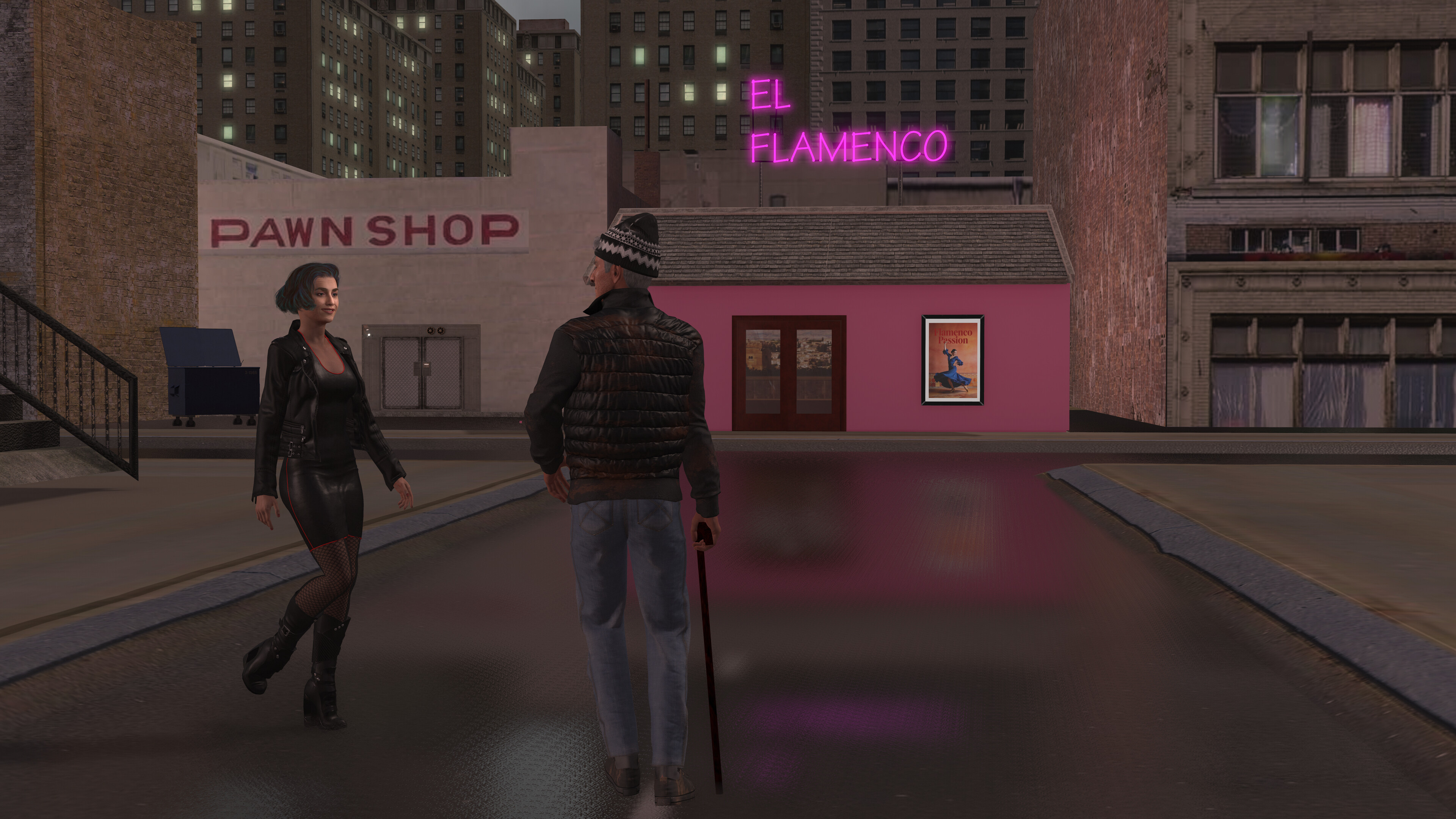
I then devised a prompt to tell the AI what I wanted: “Change to semi-realistic 3D cyberpunk style. It is raining. A man with a cane and a beanie stands looking at a young woman who approaches him. The young woman wears a short skirt, fishnet stockings and boots. Across the end of the street is a bar with a sign on its roof stating “EL FLAMENCO”. On the wall on the right is a poster as Reference image 1.” I then provided a reference image of the poster.
The result was quite unexpected:
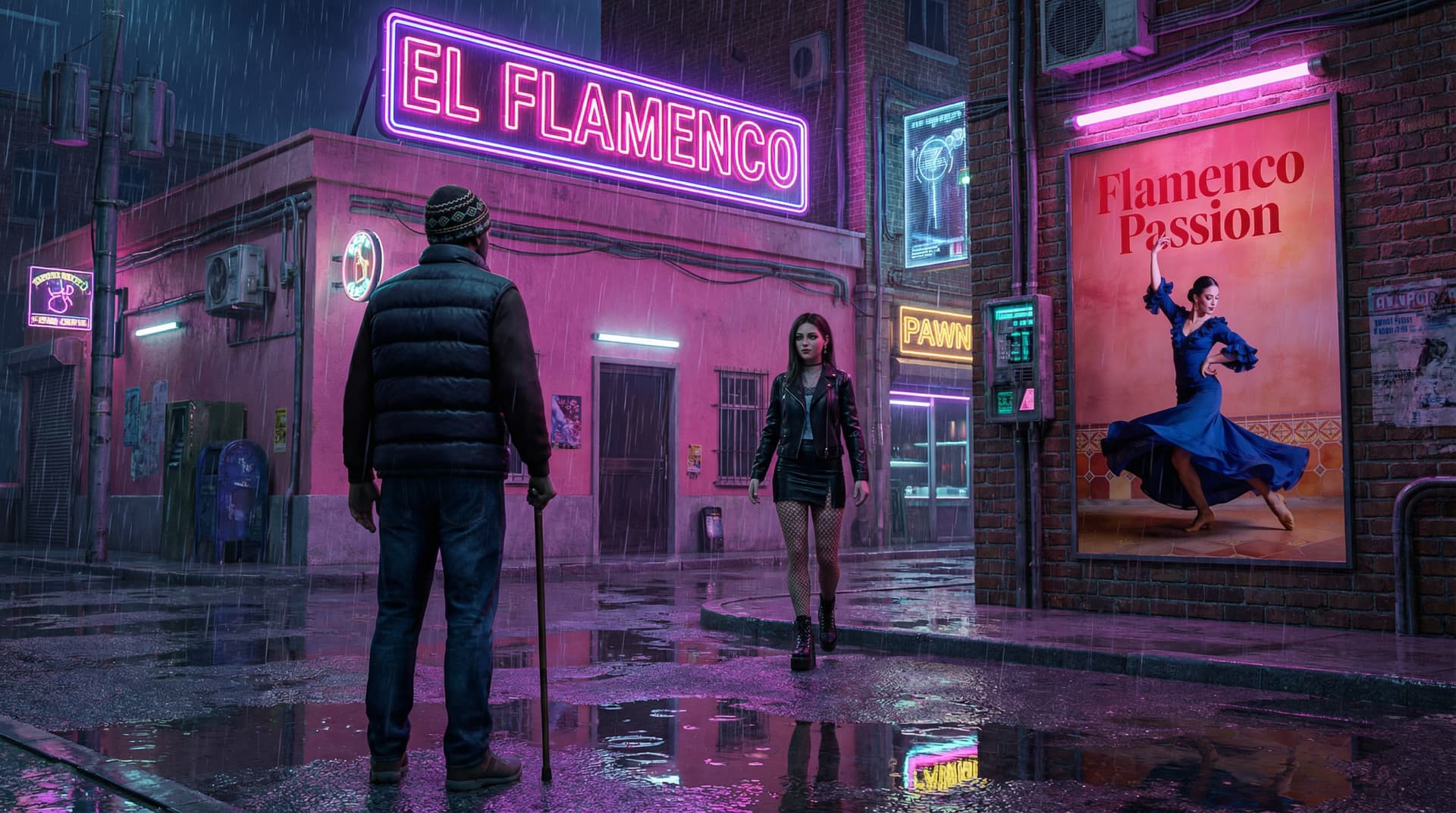
Apparently, "on the wall to the right’ was interpreted as a separate wall. I very much like the image but it was not what I intended, so I revised the prompt to: “Change the scene in the image to semi-realistic 3D cyberpunk style. It is raining. An older man with a cane and a beanie stands looking at a young woman who approaches him. The young woman wears a short skirt, fishnet stockings and boots. Across the end of the street is a bar with a sign on its roof stating “EL FLAMENCO”. On the wall of the bar is a poster as in Reference image 1.”
That gave a result closer to the original image, but still with the cyberpunk feel:
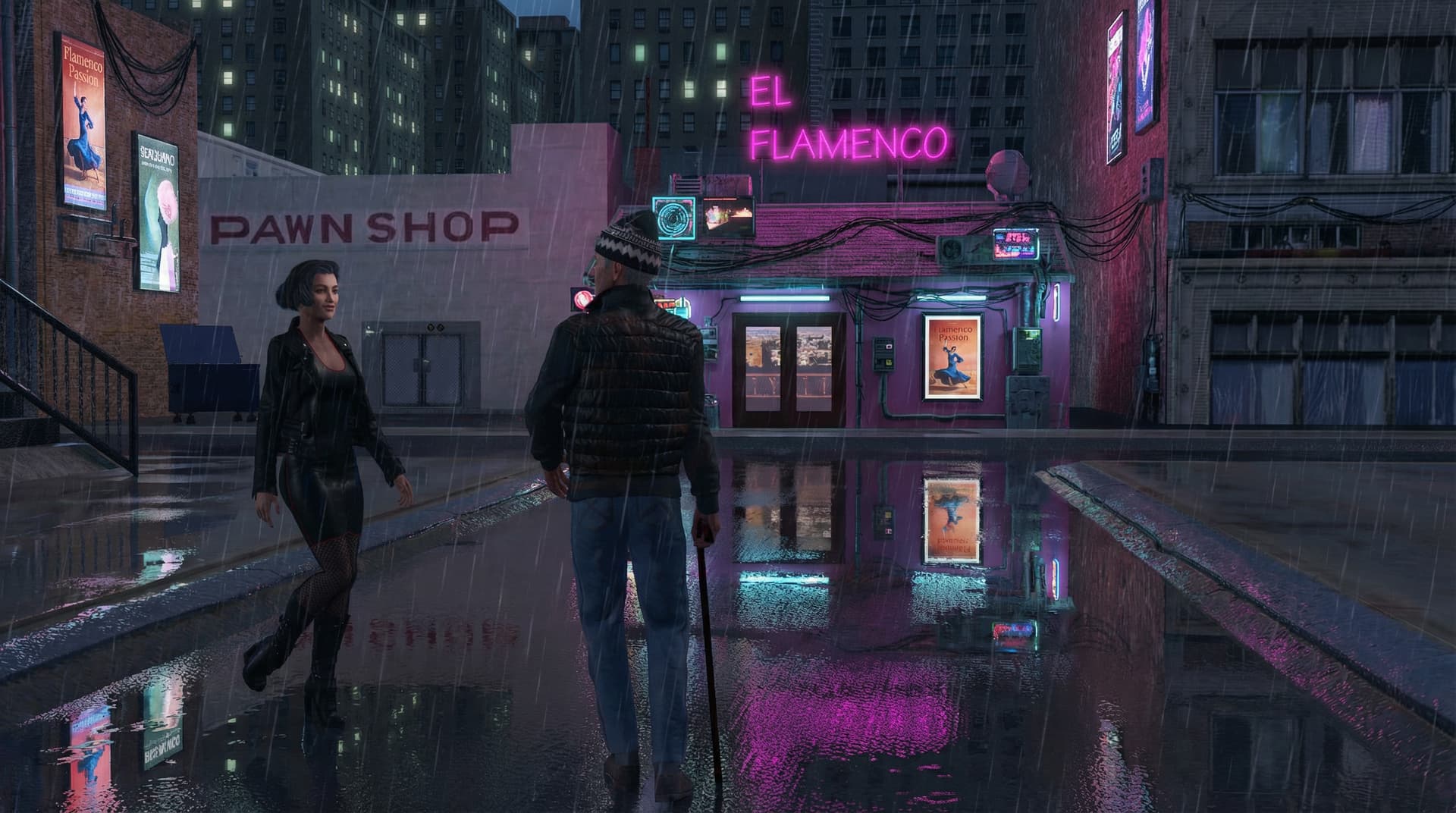
The changes in the prompt were that I mentioned that the poster should be on the wall of the bar. I also stated in the prompt: “Change the scene in the image to…”, although that should be obvious.
Next, I will created a 10-sec video using the AI-rendered image as the first frame. That works quite well I have found in earlier tests of similar images.
I have a confession to make that I actually like creating the intial scenes to use as input, but I am happy for the AI to take over the animation.
2 Likes
Next Level :

2 Likes
This is a really long video (59 minutes) Although it might be worth a watch for people who are still trying to decide which video AI. Generator you may want to use for your specific purposes.
I’m surprised to see how well Grok did on the photorealistic stuff, as I personally have only been using it for my 2D animations, which is my primary interest at this point.
1 Like
I saw a similar overview about a month ago, so this is very helpful to become up-to-date. What I like about this is that it covers the same scenario for different models.
1 Like
Hello,
I also briefly created an AI video
with Filmora Open AI Sora 2. I don’t know much about AI,
and I have to admit that I’ve probably missed out on something.
Best regards, Robert.

2 Likes
Roberto-Marvel Production 
When can I see it in the cinema?
1 Like
the real SuperRob

3 Likes
Oh my God 