CC/iC Blender Tools 2.4.0
| Github: | Product Page | Release Notes | |
| Online Documentation: | Documentation | ||
| Blender Auto Setup Add-on: | Blender | ||
| CC/iC Blender Pipeline Plug-in: | CC4 / iC8 |
Changelog
2.4.0
Blender Add-on
- Displacement update for Skin and Pbr materials.
- Displacement added for Teeth and Hair.
- Clean empty mesh shape-keys and vertex groups on import (optional).
- Motion imports use actions slots for a single action for the entire character (optional).
- Depending on action options, motions will refactor into Single action or multiple actions for each object.
- Refactoring will also strip key-frames from bones and keys that have drivers.
- Unused bones and shape-key tracks will be placed into unassigned slots or actions.
- Motion imports set the preview range.
- Add empty keyframes for non-animated shape keys (optional).
- Function to clean up duplicate keyframes.
- Function to add a new empty motion set.
- Motion, Pose and Sequence action import options:
- New - Add new motion for the character.
- Replace - Replace existing motion.
- Overwrite - Overwrite keyframes of existing animation with the imported motion.
- Motion, Pose and Sequence frame import options:
- Start - Import animations to frame 1.
- Current - Import animations to the current frame in the scene.
- Match - Import animations to the same frames as in CC / iClone (+1 for Blender)
- Rig drivers add missing expression blendshapes.
- FaceRig collection uses Rigify Face collection.
- Can now be enabled / disabled with the Rigify UI controls.
- Standard eyelash disabled when HD Eyelash detected.
- Fix to Facerig following root position.
- Fix to shape key baking on export.
- Fix to bad vertex weights when skinning the rigify face rig on SubD 1/2 characters.
- Fix to material merge (InstaLod) character detection.
- Fix to baking node socket strength values from Color/Vector inputs.
CC/iC Plug-in
- Fix/Update to mesh replace.
- Fix to expression import/update for Go-CC.
- DataLink motion exports use Blender FPS (when connected).
- Fix for iClone 8.7 accessory export API issue.
Notes
A few API changes in the most recent CC/iClone versions broke much of the pipeline so this should fix that.
The biggest change is that Blender will use the new action slots for a single action for the entire character. This is an option that can be disabled in the Import Options, and it will create separate actions for each animated object in the character as it used to.
The motion will refactor itself to the character when Loaded, combining into a single action or splitting into multiple actions as needed for the chosen options. Any bones or shape-keys that have drivers (or don’t exist on the character) will have their animation curves stripped from the resulting action, and placed into an Unused slot or action. This way blender doesn’t do any needless calculation for animation curves that are never actually used.
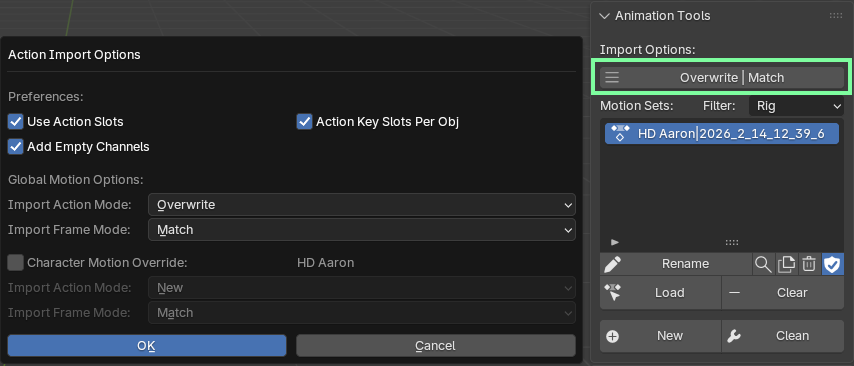
In addition to this there are options to determine how to import the motions:
- add a completely New motion.
- Replace the existing motion.
- Overwrite the existing motion with the frames of the incoming motion.
And options to set which starting frame to import the motions to:
- Start - import to frame 1.
- Current - import to the current frame in the Blender scene timeline.
- Match - import to the matching frame from the iClone/CC project (+1 as Blender starts at frame 1)
These options work for Pose, Sequence and Motion imports across the DataLink. So you can send poses and motions from any frame - to any frame in the Blender animation and you can send them to the same action or create new or replace actions.
As always. Keep an eye out and report any tracebacks in the system console. That’s the surest sign something has gone wrong and needs fixing.
Known Issues:
- For many older characters, the facial profile has bad expression bone data. This data is crucial for setting up the facial rig.
If your character has this problem, then typically, when Rigified, the eyes wont move and sometimes the jaw:
Eyes not rotating with face rig in blender
The only real solution is to replace the facial profile on the character.