Hi, kdn115
The T_lacrimal_h is just a texture asset, it shouldn’t be related to other objects, which is a bit strange.
Or you could package the UE project and send it to us for checking.
Besides this issue, are there any other errors?
thanks,
Luke
Hi, kdn115
The T_lacrimal_h is just a texture asset, it shouldn’t be related to other objects, which is a bit strange.
Or you could package the UE project and send it to us for checking.
Besides this issue, are there any other errors?
thanks,
Luke
Oh ok. so CC3+ should be fine. it worked in previous versions using the old auto-importer.
I pinged reallusion support and they said to turn on ‘Use T0 as reference pose’ but that crashes the engine on import.
we’re all stumped
Sorry. I had a typo in my reply. T0 is no longer used in the current plugin.
so how to fix for 5.7? none of my imports are working. they all result in those missing bones error. I even tried exporting with the UEFN reference pose. no dice.
I feel like this was an accident but when trying to use 1.41 for UE 5.7 it looks like someone put a uproject in that folder, which contains the RLPlugin for version 5.6 that wont compile.
If 2.0 has so many import crashing issues could we at least get a working 1.41
Hi, DissociatedGame
The crash originates from Unreal 5.7.1 and is not caused by AutoSetup.
To prevent the crash, simply uncheck Use T0 as Bind Pose in the FBX importer panel. This is also the method recommended in our tutorial and manual.
Even though we only provide AutoSetup 1.41 for 5.7.1, enabling Use T0 as Bind Pose and Import Morph Target will still cause a crash.
thanks,
Luke
Hi, theo.adams.iv
If you are referring to the crash issue, you can simply uncheck “Use T0 as Ref Pose.”
If you are referring to the “Missing from the bind pose” message, this is expected and should not cause any other issues.
If you are referring to the floating issue, could you kindly provide a bit more detail so we can better understand and assist you?
thanks,
Luke
disabling T0 and morph targets on import still results in a crash unfortunately. I guess for now the workaround will be to import into a blank 5.6 project and migrate the assets over.
Hi, DissociatedGame
Could you kindly provide your FBX and the related files so I can check?
thanks,
Luke
When generating rig it used to create separate Face SKM and Body SKM but the new version doesn’t seem to separate it anymore… I still get both Face SKM and Body SKM file but they both have body and face merged. I don’t get body without head and head without body versions anymore. Is it supposed to happen?
So i poked around in the modify panel, wondering if there was anyway to make sure the character was zeroed in regards to height. and turns out… somehow the character’s Pose offset was x-0 y-0 z-78 ???
no idea when that happened. but i have set the z to 0.
hopefully that fixes it
I’d like to know that too.
Why face and body are no longer separate.
Greetings Robert
Hi, motion_889456
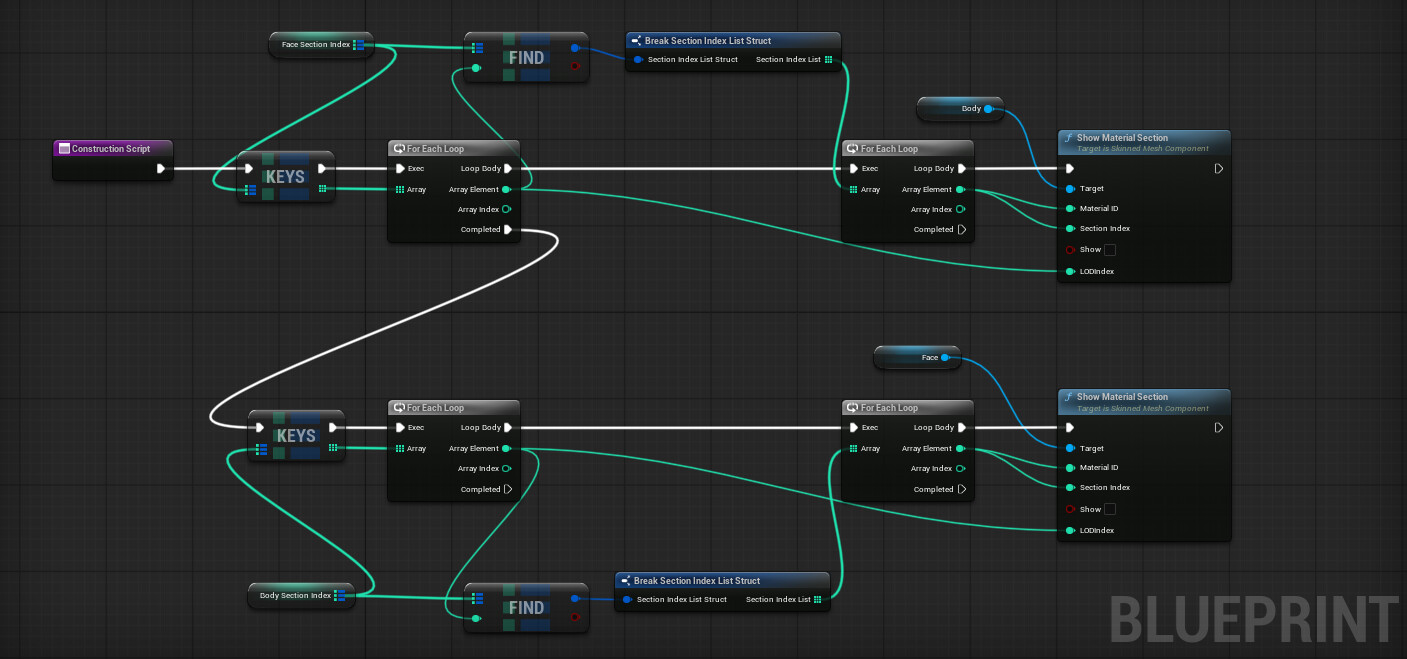
Before AutoSetup version 1.41, we hid the mesh on the skeletal mesh by disabling the material. However, this method caused Unreal to crash when applying groom hair, so we later switched to hiding the mesh within the Blueprint. We will continue exploring the best approach to handle this.
For now, it is possible to manage this using a Construction Blueprint. I will try to explain how to do this manually until we have a quicker solution.
thanks,
Luke
Which Blueprint does this need to be in? I also have the face and body showing the full SKM. Right now I disabled the respective sections.
Also has anyone managed to get face and body animations to work while playing third person template ? If so, did you use the animation blueprints created via auto setup or had to made custom changes?
I followed the tutorials and got the facial lip syncing and body animations created/baked to control rigs via control rig blueprint. They play fine in sequencer, but I don’t know how to get them working together while in game. I’m just using third person template as an example since I know it varies per project. I can only get the face lip syncing to play and the body will not.
Plugin for UE5.6 seems broken, or maybe it’s the character file, but it won’t generate a control rig for my character. I followed official tutorials for using AccuRIG to generate skeleton, use blender to add custom bones and blendshapes, but finally in UE5.6 the disappointment that the plugin fails to generate control rig. Perhaps it’s the bones being wrong named, because CC and Blender likes to add their own topnode bone. Right now my skeleton starts with the first four bones are rl_boneroot > armature > rl_boneroot_0 > CC_base_hip
I have followed the instructions correctly when using Groom Hair but the end results in the hair not attaching to the head correctly. Understand that my character is not the template character but that was created using the Character Creator mixer. Should the tutorial still work for custom characters?
Hi, cheyennerobinson_45
Characters generated using Mixer are CC characters, so they should be supported. If it is convenient, could you please provide the ccAvatar for us to run a test?
Hi, paxton_469831
Based on your description, was the character generated using AccuRIG? Did you confirm that the five-finger option was selected? A complete CC skeleton is required to generate a proper Body Rig in Unreal.
You also mentioned that you added bones in Blender before importing the character into Unreal. It is possible that this step caused the issue. If it is not too much trouble, could you provide the final FBX file so we can check whether it can be handled on our side?
Thanks for responding. I actually found the issue. In the tutorial it says to make sure that the groom asset is under the body but I dragged it under the face item which made it look as thought it was attached to the face and things started working correctly. May that step needs to be clearer. Now I just need to know how to make the hair more stiff for some of the styles.
Thanks. I can’t upload this character on a public forum though. Yes it has 5 fingers. The main difference is it has more topnode bones that CC5 keeps adding every time I import the character
I really, really wish that Reallusion would make a clear statement about whether it’s possible to take Accurig characters (with some random extra bones in Blender e.g. tail) and get the control-rig working with AutoSetup-plugin.
It would help immensely to know exactly what “rules” for the skeleton-naming is required to make it work. Is it completely out of the picture to have any bone, what so ever, other than the default? It’s so frustrating that the plugin is so secretive about what it requires to work optimally 
It says very little that it must be “default”, because CC is an exosystem with many many different skeletons. Cant you make an overview poster so we can check our skeletons manually ourselves, and make fixes, rather than blindly being forced to keep exporting and importing all kinds of combinations?