Thank you so much. It works perfectly now for pics but keeps failing for video. The video preview process is ok but when i go to render it fails.
Hello, backalleytoonz,
I’m glad to hear that it worked for image generation. For troubleshooting the video issue, could you kindly confirm the following three points:
-
Please go to Menu → Script → Console Log and check whether any messages appear when video generation fails.
-
Please navigate to your history location (History item → Right click → Browse), then run Workflow_Gen.json in ComfyUI (Open WebUI from the Connection tab in the Settings Panel). If any error messages appear, please share a screenshot with us.
-
Please also share your device information, including graphics card and VRAM.
Thank you.
I would like you guys to update something in upcoming release if possible.
The video play in Preview/History panel is way too “invasive”. It plays endless loops as soon as video render finishes and whenever you select the preview from History on left side until you hit stop. And also switching between different video previews sometimes causes one or more of them to stuck in the RAM which prevents deleting previews from History until iClone is restarted.
I’d prefer to retain image preview load first (regardless if video was rendered or not). And then if I wish to view the video I can always click play. Or at least offer a check box to switch a default video preview behavior. Thanks.
Hi 4u2ges,
Thank you for your feedback.
Our team has been discussing the necessary fixes regarding your issue.
Thank you.
1 Like
There is something else I’d like to see integrated at some point alongside with AI renders.
That is a module/model for background removal from rendered AI images and videos which would be great for composing where background/scene behind characters is not rendered the way we would like it to be (which is in turn most of the time as we have very little control over it) .
Or, generate an accurate post-render mask with AI (would be suitable for videos).
 AI Render Update is live — now available for iClone & Character Creator Trial users
Highlights: Trial support, Face Detailer toggle, plus stability and workflow fixes.
Update now: Existing users update to iClone 8.6 / CC4.6 first, then install the Patch; first-time installs use the Full ZIP. Note: iClone 8.54 / CC4.54 are no longer supported.
View full release notes & download now: [Official]  AI Render Plugin 1002 Version Release Note

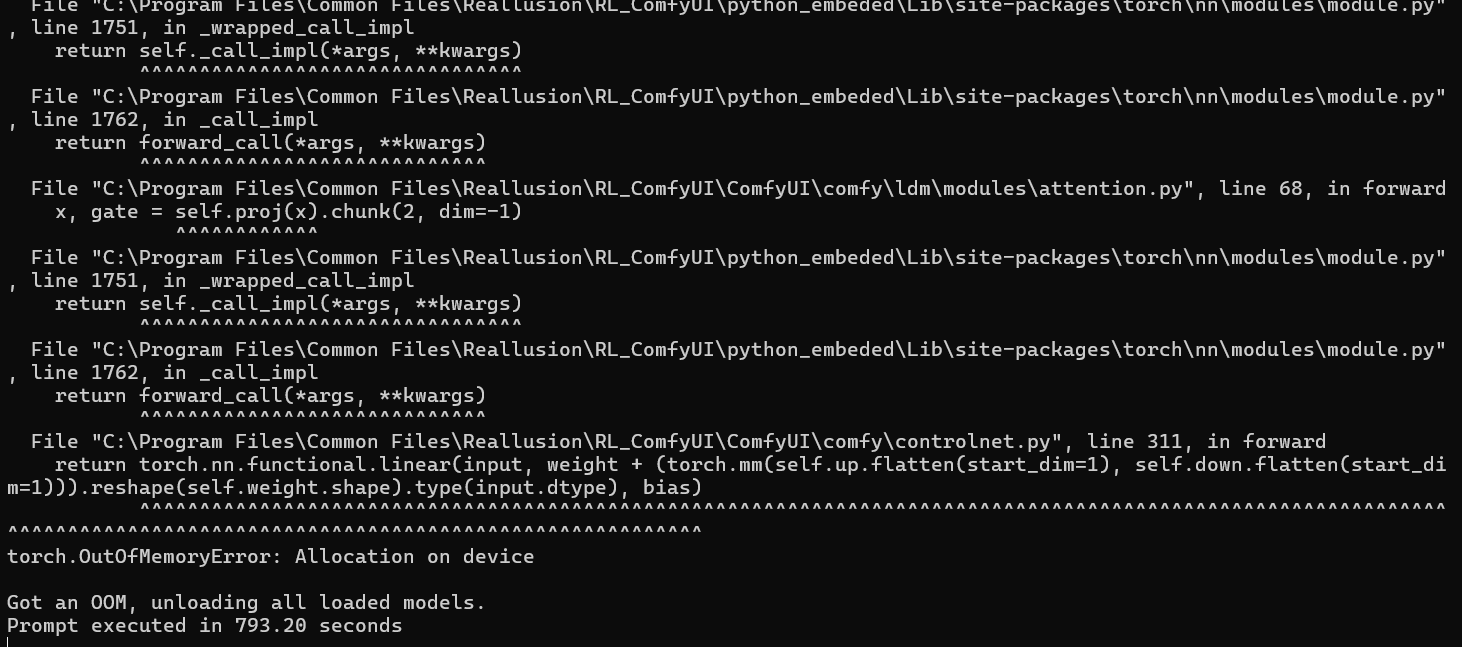
Hello, Sp3c1alk
As shown in the image you shared, the message “torch.OutOfMemoryError: Allocation on device” indicates that your graphics card’s VRAM may not be sufficient.
In this case, please try restarting ComfyUI and running the workflow again. If the same error occurs, it likely means that your current VRAM capacity is not enough to run this workflow.
Could you kindly share which workflow you used, along with your graphics card model and its available VRAM? This information will help us provide more accurate suggestions.
Thank you.
Yesterday, Reallusion automatically updated AI Render (adding a LoRA function) and then within a few hours reinstalled the prior version of AI Render. After Reallusion reinstalled the prior version of AI Render, the Export - Send To - iClone function (in CC5) stopped working.
Please advise.
Thanks.
Randolph Kessler
Hi rlkessler,
We’re sorry, but we couldn’t replicate your issue. Could you please provide your system information?
You can obtain the data from Reallusion Hub > Help > System Information > Export.
The file will be located at C:\Users\Username\AppData\Local\Temp\Reallusion_Bug_Reporter\RLSystemInfo.
Please send the file to me via private message. Once we have the system information, we’ll investigate the cause as soon as possible.
Thank you.
What happened to my AI render button after the new update for video mocap…???
I recently installed AI Render with the latest iClone version (8,63) and now after launching iClone the Console Log opens, complaining about something:
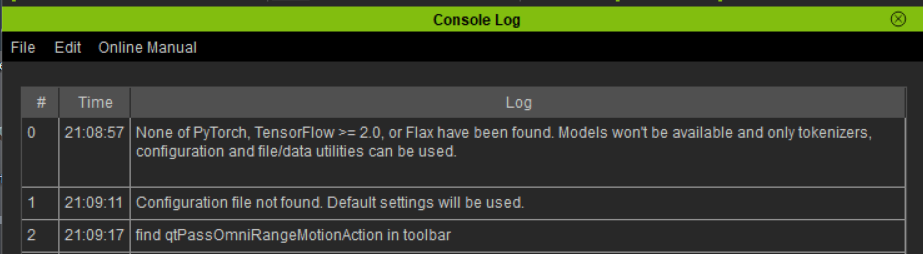
AI Render works fine (local option), so I’m just wondering what this means. I’m on WIndows 11.
Hello animagic,
These messages appear automatically during the plugin loading process. You can safely ignore them—they won’t affect how the plugin actually works. Just carry on as usual, everything should function normally.
I’m unable to change the model used for rendering because the option is greyed out in the render preview window. (booth in iClone and CC4, plugin and SW latest verison), what to do?
Hi morematall,
I would like to first confirm whether you are trying to render a video.
If so, please switch the AI Render panel to Video mode. Only then will the Render Preview panel enable the video render options.
Getting noisy video render results for Photorealism Video Styles with Wan2.1 VACE
Plugin Version: AI_Render_Beta_1002_for_IC8
System: AMD Ryzen Threadripper PRO 5965WX 24-Cores; NVIDIA RTX 4090 24GB VRAM; 128 GB RAM; Windows 11 Pro
ComfyUI 0.3.40
Testing the AI plugin for iClone 8.62 and focusing on the XL Photorealism Style - SDXL Wan Video to Video exports. The preview images look good and I then proceed to export with the Wan2.1 VACE FusionX 14B preset which results in very noisy and blotchy video quality. Having a 4090 24GB VRAM, I should be capable of 720p exports. I rendered with optimal 1024x1024 resolution, but get the same results with the other recommended resolutions. Wan2.1 Fun 1.3B look correct, but I would like to export higher than 480p. Wan2.1 VACE 1.3B starts clean at first, but degrades with moderate noise quickly. Same thing happens with SD 1.5 Wan, Video to Video preset. All video tests have been 1 second duration at 16fps. I attached an image showing the various results.

That’s how it is. VACE always renders sharp and detailed and yeah… you may say noisy (which could be blurred/smoothed in post with filters such as diffuse). FUN on the other hand renders smoother with a lot less details, but you may still render 720p with it (and it’s a lot faster). And all of the video render models suffer from occasional bug where pose armature might be composed over render.
Here is a 5 sec 720p mostly static video rendered with VACE FusionX following by 5 sec FUN render (no post).

I also did some compassion between VACE 1.3B and 14B here: [Official] 🎉 Welcome to AI Render Open Beta – Start Here! - #239 by 4u2ges
Thanks 4u2ges,
I wasn’t sure if it was something that had to do with my system setup. I’m new to using these generative AI models and appreciate the insight for rendering with FUN and VACE.
Hi,
Just started with AI render. Images are rendering just fine, videos are fine in preview, but every render attempt ends with the “cannot allocate array memory error”, no matter which preset I am using. I restarted the server to clear any existing array, but to no avail. I am running with 48 GB RAM and a Nvidia M6000 with 24 GB VRAM. Any suggestions how to fix this?
Hi puremindmatters,
Just wanted to confirm, what are the resolution you’ve set?
Also, are you using our pre-installed version of ComfyUI, or are you using your own custom ComfyUI environment?