I tried several, the last attempts were with 1280 x 720, but I tried lower resolutions as well. In the end I tried a really simple animation with just one character and 3 seconds of animation and I did not get the array error anymore, but instead a CUDA error (launch timed out) - I changed my card settings from graphics and calculations to graphics only and it got further along the road than before, but ended up after perhaps one hour with the same CUDA error, so I suppose it might be a configuration or driver problem with my M6000. Will check that in the coming days, but if you have any suggestions, what to look for, it would be much appreciated. And I am using the pre-installed version of ComfyUI.
Did some research and it looks like the M6000 architecture isn’t ideal for AI tasks, which causes low performance despite having enough VRAM. I’ve updated the .bat startup file—please put it in your pre-installed ComfyUI folder [\Program Files\Common Files\Reallusion\RL_ComfyUI], run it manually, and see if you can connect.
Nope, now it doesn’t connect at all anymore, neither locally nor with LAN after running it manually. Hm, now I’ve overwritten the original bat without creating a backup - could you kindly provide me with a copy of that? Then I can at least render some images if need be.
I suspected that the M6000 architecture might be a bit too old for this and had quite some trouble wih Audio2face already (gave up there after many very frustrating hours). I am considering switching to something more contemporary in the foreseeable future, but that is of course a major investment and needs some deliberation.
Thanks for the quick responses, I couldn’t answer earlier, because of the two posts in the first 24 hours rule. And Happy Holidays.
Hi, thanks. Everything is working now, I just had my first successful video render. That is of course due to modernizing my setup and switching to a RTX 4000 ADA 20 GB. Works like a charm and is significantly faster altogether. So I will do a lot more test renderings in the foreseeable future.
One question: I got this new FashionGen plugin, which also uses ComfyUI. I had no luck there with my old card, so I deinstalled it again and plan to reinstall it, once I get my additional SDD, since I wanted to keep 100 GB free on my NVMe. For the test I installed it in a different location than the version installed for AI render, which I also would like to move to the SSD. I hope they are not completely different versions causing any problems if I install into the same folder, or is it better to keep the two apart? For moving AI render, do I have to uninstall and reinstall, or can I just move the folder(s) to the new drive?
yes — you can directly move it to another SSD. However, after moving it, you will need to reconfigure the path settings in AI Render ComfyUI. Additionally, when removing it, you will need to manually delete it as well.
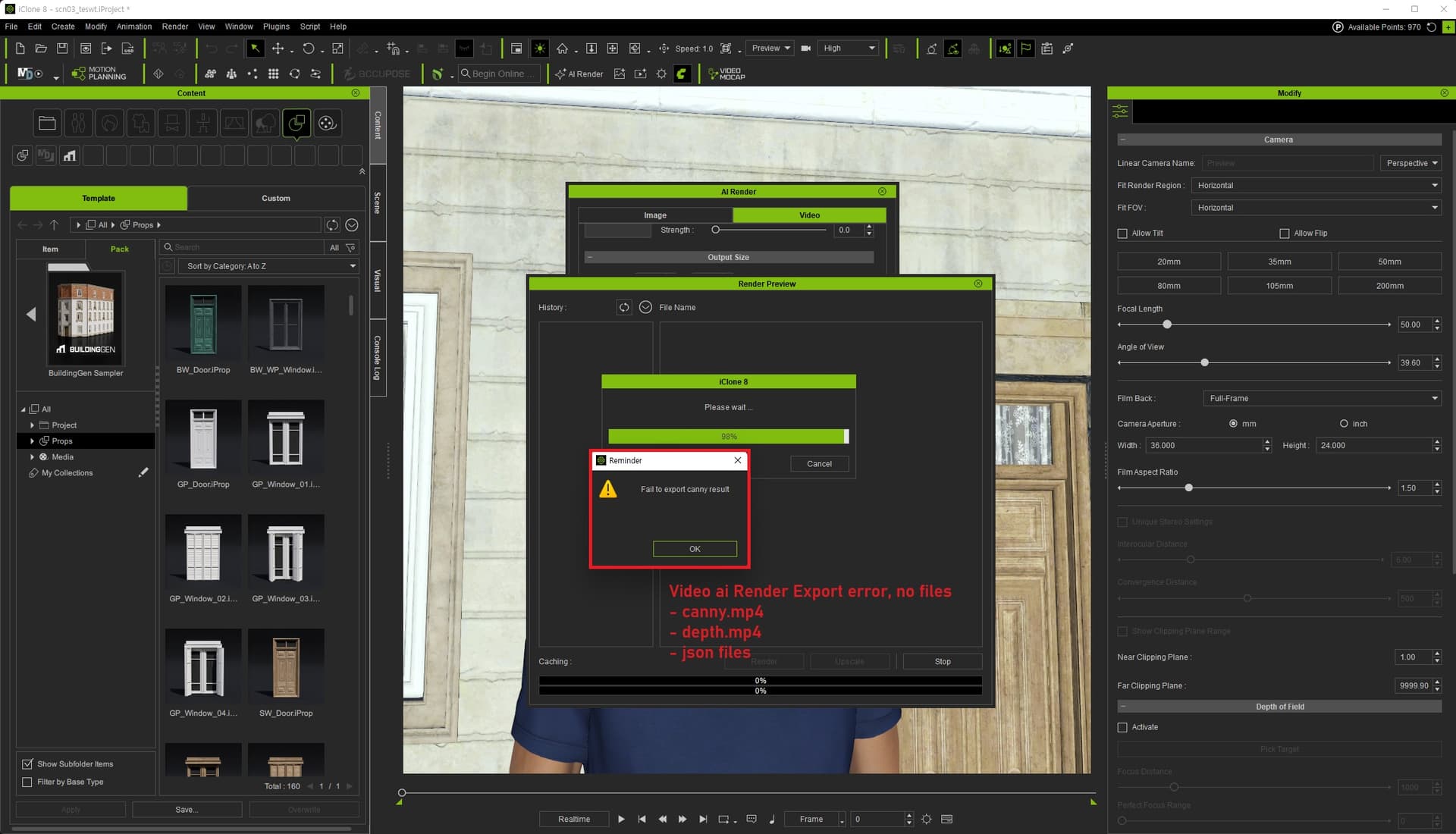
Hi, I`m leaving this comment to share my experience regarding the bugs.
Error MSG
1] Missing ControlNet Videos:
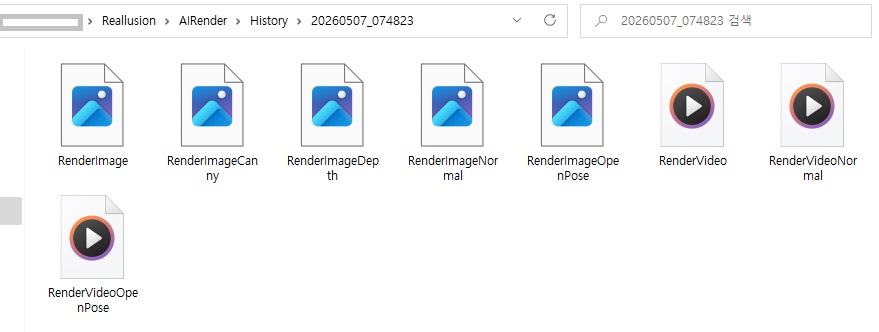
It successfully exports below.
RenderVideo.mp4
RenderVideoNormal.mp4
RenderVideoOpenPose.mp4
However, it completely fails to generate RenderVideoCanny.mp4 and RenderVideoDepth.mp4. Interestingly, the single image versions (RenderImageCanny, RenderImageDepth) are generated without any problem.
2] Missing JSON:
The export process crashes at the Canny/Depth video generation stage, the essential .json workflow file is never created in the ‘History’ folder.
3] ComfyUI Disconnection:
Without the .json file and the missing mp4 files, the task is never sent to ComfyUI, leaving the pipeline completely broken. (state of infinite loop)
A bit of fun, Comfyui save metadata into the render5ed png. Either drop the workflow into a running workflow and gather info from there or less painful, in the history panel right click on the desired preview and click apply and watch your setting return. Yes even the carefully crafted prompts comes back but be careful it wil load any errors so check your settings.