Dear Users,
Good news to share at the end of 2025:
A new release of Auto Setup 2 (All-in-One) for UE 5.7 that integrates CC UE Control Rig and UE Live Link into one plugin.
With a smoother workflow, Auto Setup 2 for Unreal Engine saves time from the complicated and routine procedures of importing and mapping animations from ActorCore to Unreal skeletons.
Read this post for more info: UE Auto Setup (All-in-One) 2.0 is released now - Supporting UE 5.7!
Compatible: Unreal Engine v5.5, 5.6, 5.7
Download here
How to Install
Step by Step Guide
Online Manual
Enjoy!
The ActorCore Team
HI, I have followed these instructions to the letter, but whenever I import I get asked the dialogue about Enabling CC and Iclone Auto Setup. Teh box is checked I click OK and Unreal just freezes … Currently using CC5 and UE5.6.1, I cannot even check the the output log in UE5 as I have to use Task manager to force quite UE. Having real issues here
Hi, afreexmusic
thanks for letting us know, and sorry you’re running into this issue.
To help us investigate what’s happening, could you please share:
- A small sample project or the character/asset you’re importing
- The exact steps you take before Unreal freezes
- (If possible) a short screen recording of the process
If you’re not comfortable sharing the files publicly, you can send them to me directly by email at raytsao@reallusion.com , and I’ll keep them confidential.
This additional information will really help us reproduce and diagnose the problem. Thanks again for your patience
Hi there.
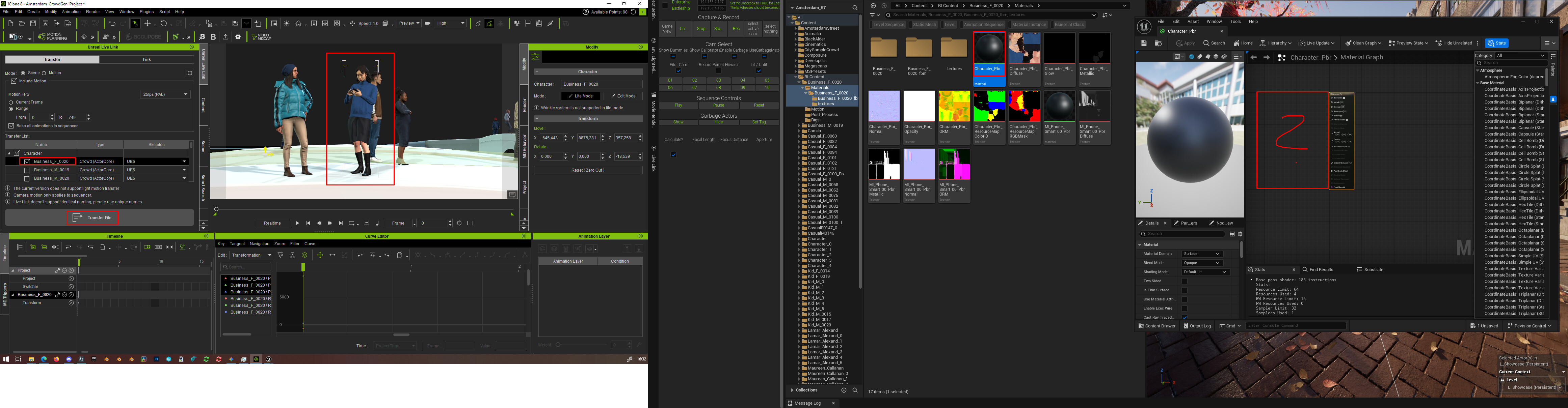
I´ve created a crowd in iClone 8 which i now want to end to UE 5.7.
I have installed the newest version of Auto Setup 2.0 in Uneal.
When i transfer the ActorCore Actor from iClone to Unreal via UnrealLiveLink, i get a black material with no textures in it. The textures get imported, but they are not added to the shader and i have to manually add them, which is really annoyng. I know it worked before Auto Setup 2.0 came out, but now, since Auto Setup 2.0, nothing seems to workproperly anymore.
Also, the motions don´t get tranferred over. I have created the crowd sim with motuions in iClone, but no matter what i do, they don´t get tranferred to unreal.
And that´s not the only problem with AutoSetup, it also has problems genearting the Control Rig when i export a Character from CC5 to Unreal, which also worked with the old CC Auo Setup und CCControlRig plugins, but since they are not available for UE5.7, i need to use the not working AutoSetup 2.0.
Here´s a video of my process: https://youtu.be/kNpuiurVnf8
Hi,
Thank you for providing the recording.
We tested the same workflow on our end but weren’t able to reproduce the issue. The textures applied correctly, and the Level Sequence worked with the actors moving.
Could you please check if both your iClone version and your Live Link Plugin are up to date? Or provide more details about your operating environment?
As for the Control Rig issue, could you provide more details about what you are experiencing?
Best,
Alan