After updating to version 8.75 today, the Chinese interface disappeared again, and I am also unable to switch to other languages.
Hi gaweiwei,
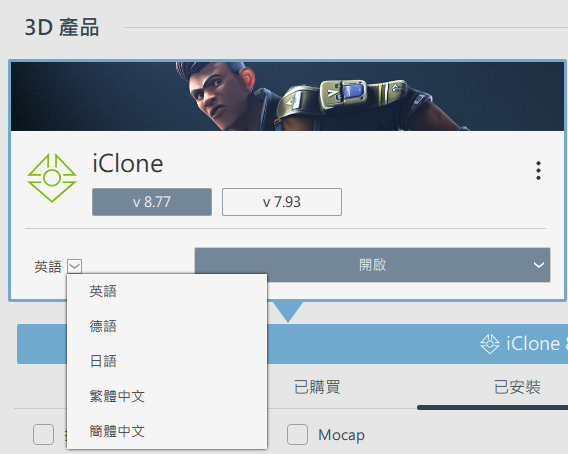
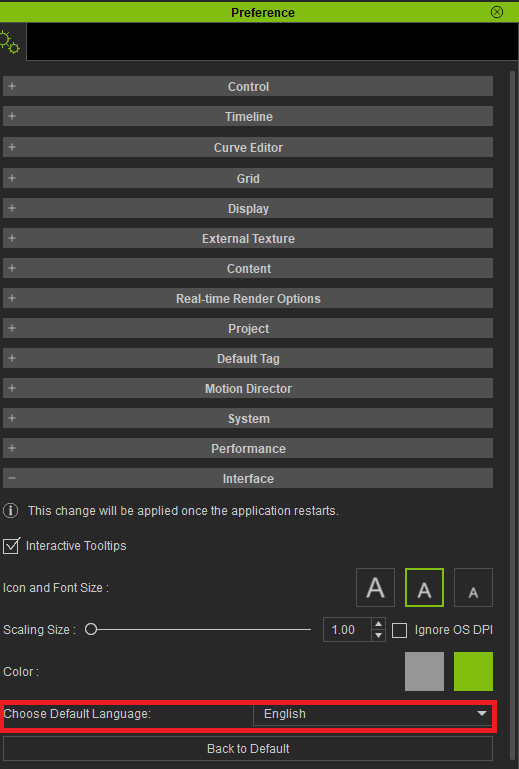
You will be able to change your langauge interface in 2 ways.
-
Reallusion Hub
-
iClone Preferences
Regards
After updating to version 8.75, I tried switching to different languages, but the new version still doesn’t display, just like last time.
Hi gaweiwei,
Thank you for reporting this issue. A few of us were able to reproduce it, so we’ll report it to our R&D team for further investigation.
Thank you.
Hi gaweiwei,
We sincerely apologize for the inconvenience. Unfortunately, this issue has reoccurred unexpectedly. Please follow the workaround steps below to replace the file again. We will ensure this does not happen in future updates. Thank you for your patience!
- Ensure you have installed the latest version of iClone (v8.75).
- Close the program completely.
- Download and extract the IC8.75_MultiLan_Resource.zip file to your local drive.
- Rename the existing Resource folder in your program directory to Resource_0902.
- Default path:
C:\Program Files\Reallusion\iClone 8\Resource
- Default path:
- Copy the newly extracted Resource folder into the main iClone 8 directory.
- Default path:
C:\Program Files\Reallusion\iClone 8\Resource
- Default path:
- Done
Hope this helps!
1 Like
Everything works fine after changing the resource. Hopefully, this won’t happen again. Thank you!
Hello, I use iClone 8.75. The google drive link of IC8.75_MultiLan_Resource.zip in forum cannot be accessed in mainland China. Please send me a direct download link of this multi-language resource package.
thx 