I’m writing to submit a critical optimization request for severe memory overconsumption and lag issues in iClone 8, specifically when importing OBJ scene files exported from SketchUp. As a regular user creating architectural scene assets, I’ve encountered extreme performance bottlenecks that severely limit my workflow and project scale, even with high-end workstation hardware.
My device is equipped with an Intel i9 CPU and 128GB of high-performance RAM, which fully meets and exceeds the official operating requirements for iClone 8. However, the software still suffers from serious stuttering and unresponsive operation when loading simple architectural scenes. For testing, I created a basic single-floor school scene in SketchUp, containing only three to four small classrooms with standard furnishings including desks and chairs, without any complex models, high-poly details, or extra decorative assets.
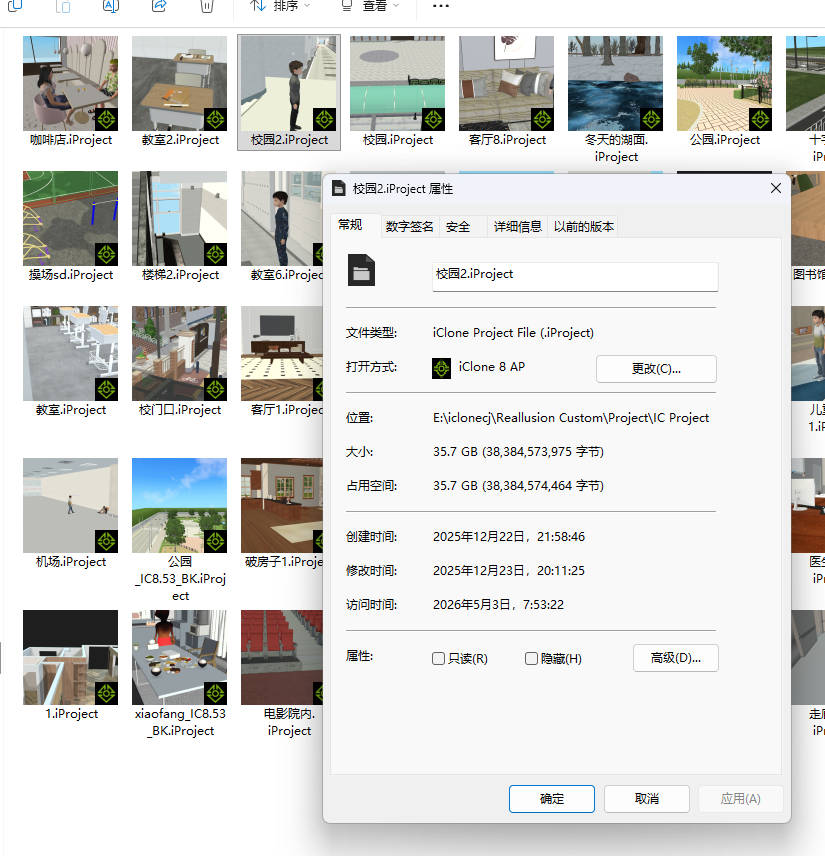
Surprisingly, after importing this lightweight OBJ file into iClone 8, the system’s occupied memory soared to 35.7GB, as clearly shown in the software’s property panel. Even with my premium hardware configuration, the scene runs extremely sluggishly, affecting viewport navigation, asset editing, and real-time preview. This issue severely restricts my creative capabilities. Currently, iClone 8 only supports the production of tiny and simple scenes, and any attempt to expand scene scale leads to unbearable lag and memory overload.
I sincerely hope the official team can optimize the scene memory management mechanism for imported SketchUp OBJ files, reduce invalid memory occupation, improve resource utilization efficiency, and enable the software to stably support medium and large scene production. This optimization will greatly enhance the practicality and workflow efficiency of iClone 8 for architectural and environmental scene creation.