I have IC8 open on my laptop - I move it to a second 24 inch screen for better viewing but the "Track Menu Panel ’ when opened ,always stays on the primary screen[ my laptop ] . It doesn’t float so cant be dragged anywhere.
Another annoying thing to me is it always opens with ‘full list of scene items’ , It would be easier to navigate if the subfolders were hidden making the initial list much shorter therefore quicker to browse for required item you want.
I truly believe this is a weak part of interface that should have been fixed years ago.
Could you share a screen recording of your setup? I tried moving iClone from my primary scene to a secondary scene, but the track list and everything else moved to the secondary scene as well.
Thanks for responding
Bit tricky getting pics to illustrate so hope these shots will demonstrate.
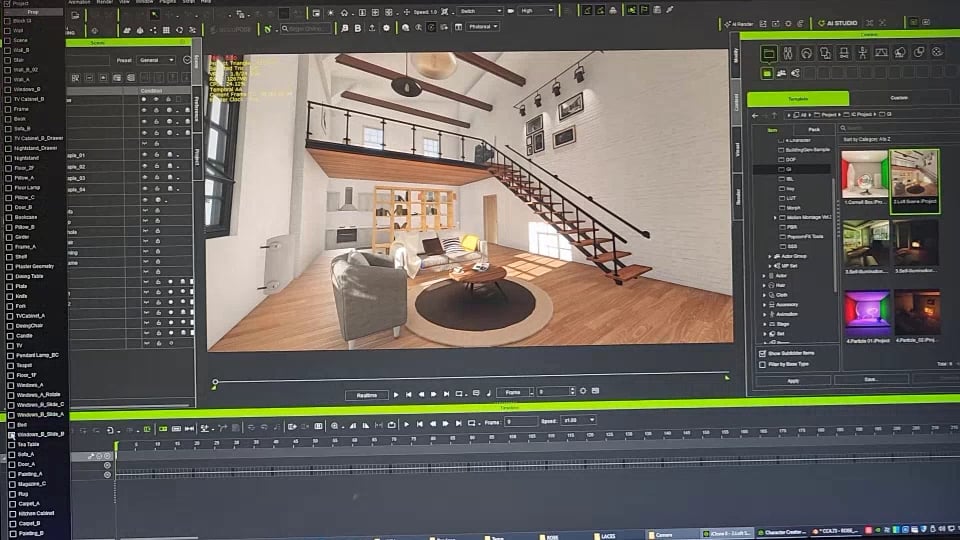
1] Is Iclone on my laptop with Track List open.
2] Is combination where IC8 is half dragged to second screen. Note ,here the Track List disappeared.
3] Is IC8 Fully moved to second screen. No Track List on either screen. I click on screen 2 to open it. It appears on my primary laptop screen.
My System
Device name MSI Processor 11th Gen Intel(R) Core™ i9-11900H @ 2.50GHz (2.50 GHz) Installed RAM 32.0 GB (31.7 GB usable) Graphics card NVIDIA GeForce RTX 3080 Laptop GPU (16 GB) Intel(R) UHD Graphics (128 MB) Storage 1.38 TB of 1.86 TB used System type 64-bit operating system, x64-based processor
Thank you for taking the time to share these photos, especially since this issue can be tricky to capture.
The Track list is designed to stay with the Timeline wherever it is moved. We’re not sure how it became detached in your setup. Could you record your screen while undocking the Timeline or moving it to your second monitor? This would help us see the steps that lead to the issue.
Thank you for sharing the reference video. We were able to reproduce the issue and will ask our team to investigate whether this is expected behavior or something that needs to be fixed.
Thanks for response.The advice given by others relating to “Object Track” seems a solution to managing the time line. Something I hadn’t previously understood.
I will endeavour to capture a video for your information though it may take a little while before I do. However I note the image you provided is from AI Studio - not Iclone so just wondering if that was intended ?
Hey thanks for that - I never realised how the ‘object related track’ could be used. Another of those features that get lost amongst Iclone’s messy icons interface .
Obviosly from comments in the posts you have referenced the track menu list has been an ongoing problem for years. Seems to me it is a hangover from legacy programming that never carried forward as IC developed.
Thanks again. Much appreciate time in responding.
Glad you could understand the problem and if the team can fix it I’m sure others would be happy about that and at the same time 'make the menu open in a collapsed state '. I note others have commented on that aspect.
cheers and thanks for your response.
Exactly. That was the main reason I stopped using Track list years ago. It was such a PITA to look for the necessary items while working on large projects.
And then this iClone 5 era classification - Upper/Lower which does not makes sense with modern characters, separate attributes for Eyes/Teeth… etc with the same names (if you have multiple characters).
Track list tree has to match the scene tree structure and individual branches expand/collapse state memorized when the list is closed. And yes, an option to sort the list…
@ Winner_RL
So maybe it’s finally a right time for the Track List Menu overhaul? .
Thanks for the reminder. I accidentally uploaded the AI image from another post, so I’ve deleted it to avoid any confusion. Sorry about that!
After reviewing 0oseven’s screenshots and 4u2ges’ videos, I initially wondered whether the Track Menu List was too long and extending onto the other screen. I also wasn’t sure how it had been undocked, since we don’t see an option to undock it. I tried toggling it on both the primary and secondary screens, and it appeared as shown below:
It doesn’t seem to be an issue with the list being too long. We’ve passed this question to our team for discussion, and I’ll let you know whether this behavior can be adjusted.


 .
 .

