I’d like to modify morphs using a Python script directly inside Character Creator 5, but I haven’t been able to find any documentation on how to control morph settings through Python. Can anyone help or point me in the right direction?
Hi Vashkaniuwo,
Here is a sample code for getting and setting Morph Sliders in CC5.
Please take a look, and feel free to reach out if you have any questions!
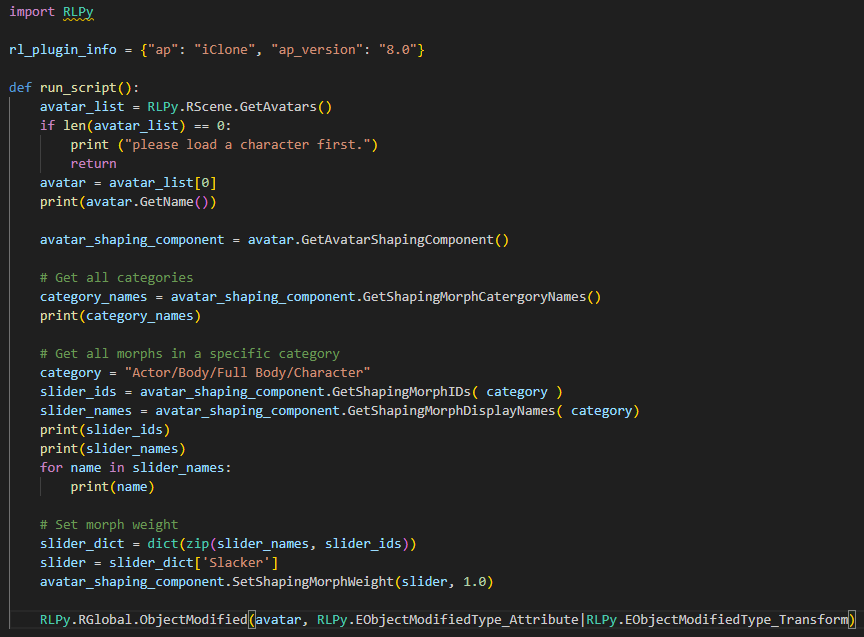
import RLPy

rl_plugin_info = {"ap": "iClone", "ap_version": "8.0"}

def run_script():
    avatar_list = RLPy.RScene.GetAvatars()
    if len(avatar_list) == 0:
        print ("please load a character first.")
        return
    avatar = avatar_list[0]
    print(avatar.GetName())

    avatar_shaping_component = avatar.GetAvatarShapingComponent()

    # Get all categories
    category_names = avatar_shaping_component.GetShapingMorphCatergoryNames()
    print(category_names)

    # Get all morphs in a specific category
    category = "Actor/Body/Full Body/Character"
    slider_ids = avatar_shaping_component.GetShapingMorphIDs( category )
    slider_names = avatar_shaping_component.GetShapingMorphDisplayNames( category)
    print(slider_ids)
    print(slider_names)
    for name in slider_names:
        print(name)

    # Set morph weight
    slider_dict = dict(zip(slider_names, slider_ids))
    slider = slider_dict['Slacker']
    avatar_shaping_component.SetShapingMorphWeight(slider, 1.0)

    RLPy.RGlobal.ObjectModified(avatar, RLPy.EObjectModifiedType_Attribute|RLPy.EObjectModifiedType_Transform)
B.R
Johnny
Hi Johnny,
Thank you very much for your help — your suggestion worked perfectly. I have another question and would appreciate your guidance if you’re familiar with this.
I’m trying to remove the character’s stomach region and replace it with my own custom stomach, but I’d like to perform this operation using Python scripting. Do you know how I can programmatically detect and remove the stomach area so that I can position my custom mesh there?
Or maybe the other solution can be converting my abdomen .obj format mesh to .ccCloth and then apply on the character. But my code did not work for this.
Looking forward to your insights. Thanks again for your help!
Hi Vashkaniuwo,
Currently, the Python API provides limited functions for mesh editing. You might try using RIMesh to see if it meets your needs.
        avatar_list = RLPy.RScene.GetAvatars()
        avatar = avatar_list[0]

		# get RIMesh
		find_child_mesh = False
        mesh_list = avatar.GetMeshes(find_child_mesh)
        body_mesh = mesh_list[0]

		# get name of mesh
		mesh_name = body_mesh.GetName()

		# get vertex count & face count
		vert_count = body_mesh.GetVerticesCount()
		face_count = body_mesh.GetFacesCount()

		# delete faces by index
		body_mesh.DeleteFaces([0,1,2,3,4])

		# replace mesh by OBJ/FBX file
		replace_uv = False
        body_mesh..ReplaceMesh(objfile_path, RLPy.EReplaceMeshOption_YUp, replace_uv)
Why is stuff like this not documented AT ALL? Or the ShapingComponent listed above? Half the time, the examples shown in a function definition no longer work! CC and iC are such great programs and it would be wonderful to write plugins to expand them, but it is currently a nightmare to find accurate and complete information.
Hi 0Calvin,
I’m really sorry for the frustration. I totally get it—it’s a nightmare trying to build something when the docs are outdated or examples just don’t work.
If you need the most accurate info right now, the best place to look is the RLPy.py file in the Bin64 folder of your IC/CC directory. It’s basically the “source of truth” for the API and includes things like the ShapingComponent that might be missing online.
To be honest, our documentation process has been way too manual and slow, and we’ve had a hard time keeping up with the updates. We’re actually working on fixing this right now by improving our workflows through AI to automate the documentation and keep it current.
We’re pushing to get this sorted so plugin development is actually fun and straightforward, the way it should be. Thanks for bearing with us!
Johnny_RL,
Thanks for the reply and advise about RLPY.py. I’m looking forward to having clean docs eventually. In the mean time, I’m making due.
Cheers, Brian
1 Like