I have a Blender scene with a couple of characters in it and a vehicle.
I have imported the vehicle as a prop into iClone to position the characters on. (One is driving the vehicle, the other one is under it).
I have sent the characters to Blender with the Send Avatar button and they ended up perfectly in the right position, the same osition as they have in the iClone scene.
When I alter their poses and facial expressions, and use the Send Pose button, they stay perfectly in place.
When I keep everything in its original place in Blender, this is good, but…
… I want to be able to move the characters around in the Blender scene, so I parented their root bone (CC_Base_BoneRoot) to an empty.
This works. When I move the empty, the character follows.
But, when I alter the pose in iClone and use the Send Pose button, the character ignores the empty and goes straight to the same position it has in the iClone scene.
it is still attached to the empty, but has an offset now.
Is there a way to keep it oriented to the empty, so I can change the pose and facial expressions in iClone, but keep its position locked to the empty once it lands in Blender?
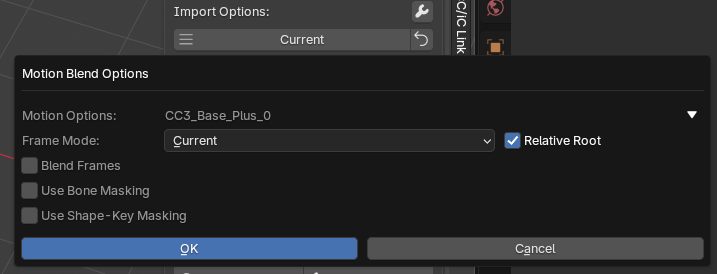
If you set it to Frame Mode: Current with Relative Root ticked.
Any pose you send will be placed in the current frame (regardless of which frame in iClone) and relative to the current root bone keyframe.
This blends the animation tracks, so just parenting won’t work, the root bone must be keyframed to the new position for this to work.
It looks complicated but it’s very versatile.
There are many addition uses of motion blending, it can blend whole animations, not just poses, fade in, fade out, and use masking so only certain bones or shapekeys are updated.
Thanks to your Relative Root method I managed to parent the character to an empty which I can move around my scene in Blender, and I can update its pose ore animation while it stays oriented to the empty.
But props that I parented to the character in iClone, are only transferred seperately.
When I change something about the animation of the character in iClone, for example I rotate his arm, it goes wrong.
Because of the change in the position of the arm, the prop that is parented to his hand, ofcourse automatically gets a different position than before. This works fine in iClone, but when I send the pose or animation to Blender, it doesn’t affect the prop, so it gets detached.
There is also no button to send the animation of the prop seperately, so I tried to resend the prop with the Send Prop button, but then it lands in the default location in the Blender scene, instead of in the hand of my character, which is in another place in the scene.
Is there a way to send the animation of the prop and character together and keep them connected to the empty? Or is the only solution to resend everything and then reconnect to the empty and re-move them together?
I can ofcourse parent the prop in Blender, but that’s not a solution for props who have their own animation.
I have another solution for this: putting every animation in its own Blender file and then linking those collections, but I was wondering if there is another (better) way.