I’m testing the Iclone beta RTX. I have an RTX super 2070 and realize this doesn’t meet minimum system requirements but I wanted to test the results before I replaced my video card. I was able to render 8 secs of a simple scene, (one character, one asset, animation, and camera movement) to HD 1920 x1080 in 5.5 hours at:
1024 samples, 24 bounces, 6 diffuse bounces, High quality, Accurate prefilter, Albedo and Normal passes, NVIDIA GPU denoise. Max texture unchecked
Is it possible that this rendering time is not related to the 2070 super, in which case an upgrade to the 5070 might not decrease rendering time, or not significantly?
Can anyone with a similar system and a 5070 card tell me what rendering times they are getting?
Thank you
Paul
Iclone version is 8.73.5509.1
Nvidea driver is 610.88
Windows 11
MSI Z790 gaming WIFI
i7 14700kf
64 G RAM
Dude, I have a 16GB RTX A5500 Graphics Card, with 128GB of RAM total available to my machine, so I pretty much blaze through rendering in Unreal Engine, or C4D using Redshift or Octane, but under 30 seconds of RTX animation in iClone took me all day. So yeah… you are not alone.
OK thanks for the info. Depending on whether “all day” is 12 hours or 24 hours it sounds like we’re getting similar rendering times and the extra RAM doesn’t seem to be helping ( though I’m not sure how important RAM is for RTX rendering I think most of the heavy lifting is done by the GPU VRAM. Is the 5500 also 8G ? If so maybe we could both get better times with a 16G card
Sorry I just saw your specs again , Your card is 16 G Which makes me wonder what an upgrade would do for me. I wonder how I’M disadvantage by the 2070 card
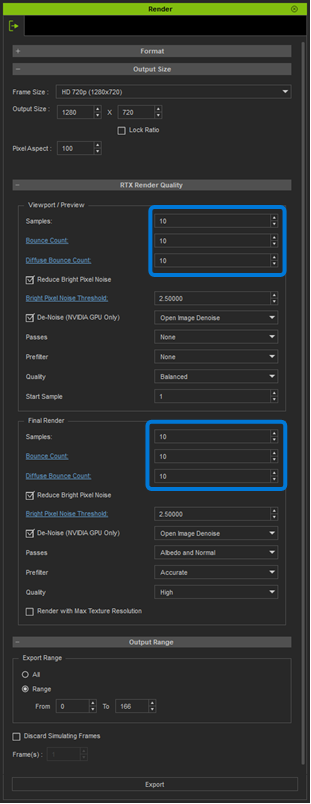
I think it would be a good idea to find out what your lowest acceptable settings are. If you are using the denoiser, then you can drop the steps down a lot, and still be OK. Also, you may be OK with fewer light bounces, depending on your scene. Play with steps and bounces independently to see what makes the biggest difference.
Try low-balling it to see what you get, then gradually raise it up to where it looks good. Start with the Viewport/Preview to get the lowest settings that look good, then set the Final Render the same, or a bit better.
Hello Rampa , thanks for the advice. I will do as you suggest and reduce the rendering quality to find out how low I can go. But reducing quality is also reducing justification for a GPU upgrade. I would like to be able to utilize the full RTX rendering, and will upgrade my video card if it will significantly reduce rendering time. If Lord Dreadmoor’s “all day” is 12 hours and not 24 then his system could be rendering at twice the speed of mine. Of course this doesn’t consider the complexities of the scenes we are rendering. Is it reasonable to assume I would cut rendering time in half with twice as much VRAM? Otherwise at my current speed a 5 minute animation is going to take 8.5 days for the very simplest of scenes.
@Heb_Gnawd you are correct, the render took around 12 hours and I gave up before it was even done, so I only managed to get roughly the first 30 seconds of it done, but that was more than enough to answer any of the questions I had about performance. Here are the comparison results:
Thanks for the sample and the info. I think the RTX render would be worth the price of a video card but even 4 days instead of 8 may not be realistic for me. Your results are similar to mine, the most obvious improvement is in the dynamic range, maximum black is considerably deeper which opens up all the shadow detail. Here is my 8 sec comparison, notice the change in background tone which is absolute black. But also the RTX superior light and tonal rendition creates volume. You can see in the example the DX11 rendered face seems flat in comparison, like a mask. Where I’m not seeing much improvement is in skin texture.
First of all, thank you for the active discussion.
In general, Blender Cycles is currently one of the most appropriate benchmarks for comparing RTX rendering performance.
Regarding hardware, since our renderer is based on NVIDIA CUDA technology, GPUs with more CUDA cores generally provide better rendering performance. However, overall performance is also influenced by factors such as GPU clock speeds, memory bandwidth, and power limits.
In addition, desktop GPUs typically outperform laptop GPUs because they operate with significantly higher power budgets and can sustain higher clock speeds. As a result, laptop GPUs generally deliver lower rendering performance than their desktop counterparts, even when the GPU model names are similar.
That said, we’ll continue looking for opportunities to further optimize performance wherever possible.
Thanks for the info There must be something else involved than the video card You rendered 2000 frames in 2 hours at 1440 and I rendered 242 frames at 1080 in 5.5 hours. I would have expected your rendering speed to be 3 or 4 times faster but not 40 times faster! It must be the sample rate I could runa test at 200 samples and see how long it takes N.B. cute frog!
OK thanks for everyone’s help.Just to conclude and get this on record I tried to match Rosuckmedia’s test. I rendered 100 frames at 2560 x 1440 at 200 samples in 24 minutes, which would be 2000 in 480 minutes (8 hours)
Rosuckmedia rendered 2000 frames in 2 hours so he is 4 times faster with a 4070 Ti , which I would expect . So RTX 2070 super to rtx 4070 Ti expect 4 times longer render times