A new build of the RTX Render open beta is now available: Beta3_0917.
Following our initial beta releases, Beta 3 introduces major feature additions—including native Volumetric Lighting, a dedicated Lens Flare post-processing channel, and physical Lens Presets with Sensor Shift alignment—alongside core architecture refinements to Substance materials, World Lighting, and Denoising mechanics.
For a complete walkthrough of all features, workflows, and visual examples, check out our full guide:
 RTX Render Open Beta 3 Full Feature Guide
How to Update
This build does not update in place. To move to Beta3_0917:
- Remove your existing RTX Render beta files (the previous build).
- Download the new build using the original links in your beta email.
- Unzip and run as before. No installation needed.
Getting Started for New Users
If you are joining the RTX Render Open Beta for the first time, getting set up takes just three simple steps:
- Submit the Signup Form: Request access by filling out the beta application form in the main thread.
- Receive Download Links: Once approved, check your email for your unique download links and access credentials.
- Download & Run: Download the package, unzip the files, and launch the tool—no complex installation process required.
For the complete step-by-step installation guide, hardware requirements, and signup links, head over to the official RTX Render Open Beta Thread.
 Enhancements
1. Substance Material Integration
- Preserved Depth: Substance materials retain their full 3D surface structure and depth when converted to RTX—no baking or flattening required.
- Live Parameters: Substance material parameters remain fully adjustable in real time within RTX mode.
- Animation Support: Keyframing Substance parameters functions as expected in RTX. (Note: Real-time playback is ~3 FPS in RTX mode due to current performance bounds, compared to ~60 FPS in DX11).
- Known Limitations: Displacement and Ambient Occlusion (AO) effects are currently unsupported in RTX rendering.
2. Lens Flare
- Enhanced Visuals: Refined lens flare controls and direction settings for improved optical quality and control.
3. Volumetric Light
- Expanded Support: Volumetric lighting is now supported for Spot Lights and Point Lights. (Directional Lights are not yet supported).
- Note: Volumetric light currently does not pass through glass materials in either RTX or DX11.
 New Features
1. Advanced Camera Tools
- Lens Presets: Choose from realistic lens profiles including Prime Lenses (e.g., 12mm f/2.8), Zoom Lenses (e.g., 24-70mm f/2.8), and Universal Zoom (unrestricted 20mm–200mm).
- Sensor Shift: Simulates tilt-shift lens behavior. Adjust framing without altering camera position, orientation, or perspective lines.
- Depth of Field & Bokeh: Includes F-stop control, Squeezing Factor (anamorphic lens simulation), and Dynamic Focus Tracking on animated objects/vertices.
2. Color Management
- AgX View Transform: Added AgX View Transform alongside Standard mode for better highlight retention and color fidelity.
- Look Profiles: Includes AgX-exclusive profiles such as “Punchy” and “Greyscale”.
3. Render Settings & Denoise
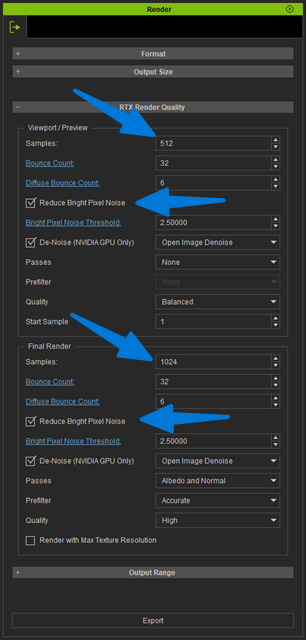
- Independent Workflows: Separate configuration panels for Preview and Final Render to balance interactive performance and output quality.
- Quality Controls: Adjustable Bounce Counts, Diffuse Bounce Counts, and Brightness Pixel Noise Threshold (firefly reduction).
- Denoise Options: Flexible Viewport Denoise triggers, sample count thresholds, and pass-assisted noise reconstruction (Albedo/Normal).
4. Visual & World Background
- Decoupled Lighting & Background: Independent controls for World Lighting and World Background panels.
- Dynamic Sky System: Procedural atmosphere system with customizable sun brightness, sub-horizon colors, and edge blur controls.
- 2D Background Integration: Unified 2D background management directly within World Background controls.
5. Bloom & Glare
- Multi-Scatter Method: Combines 6 bloom layers for realistic, natural glow without retro/vintage overexposure artifacts.
- Kernel Method: Supports EXR/DDS HDR textures for custom bloom shapes with high-luminance Boost controls.
6. Render Passes
- New Render Passes: Added support for Transmission, Coat, Sheen, Emissive, Specular, and SSS (Subsurface Scattering) passes for enhanced post-compositing workflows.
Have fun exploring the new features, and please keep us updated if you encounter any issues!