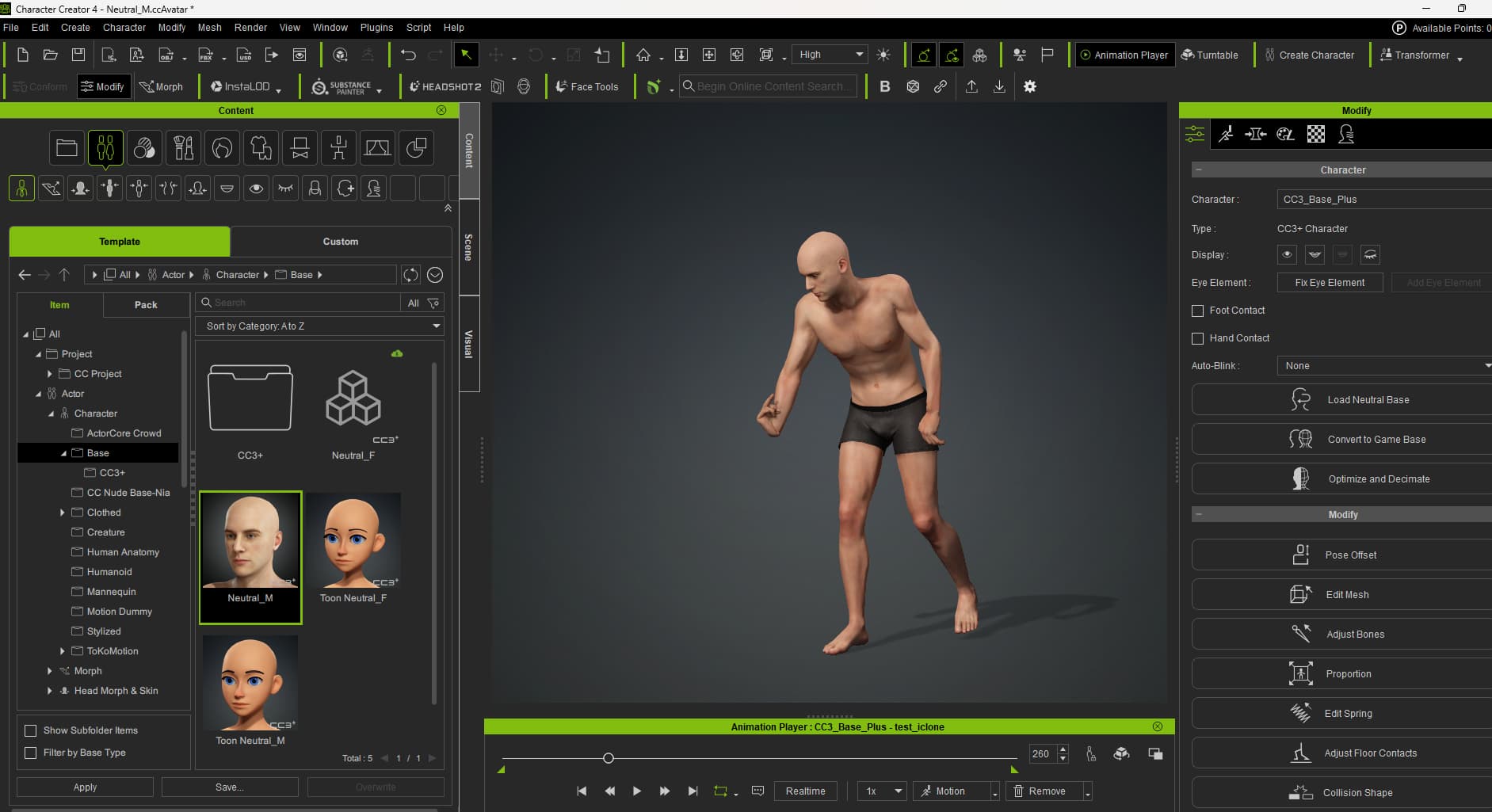
Greetings all,
I’ve recently purchased the Rokoko Smartsuit Pro II and used the Rokoko studio for the first time to record and export a test animation.
(Test was a success in Blender when exporting the .fbx with a Mixamo profile. )
However in CC4 and IClone8 (using the iClone profile and Mixamo) that same .fbx mocap file causes the model to deform, slide, have limbs crooked. (I’ve tried with a CC Base and a custom model, both do the same thing).
It’s possible this is a Rokoko Studio issue and not an IClone one. I’ve contacted Customer Support there and will return with information.
I’ve noted that trying to bring a model created in Character Creator 4 (Like the Neutral M) to Blender results in the model’s mesh being 90 degrees from it’s armature.
When retargeting in Blender using the Rokoko Add-on or Auto Rig Pro, the model breaks.
Is there a specific detail with CC/IC models that I’m missing?
Hello @mmapoodle,
Try to export an other time the animation from Rokoko Studio with the “default” .fbx export setting. Rokoko’s support team gave me this advice and it works very well. Hope it solve this isseu for you.
Best regards