@Reallusion:
Can you guys explain to me why it still does not exist?
I’ve seen a 2 years old Reallusion pipeline demo video about importing clothes, etc…and this problem showed up.
Two years passed and it is still not solved!
I’d rather have actual useful functions instead of 500 Ai render points…
()
Unfortunately it’s hard to fully understand the problem with the information you have supplied. Do you mean certain import/export features not being available in both CC5 and iClone 8? If that is not the issue, can you provide more details about the problem. Thanks?
Also, you mention it’s been two years. Did you report the issue in the Feedback Tracker at the time you encountered the problem? If so, can you share your tracker number so we can check. Thanks.
Please Note: The Feedback Tracker is the best way to get issues logged and investigated by the dev team. Most fixes in updates come from tracker reports so it’s really beneficial to make use of it.
The video is 2 years old. The situation is still the same.
What we import into CC5 (meshes to become clothing, or even just a pose from UE5) does not align.
I export the character to UE5 in T-pose from CC5.
In UE5 imported, it has A-pose (which I would have preferred already in CC5) by default. The clothing I imported from Style3d Atelier perfectly mathces it, great.
So I export the A-pose from UE5 and bring it into CC5 as a pose.
Suddenly the clothing mesh that perfectly matched the body, imported also into CC5, is smaller, at a slightly different coordinate, etc…
In every other program (UE5, Style3d, whatever) they are at the right place, right scale, right pivot…
We can import/export and work with them. Not when trying to bring them back to CC5.
I checked the “UE5 skeleton” when exporting/importing, still no expected parity.
No, moving it manually to somewhat to the right position -as shown in the video - is not a solution (did not work in my case, no clothing-body match).
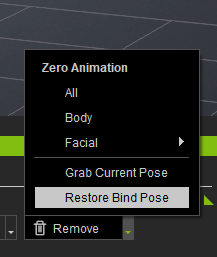
First, click on Restore Bind Pose (See Image) and then export the FBX. Later, when the clothing is finished, use this Pose to align the body and the clothes.
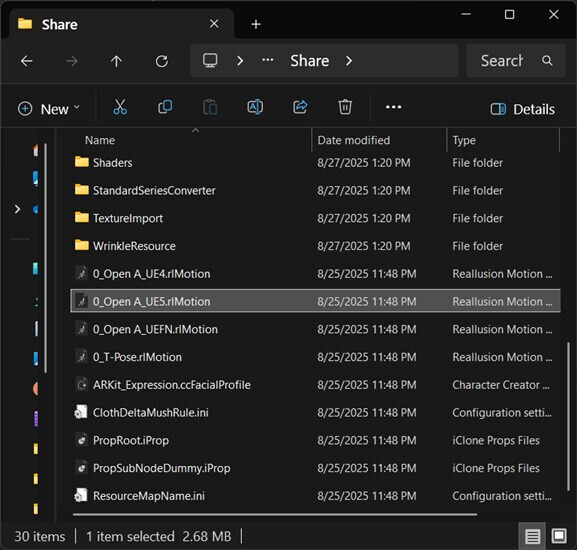
All you need to do is add the proper pose to your character. If you do not find it in the Content Manager you can find it here:
C:\Program Files\Reallusion\Character Creator 5\Program\Assets\Share
It is because the import as Accessory is attached to the hip. It can be corrected, but it is much easier just to import as a prop and then attach it to your character in the Modify panel. That will give it perfect allignment.
It does not not matter what part of the body you attach it to, because you are transferring the skin weights to actually make it clothing weighted to the bones underneath it. I usually just attach it to the head, because it is easy.
So:
load your character.
Apply the UE5 pose.
import your clothing. Either from the Create>Prop or File>Import menu.
With the clothing selected, click the “Pick Parent” button in the Attach section of the Modify panel. Then click on the character somewhere. I usually choose the head.
 )
)