Does anybody know how you get the avatar inn MetaTailor into a T-Pose for when you are importing and fitting a garment that is also in T-Pose? MT seems to default to A-Pose.
Hi…
MetaTailor defaults to an A-Pose, but the following steps should work if the garment you are importing is in a T-Pose.
- Open MetaTailor and load your avatar (default A-pose).
- Use the Import Garment option to bring in your T-pose clothing.
- Use Pose Match (MetaTailor’s Pose Match tool automatically adjusts the garment’s rigging from T-pose to A-pose.)
- Once aligned, use MetaTailor’s garment fitting tools to refine placement.
- Optionally, if Pose Match doesn’t give perfect results, you can pre-adjust the garment in Character Creator into a A-Pose, then Export again and re-import into MetaTailor.
Can you explain step 3 in more detail? The pose matching tool allows me to move the garment around, but when proceed, I get something like the image attached–the sleeves of the garment don’t move to an A pose, the shirt just conforms around the figure’s arms.
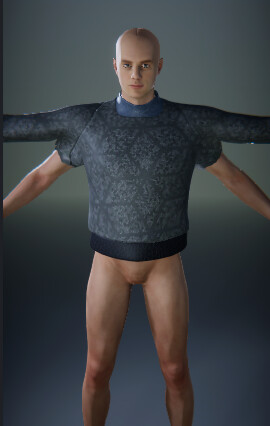
Have a look at this to better understand the process! Screen capture - 9936f616b49f46391d5fa2b99a4c4282 - Gyazo
Okay, so the MT base figure is in T-Pose, but there’s no way to start an imported CC character in T-Pose?
To do that, you’ll need to make Tpose the bind pose of the avatar before sending it over. I believe this is in the export settings.
There are no export settings available when using the MetaTailor export link from CC4?