After recently purchasing all of your MD mobility series, I was highly disappointed to see that it simply does not work as advertised.
Yes the character rides or interacts perfectly with the dummy prop, that is not the issue.
The issue is the actual prop/accessory that is supplied is only half done. When applying the accessory it only does a basic parent to the dummy prop, meaning it might translate and move with the dummy but the most glaring issues?
The wheels for goodness sake, they don’t even move with the dummy prop!!! I follow the quick start guide with the pram stroller and it just doesn’t auto rig the wheels, they don’t move!!!
If they need to be rigged manually ‘YOU DO NOT SAY SO’!!!
If they need rigging, I cannot open the accessory in 3DExchange to view the hierarchy. If the manual rig process is needed then how can I view the full hierarchy tree of the hidden items that certain dummy props are attached to. I’ve tried to manually rig and need to see all the parent/child list not have this hidden away.
Why would you do this?? Simply not good enough.
Hi…
Sounds like you may not be setting up the MD Personal Mobility props correctly. I just had a quick check and everything is working fine for me when I tested with the wheels turning as they should.
Please take a look at the Getting Started tutorial HERE. This takes you through the process of using the Stroller and should help resolve the issues you are having.
In all fairness I quite clearly explained I had followed the quick start guide that you suggested in my post!
The same stroller quick start guide that I followed to the letter and it didn’t work!
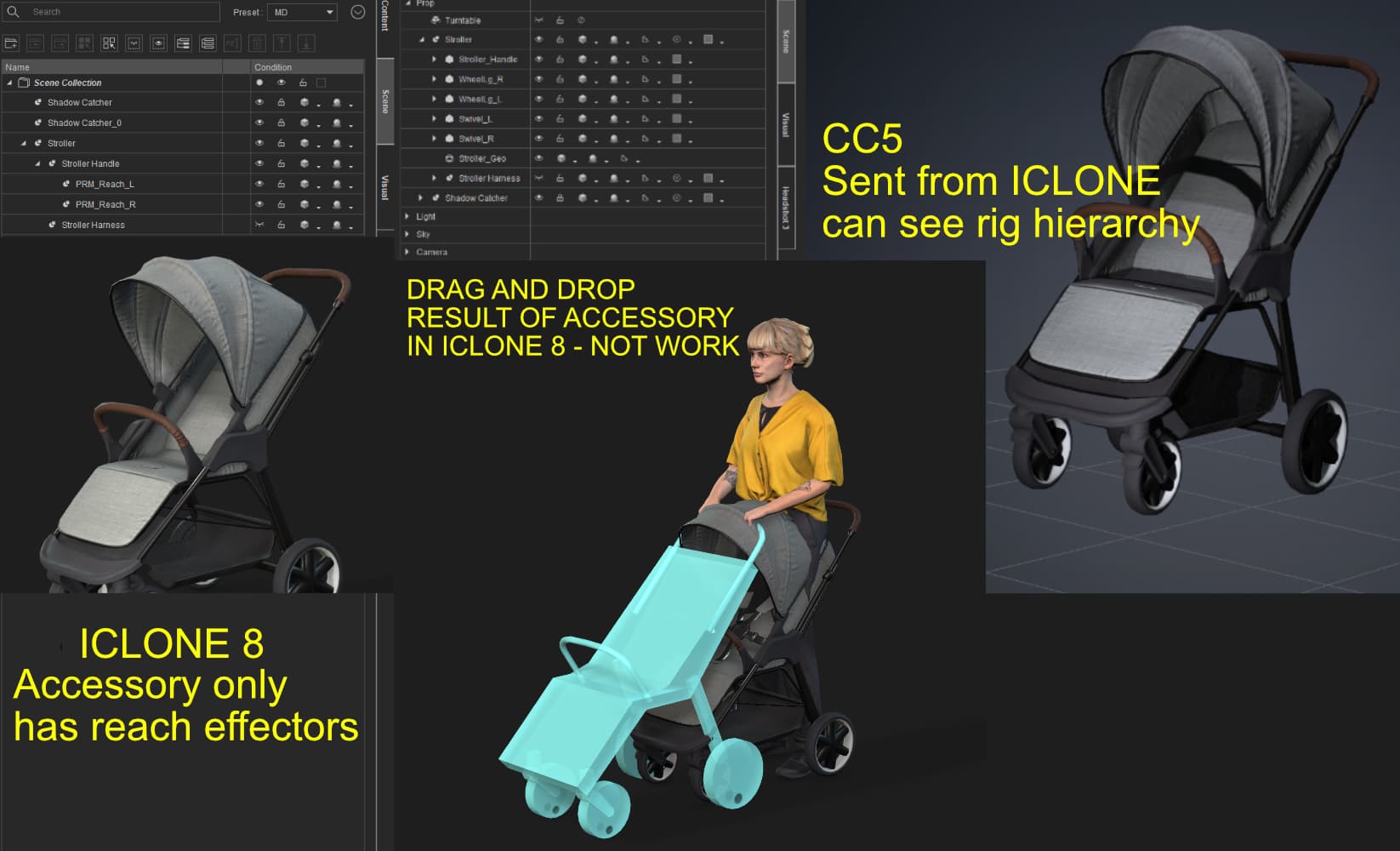
Yes, of course the dummy prop rig moves around fine and the wheels turn in MD with the character, but I’m talking about the supplied stroller accessory that does not properly conform to the rig whatsoever. I followed it as said, I simply cannot see how it could work when the accessory supplied has no seperated heirarchy of wheels that could be parented to the rig. It is all one mesh, like a prop and that is it.
This is what happens at my end, following everything to the letter. I can see the rig hierarchy if I send the accessory to CC5, but in ICLONE all you see is the reach effectors and that is it. It doesn’t even conform properly dragging and dropping as the image suggests. I’m not new to Iclone, I’m having issues with the DAZ transformer also. This is a fresh new install of everything, IC8, CC5 the lot. I’m simply getting issues that you cannot explain, I’m doing things correctly.
The software is buggy somewhere, I simply cannot be stupid and be brushed off as not following instructions.
We have simulated the issue you’ve encountered on our end, and there are a few minor details in the process we would like to double-check with you.
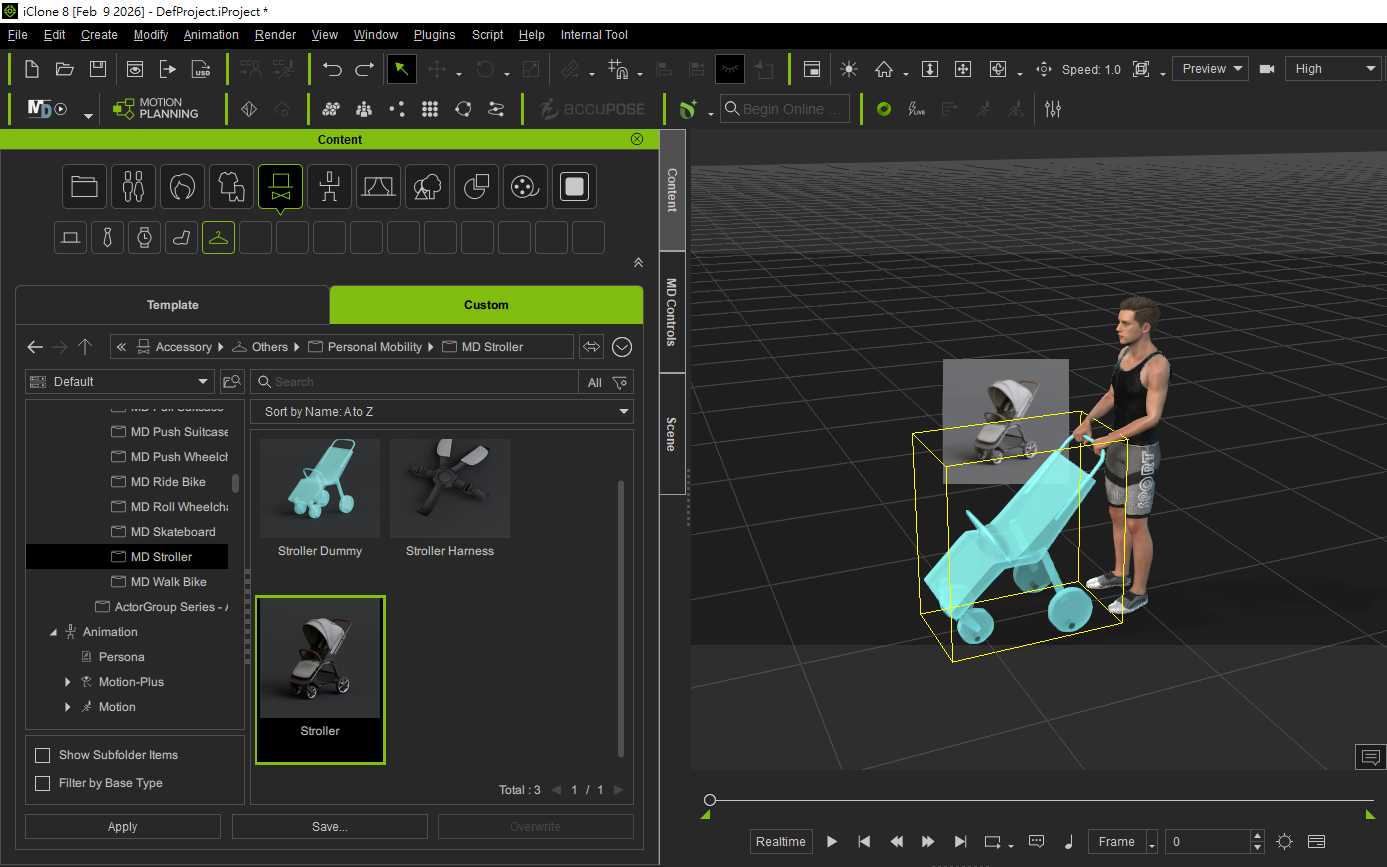
When replacing the Accessory, please right-click and drag it onto the Dummy to swap them. Please pay close attention to the following two points during this step:
- Ensure you use the right-mouse button: This is required to trigger the “Replace” function.
- Confirm the target object is outlined in yellow: Make sure the yellow selection box appears on the target before releasing.
If it is accidentally applied to the character instead, or if there is a slight misalignment in the selection area, the system won’t be able to map to all structures correctly.
1 Like
Hello and thankyou so much for your response.
Yes indeed, the important step is to ‘right-click’, I don’t think the quick start guide highlighted this massive important detail.
It now works beautifully as expected, congratulations on a wonderful release for the new MD mobility series!!
Thankyou, all the best.