Blender rigify is a hundred times better and smoother for animating characters than Iclone. But, Iclone has 2 things that I need.
very quick hand gestures through “Edit motion layer”. Creating hand gestures in blender through the rigify rig is slow and unintuitive.
Lip Sync template options in the iclone HD face control plugin. They don’t appear in rigify’s face control.
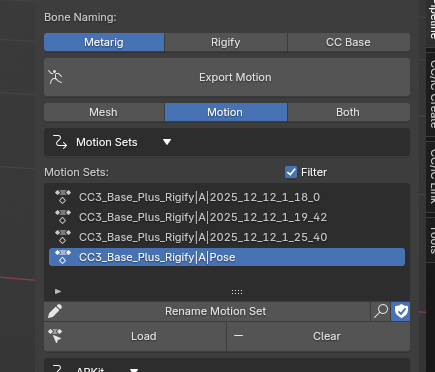
This situation is funny because I cannot animate in blender without iclone, and I also cannot animate in iclone without Blender… So I had an idea to sync poses through blender pipeline’s live data link. The plan is to send poses back and fourth between the 2 softwares until I have what I need for each keyframe.
The issue: Sending the pose from iclone to blender REMOVES all other keyframes. Meaning- If I have a full animation, and I want to send my keyframed pose to Iclone in order to edit the hands then send it back, sending back the pose from iclone would remove all the other keyframes in blender. Which, is, a bit dumb… Only if I could list the video I took.
I think that “Send Pose” creates a whole new sequence in blender instead of one new keyframe, which is the issue. This is so dumb.
There has to be a way to animate with blender live link, there has to be a setting that fixes this issue. Thank you.
Pose is a separate track. Sending different poses from iClone would override it.
But sending Pose does not override animation tracks (unless you animated a pose track).
You can send as many motions from iClone as you’d like and they would stack up as separate actions.
I see the poses I send from iClone to Blender but how do I use the pose in Blender? How do key an individual or if I want to send several poses to blender how do I put multiple poses in the Blender timeline? Everytime i load pose in blender it removes the previous pose that I had in the timeline.
It does not work like that. As I mentioned, there is a single Pose track created in Blender and it’s getting overridden each time you send a pose from iClone.
If your workflow is to animate in both - Blender and iClone and exchange when necessary, you need to utilize a “Sequence” track. It’s also a unique track used for synchronization.
Send animation from Blender to iClone using a “Sequence” button, tweak motion in iClone and use “Live Sequence” button in iClone to update a sequence track in Blender. It a bit time consuming though, specially on long clips.
I am not a fan of animating in Blender, but here is a couple of tips for sending motions back and forth:
Whenever motion is sent from Blender to iClone to the character which has motion removed, the timeline would remains blank until you actually start editing a motion.
Motion arrive to iClone fully sampled. So if you need to edit it, you either flatten it first, or use Animation layers.
There is a discrepancy for motions send from iClone to Blender while using Rigify. Slight delta discrepancy might have been OK, but that delta is accumulative when you keep exchanging motion with Sequence back and forth. There might be some setting which would prevent that, but I don’t see it.
Kind of figured this one out. If you switch to FK mode in Blender rigging panel, the discrepancy is gone. Tried to exchange a sequence track motion a few times between Blender/iClone with “Sequence” in Blender and “Live Sequence” in iClone and noticed a perfect motion transfer. Although, as I said, I only occasionally animate in Blender…