Hello,
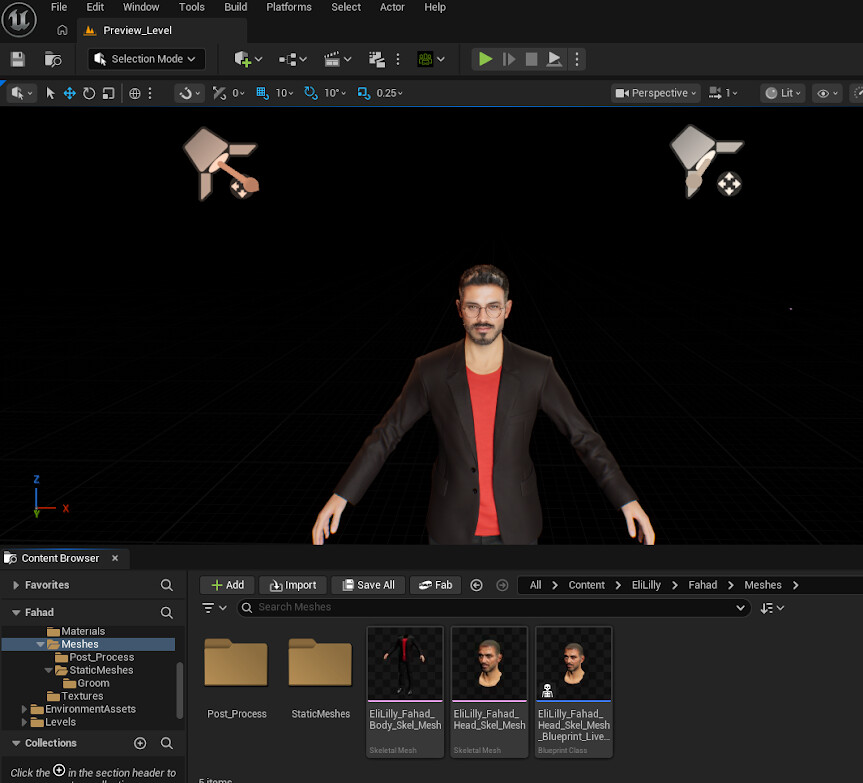
I am experiencing an issue while synchronizing a character from *iClone to Unreal Engine using Live Link .
Setup
- Unreal Engine: 5.6
- Character Creator Auto Setup Plugin: Installed and enabled
- iClone: Live Link enabled
- Unreal Engine Live Link: Connected successfully
- The character has separate Head and Body Skeletal Meshes
- The Head and Body are using different Skeleton assets
- The same character name is used in both iClone and Unreal Engine
What Is Working
The iClone → Unreal Live Link connection is working correctly.
The character’s:
- Pose
- Movement
- Animation
are successfully transferred from iClone to Unreal Engine.
So, the Live Link connection itself appears to be working.
The Problem
The problem occurs because the Head and Body use different Skeletons .
When the character is synchronized through Live Link, the head does not remain correctly aligned with the body.
The head moves away from the neck / comes out of the neck area instead of staying attached to the body correctly.
The body animation is working, but the head position becomes incorrect during the Live Link synchronization.
Question
What is the correct way to set up the Head and Body Skeletal Meshes when they use different Skeletons so that they remain correctly aligned during iClone → Unreal Live Link synchronization?
Do I need to:
- Use the same Skeleton for both the Head and Body?
- Retarget the Head Skeleton to the Body Skeleton?
- Use a specific Skeletal Mesh / Skeleton setup in Unreal Engine ?
- Configure the Character Creator Auto Setup or Live Link settings differently?
- Attach the Head to the Body using a specific socket or bone setup?
- Is there a recommended workflow for using a separate Head Skeletal Mesh with a different Skeleton while still using iClone Live Link?
Any guidance on the correct Character Creator + iClone + Unreal Engine setup would be greatly appreciated.
Thank you.