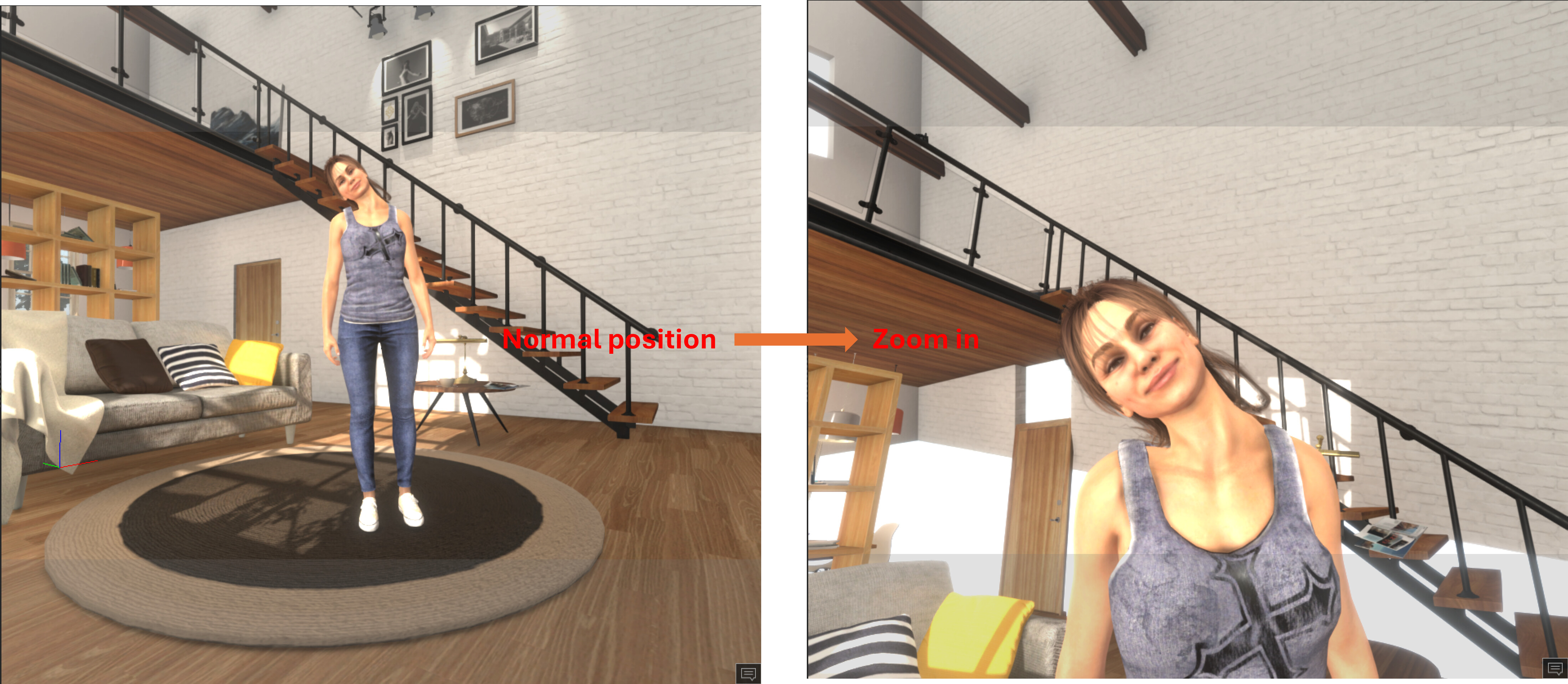
I want to show only the upper body of my character, focusing on the head, neck and shoulders, but I’m having trouble with the background.
The problem is that I can adjust the view so that the head and shoulders fill the frame, but when I do this, the background shifts and looks very strange. See picture.
My scene contains separate background objects, which are listed individually in the Scene Manager under a top-level entry called “Scene”. Could the way these objects are organised be related to the problem?
In the Modify panel, check the focal length of the camera. Anything below 50mm is considered “wide angle”, which will distort the picture. Set to a level 50mm or higher and then move the camera to get the framing you want.
You have a couple of objects (picture frames, objects from a table, back wall) which might have been unintentionally animated on a timeline. If by the “background shifts” you mean them moving out of place, you have to reset animation for those objects on frame 0.
Or maybe those objects linked to a camera. When you zoom, objects are moving along.
Thank you all for taking the time to help! I appreciate your suggestions. The idea of adjusting the camera’s focal length instead of moving it forward sounds promising, so I’ll give it a try when I have some time to experiment. I’ll report back here on the forum once I have.