iClone 8.72 introduces integration support for AI Studio along with a dedicated AI Studio Toolbar, allowing users to quickly import source guiding materials for 3D to Image and Video workflows. This update also adds a new Workspace Menu to start new projects with tailored layout environments, introduces a “What’s New” pop-up screen to keep users informed of latest events and member benefits, and delivers important bug fixes for overall ecosystem stability.
New AI Studio Toolbar provides quick import of source guiding material for 3D to Image / Video functions.
The addition of a “What’s New” pop-up screen in Reallusion applications helps users stay informed about the latest events, member benefits, and free reward points.
New “Show Workspace Menu” toggle in the Preference menu.
Enhanced
New Workspace Menu allows users to start off with the right workspace for their new iClone projects upon launch.
Fixed
Repaired data that prevented iProjects from importing.
HD Face Control
Fixed
HD Face Control can now be reopened after performing a “Layout Reset”.
Where did the local AI rendering option go? For my needs, my RTX 5060ti with 16GB VRAM for image generation was sufficient. I hope that later they will also implement the option of local models, as we had in the beta versions of AI render. Otherwise, Reallusion is starting to remind me quite strongly of Adobe’s policy of forcing a monthly fee for new services. In the case of the new AI Studio, is that already the case, or am I wrong, and is there a hidden option somewhere to switch to local rendering/AI generation?
@ReMark3Dcz To my knowledge it’s completely cloud based, so no local model support for now.
This isn’t suitable for content which needs to be rendered “on premise”. If the current models get discontinued (like Sora), it no longer works. It’s not unlikely that prices for cloud based AI services will rise massively over the next couple of months.
First look makes this look an impressive option. HOWEVER
I have’t seen cost of ‘generating’ so we dont know what 1100 free points will provide . If the same as current Video @ 250 points [ $ 2.50 ] per 60 sec then its not much at all for a month.
The plans do not state if " unused " points will roll over - Its likely for me not to use AI all the time. I could be working on something else so if points expire I lose out which is the same as losing money !!
Wow, it’s a great AI studio. But I think I’m having some problems…
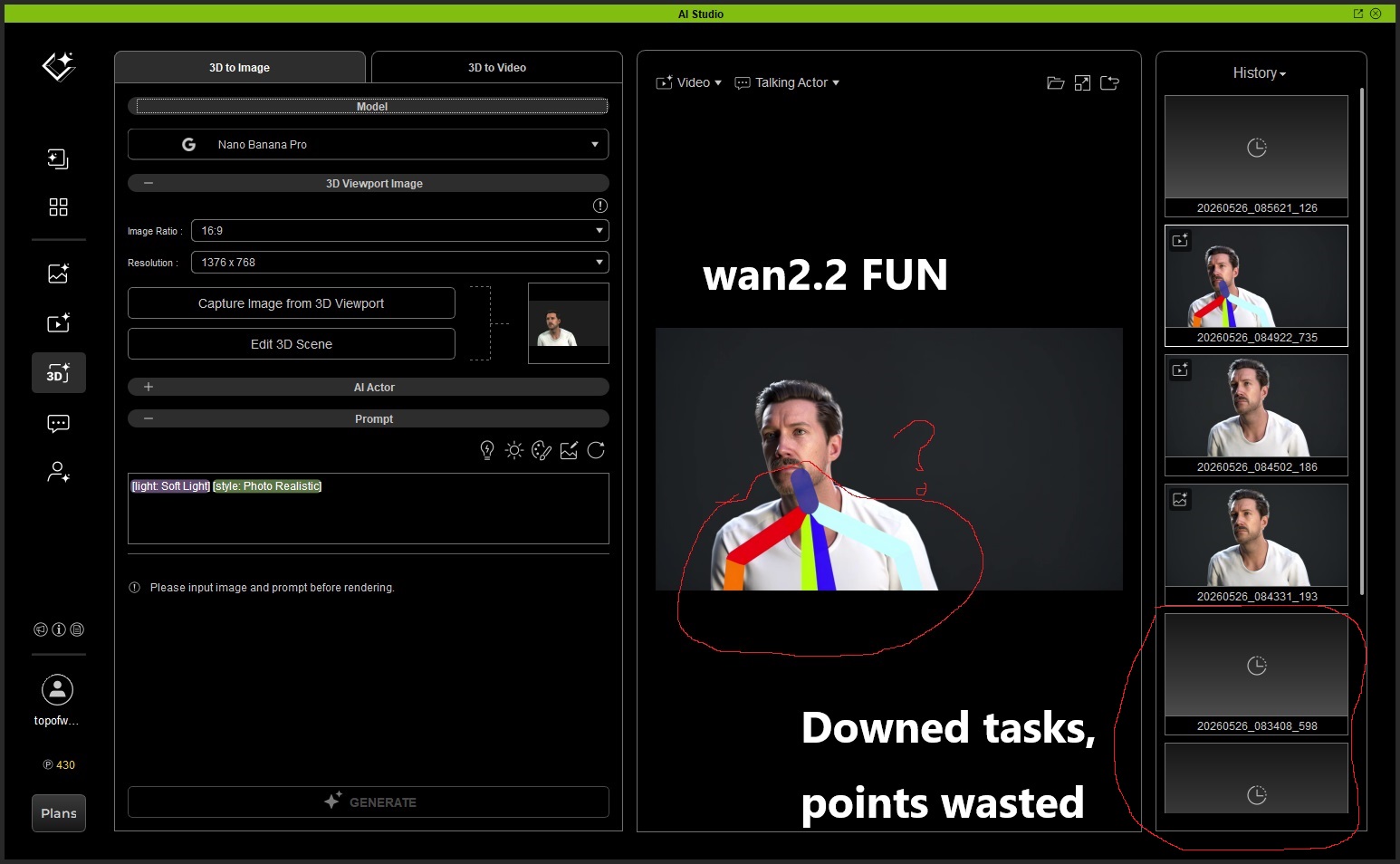
I tested AI Studio 3D to Video with a CC5 character that has full facial expression profiles.
After further testing, I found that Wan2.2 Fun Control does reflect the Viseme mouth motion better than the other models. So in this case, the lip movement itself is not completely lost.
However, there is still an important problem: the skeletal / control rig visualization appears in the generated video output, as if the control skeleton is being composited into the final result. This needs improvement.
AI generation sometimes stops or the program crashes during generation, but the AI points are still consumed even though the result is not successfully completed. This gives a very poor user experience.
So at the moment, I think there are two main issues that need to be improved:
Viseme / facial animation support:
Wan2.2 Fun Control reflects mouth motion better than other models, but the control skeleton is showing up in the final video and should not appear in the rendered result.
Failed generation still consumes points:
If the AI generation fails, freezes, or the program crashes, AI points should not be deducted, or there should at least be a refund / retry protection system.
Overall, the biggest issue is still accurate preservation of Viseme-based mouth animation and facial performance. Wan2.2 Fun Control seems closer than the other models, but it still needs improvement, and the point deduction on failed generation should definitely be addressed.
Agree strongly - I stopped using video mocap because my bad results were obviously going to eat up credits whilst I learned the features and I think Studio is going to have a much bigger learning curve.
Reallusion keeps adding intergration options to the tool bars none of which can be turned off meaning users end up with a cluttered menu system of stuff not used. By all means provide the functionallity but give the users the choice to configure “THEIR” workspace to what they need. With a preference option to turn off menu items not used or needed
We love seeing the discussion here. To make sure we see all your ideas and help troubleshoot issues faster, you can share your thoughts, creations, and questions over in the official AI Studio Category
Check out our FAQ resources in Official and find out how you can earn free AI Points just by sharing your work in Showcase & Earn!
It only gets rid of the bigger AI studio icon but the icons to switch from 3d mode or to AI mode is still on the tool bar. Can’t be removed. I wish Ai studio was a plugin we could remove to speed things up and reduce clutter.
Is anyone else having terrible performance now? Deleting a camera is causing 10 seconds of spinning wheel, CTRL+Z is like 25 seconds. This update seems to have made iClone unusable for me.
I’ve had this happen to me before not in this update but a few before. I had to just uninstall it and reinstall it again both Iclone and CC5. Keeping all local files intact though and that worked for me the last time.
 Added
Added Enhanced
 Fixed
Fixed