I don’t understand why I’m always get not responding and iclone 8.61keeps slowing down and freezing up even when I set it on the Minimal setting. My computer is Windows11 OMEN 30L GT 13 with Graphics card 24GB NVIDIA GeForce RTX 3090 Intel Core i9-10850K CPU . 64.0 GB RAM. I’m sure this is enough power, or is it?
Does it have to do with changing settings in the Preference?
Is this setting looks right in the image.
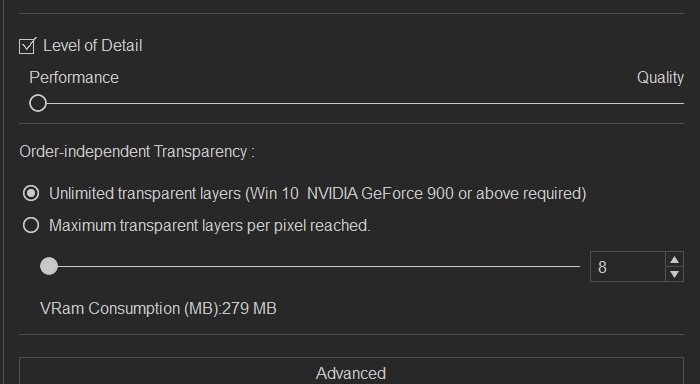
I think I figured it out . My computer is a gaming computer I don’t do any gaming but I Got It for editing 3D & 2D animation etc. . Anyway I have been downloading the wrong NVIDIA Driver that had conflicts with iClone(Game Ready Driver). Found out I should have been downloading ( Studio Driver) Now I have the right Driver Installed It seems to be working better.
Hi, I had the same issue, and I updated the NVIDIA Drivers and still the same, iClone is lagging and freezing. Not sure why.
Could you please report it on the Feedback Tracker and attach your computer specifications as well as any lagging or freezing screen recording? Also, we’d like to confirm if iClone is currently crashing for you.
We will pass it to the development team to investigate the issue. Thank you!
Hi halimhindi Did you download and installed (Studio Driver) ? It seems to work for me. You can also change the Real time render options to (Medium or Quick Mode ) when editing, that’s what I’ve been doing but now that I change to Studio Driver I can work in High Mode.

It is still kinda slow due to lot of props and stuff I guess, working in Medium Mode helps. I’m no brain when it comes to this technical stuff.