I’m currently experimenting with VR content and trying to build a proper workflow for 180° stereoscopic (3D) video from iClone.
Here’s what I’ve found so far:
- iClone supports 360° panoramic rendering, but this appears to be monoscopic.
- There doesn’t seem to be a native option for 180° 3D stereoscopic (VR180).
- The stereoscopic output option renders Full SBS, which ends up extremely wide and doesn’t display properly on some VR devices.
- Because of this, I’ve been rendering normally and then using Owl3D to:
- Add depth conversion
- Convert to Half-SBS
- Re-render for device compatibility
Ideally, I’d like to avoid the extra conversion step and render directly from iClone in one of the following formats:
- 180° stereoscopic (VR180)
- Half-SBS 3D
- Proper stereo equirectangular output (if supported)
So my questions:
- Has anyone successfully created native 180° stereoscopic renders directly from iClone?
- Is there a proper workflow using dual cameras and manual stitching?
- Has anyone exported stereo panoramas and converted them externally with good results?
- Is Half-SBS achievable directly in iClone without post-processing?
I’m trying to optimize workflow and reduce unnecessary re-rendering while maintaining proper depth and compatibility with VR headsets.
Would really appreciate hearing how others are approaching this.
Additional note regarding quality:
One of the reasons I’m trying to move toward a proper 180° workflow is image clarity.
Even when rendering 360° at the highest settings, the final result can look soft or slightly blurry in VR. I understand this is partly because the resolution is stretched across the entire 360° equirectangular frame — so once viewed in-headset, the pixel density per visible area is much lower.
When I export 360° and then crop it down to 180° afterward, the quality drops even further. So it feels like I’m losing resolution twice:
- First from spreading pixels across a full 360 sphere
- Then again from cropping/reframing
That’s why I’m hoping there’s a way to:
- Render directly in 180°
- Or render stereoscopic 180°
- Or output half-SBS properly
Rendering natively in 180° would allow more pixel density in the forward-facing area and preserve detail for close-up characters, especially in still or semi-static VR scenes.
If anyone has found a way to maintain sharpness while doing stereo VR from iClone, I’d love to hear how you’re handling it.
Hi Mstaylor,
As usual for me these days I need to stress how little I am up-to-date with Reallusion products and 3d in general.
I only have Iclone 7 and CC3.
Last year I bought a Meta Quest 3s vr headset to see what it could do for me - never having even seen one before. I absolutely love it and am genuinely unable to understand how many things have been created for the VR world.
Nonetheless, I noticed that there is a rendering option in Iclone 7 to produce side-by-side renders. I produced and saved a couple of these as side-by-side video output and watched them in 3d using the headset.
Something I have never tried is watching 3d film using ‘glasses’ with one green and one red lense. I wonder whether the side-by-side videos are simply something of that sort? I didn’t achieve full 180 degree immersion but was only looking at the video experiments locally rather than on YouTube. The local viewing window is more of a screen unlike the Meta You Tube 'immersive ’ window.
In Reallusion’s Iclone help documents there is some interesting explanations of these render types. The position of the camera in the scene is an important setting for getting an immersive ‘sweet spot’. There is another setting which I cannot recall. These camera settings involve looking at the scene objects and camera from above to verify relative positions.
There is also the ability to render two windows - one above the other rather than side-by-side.
The very quick experiments I made would have been improved probably by depth of field blurring.
Apologies for my reply above being useless to you! I realized on re-reading your posts that you know all about Side-by-side renders which you mentioned with the abbreviation SBS.
You are way ahead of me. If you can use Iclone to make immersive videos for VR headsets, I;d love to see them.
OK, I spent a little time experimenting with Iclone7 again.
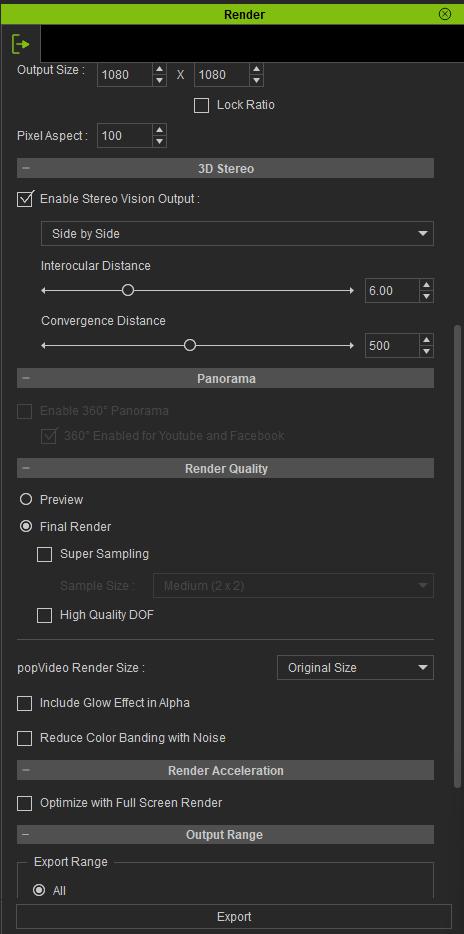
I made a(n) SBS render of only a few seconds. I made the output size 1080 by 1080 to see if I could make half SBS. This worked.
The two settings I referred to in my first reply are: interocular distance and convergance distance. The Iclone 7 manual explains what these do.
My new video - played in my Meta Quest 3s media player - actually worked this time. The ‘screen’ wrapped around me at 180 degrees when I chose the 180 3d viewing setting.
Attached are my render settings. I don’t know what ‘Pixel Aspect’ does - I need more time to play!
I just did a very short test render and yes — it worked. It produced a proper half-SBS 3D video.
Thank you very much for taking the time to experiment and share your settings. I tried so many different combinations before and couldn’t get it working correctly.
I’m going to test it properly on my projector at home and then in the Meta VR headset to compare it against the AI depth conversion from Owl3D. I’m really curious to see how much stronger the depth feels when using true stereo versus converted 3D.
Also — have you tried using the Photon App on Meta? It’s similar to YouTube, but the content uploaded there is specifically 3D or 180° VR. When viewing in the headset, it automatically switches to the correct 3D mode. It’s been useful for testing playback formats and seeing how properly formatted stereo behaves in VR.
As for achieving 180° 3D similar to the panorama option, I still need to experiment further before I can share any solid conclusions. I’ll report back once I’ve tested more and see whether there’s a workable approach there.
Thanks again — this has been a big help.
Hello again.
I’m very pleased that settings I tried worked for you also. I probably wouldn’t have tried rendering an immersive video again without the information in your posts - so we helped eaach other.
I have recently been trying the Photon app with my headset and it has many pretty amazing videos. Unfortunately, I have long waiting times for the videos to run. Then I get a few seconds if I’m lucky followed by another long wait.
I really don’t know if it is a memeory/storage issue with the Meta 3s I bought. Other models have twice the memory but I bought the least in case VR wasn’t for me. The other reason for slow, stuttering downloads may be my ISP. In the very near future telephone lines in my area will switch from copper cables to full fibre and I may update my service package hoping for improvement.
I love VR viewing which lets me see the world’s amazing beauty spots as though I was there. It’s fun to see performances from stages across the globe -professional and amateur - as well as parades, carnivals, etc. These are events which I wouldn’t normally attend in real life but surprisingly great fun to watch.
I could go on but I guess you get similar enjoyment from VR. Good luck with your experiments.
Ai generated people close up are mind-blowing also.
1 Like
Hi again,
Bit of an update a few months later. I hadn’t used Owl3D for a while and went back to update it and noticed they have a glasses-free 3D display called Owl3D Shift coming out.
I thought of this thread because apparently it supports Full-SBS and Half-SBS directly, so the 3D videos we’re rendering from iClone should be viewable on it without having to use a VR headset.
What also interested me is they’re saying it can do real-time 3D, so you can drag a normal video, photo or even an app window onto it and view it in 3D without converting it first. They also show it being used with 3D content, so I’m curious if it could be useful for looking at models/scenes while actually working in iClone or other 3D software.
I haven’t bought or tested one so I’ve no idea how good it actually is, just thought it was interesting after our experiments earlier in the year.
It’s also nice seeing someone making new 3D hardware again. Hopefully things like this might give 3D a bit of a push again, especially if you can just have a second display for it instead of always needing glasses or a headset.
It made me want to go back and experiment with iClone’s stereo rendering again, so I thought you might find it interesting too since you were testing the SBS renders on your Quest 3S.
1 Like
Hello again.
Thanks for all the new information. I took a look at the website for the forthcoming Owl3dShift and at this stage I’m not tempted to buy one because I enjoy the head-set’s immersive aspect where I can turn my head from straight ahead to look around as we do in real life. It is an impressive gadget, though and I can imagine many people enjoying their converted videos with it… We live in interesting times for sure.
I haven’t had a chance to play around much further with iclone’s SBS renders, unfortunately, but I’m looking forward to seeing what Iclone 9 might bring. I don’t expect to see new SBS rendering features but I only have Iclone 7 and an improved update might be just what I need.
Since I last posted, I have had an upgrade to the telephone lines to my home. The upgrade from copper lines to fibre is being rolled out across the UK. It has made a massive improvement to my internet speed and I can now use the Photon program to travel the world and see amazing AI-generated worlds, people and creatures.
I also downloaded (on the headset) a free video player called Commedia video player. With that I was able to look at my Iclone SBS renders at various viewing settings. (My videos were loaded onto the headset from the PC with a cable connection). In future Commedia’s update roadmap might include reading videos from USB sources. I look forward to that.
Hope some of this helps.
@Lord_Ashes did you ever figure this out? I searched around and you had posted something about this too in the older forum that is not active anymore. I could not reply to you in there. So trying to here if you are still active and figured out how to do this.
I noticed an old YouTube video made using Iclone 7 initially, It looks good in my headset.
1 Like