How can I create a scene in iClone8 where an actor is poisoned, for example, their face gradually turning black or blue?
You can use the Blend channel of the character’s face for that. A texture in the Blend channel allows you to change the appearance of the Base texture. There are options to Multiply, Overlay, or Add the effect of the Blend texture. You would have to experiment with what works best in your case.
The contribution of the Blend channel can be animated.
To mark the beginning of where you want the change to occur, you would add a keyframe at that point in the Material track of the character with the value 0 for the Strength of the Blend channel. (it is not seprated out by different materials, unfortunately). Then you move to the point in time where the effect should be fully present and set the Strength to 100%. You can add additional keyframes to have more control over how strong the effect is at various points in time.
The Blend channel is often forgotten but a lot can be done with it. I used it once to make a character blush. 
2 Likes
You can also use Diffuse Color in the Material Settings.
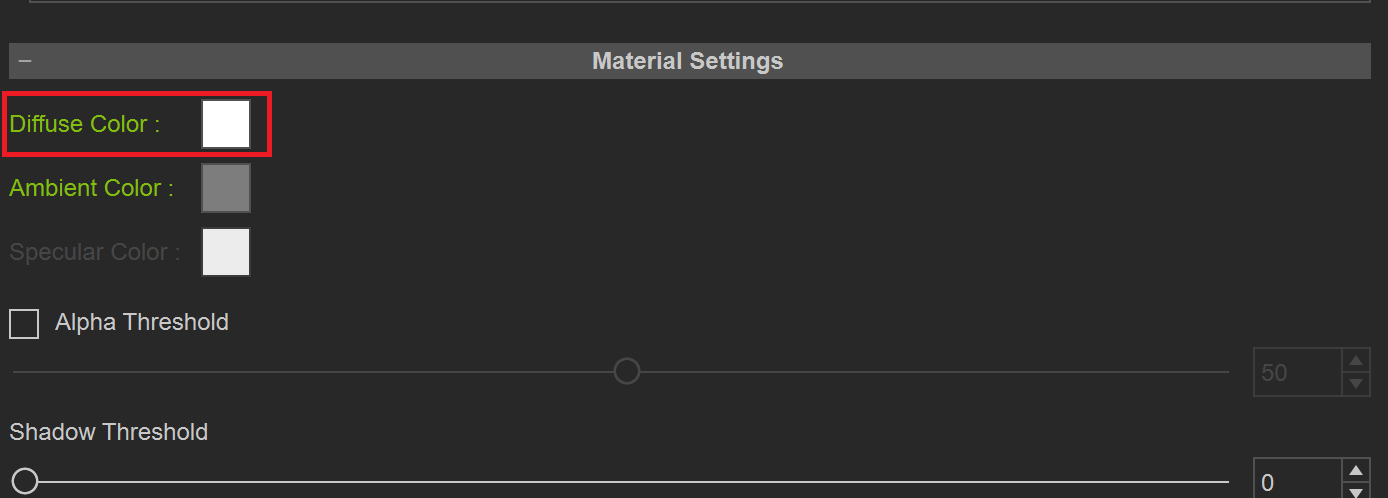
Animagic’s suggestion is better to create any kind of detailed effect on the face but if you only want their face to simply just have a color overlay then this can also work. You can animate the effect with keyframes, starting out with the default white color (if that is the default for your material) and then gradually changing it to black or blue by setting a keyframe of the transformation’s endpoint with the chosen color. If the poisoning starts later on, then just make sure to put a keyframe of the default (probably white) color at the actual start of the transformation.
Thank you, I’ve encountered another problem. If I want to make local changes, I still can’t. For example, I can’t replicate the effects of a burn from boiling water or a cut. The Blend channel can only change color, not the texture material.
Thank you for your reply. If I want to make localized changes, it seems I still can’t achieve that, for example, to simulate the effects of a burn from boiling water or a cut. How should I proceed?
By localized do you mean that only on a certain part of the body? That’s only achievable through the blend channel. If you want to change the whole material with the bump/normal, roughness etc. maps, I don’t think you can do that inside iClone but you can “cheat”. Just render the scene twice with both materials so in post you can blend the two clips to make the transition.
Instead of a texture you can add a video (this is how water works). I have used that in the past (years ago) but that should still work. You would have to know the timing of the change.
This pretty much sums up what Animagic was referring to (with blush example):
https://forum.reallusion.com/FindPost552217.aspx
You start Blend channel with pure white texture in Multiply mode. And then add color or texture to selected spots based on UV map
Thank you for your enthusiastic help.
Thank you for your enthusiastic help!
Thank you for your help!