When I export my character to Zbrush to sculpt, I noticed that the head was off center, but the rest of the body was fine. I’m not sure why this is. I used Headshot 2 . then exported to Zbrush. How can I get the head centered or make sure that the head is perfectly symmetrical in from Headshot?
Hi americanbean,
May I ask which version of CC you are using?
Also, if you export the CC character directly to ZBrush without using Headshot 2, do you encounter the same issue?
I’m using CC 4.62 with Zbrush 2022.0.8. No issues Neutral_M base model when import.
Symmetry is correct from head to toe.
However, I do get, what seems to be issues with Normal maps. Artifacts appear on the eyes for some strange reason. They go away when I deactivate the detail Layer in Zbrush.

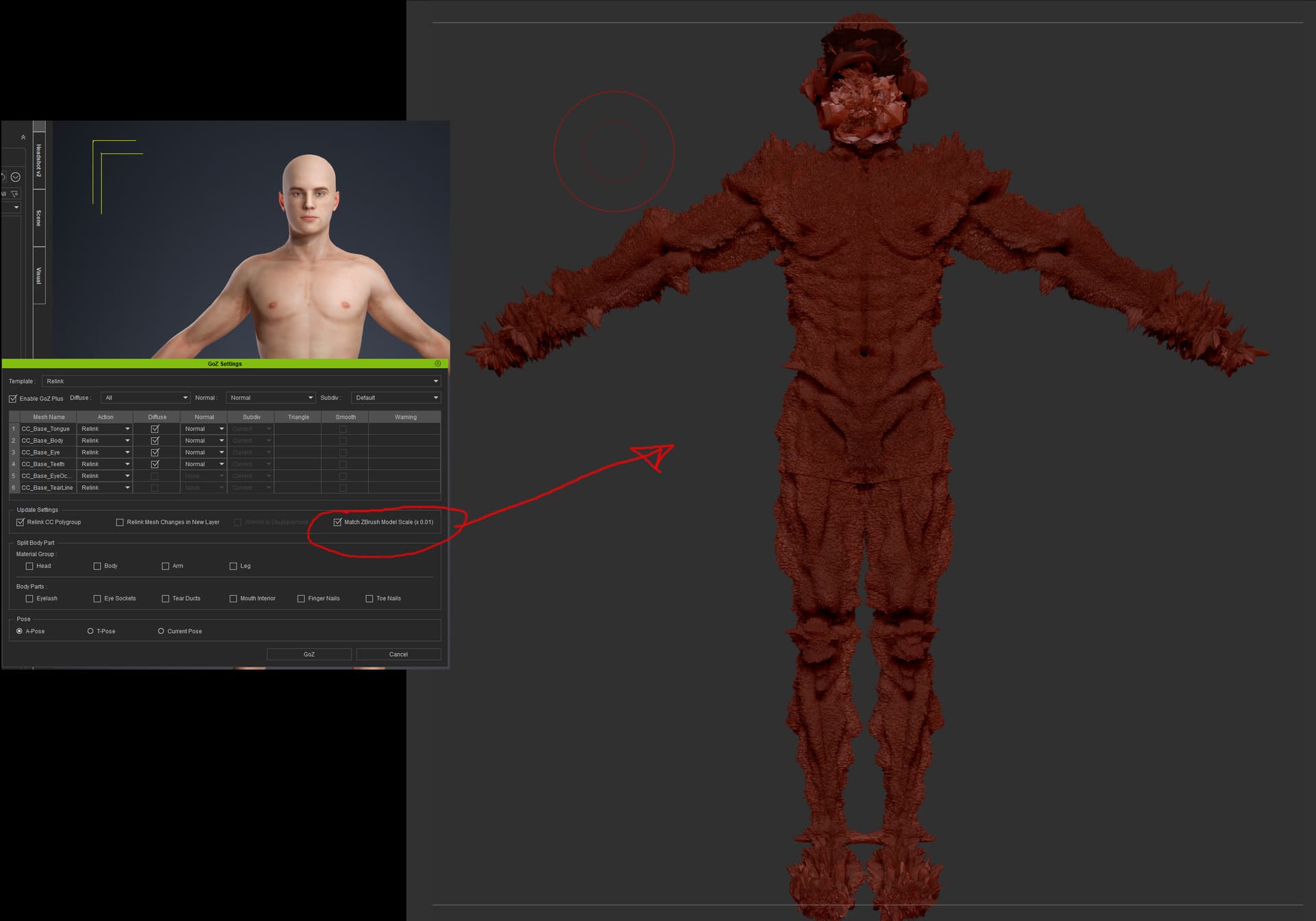
My experience with brush has had many issues. I’ve never been able to use the “match Zbrush model scale” checkbox as it blows up the model. These go away when I deactivate the detail layer, except when I’ve used headshot. it stays funky.
Hi americanbean,
Thank you for your reply.
Regarding the “head was off center” & normal map issues, unfortunately, we were not able to reproduce it. please can you report it in the Feedback Tracker and provide your project file for further investigation.