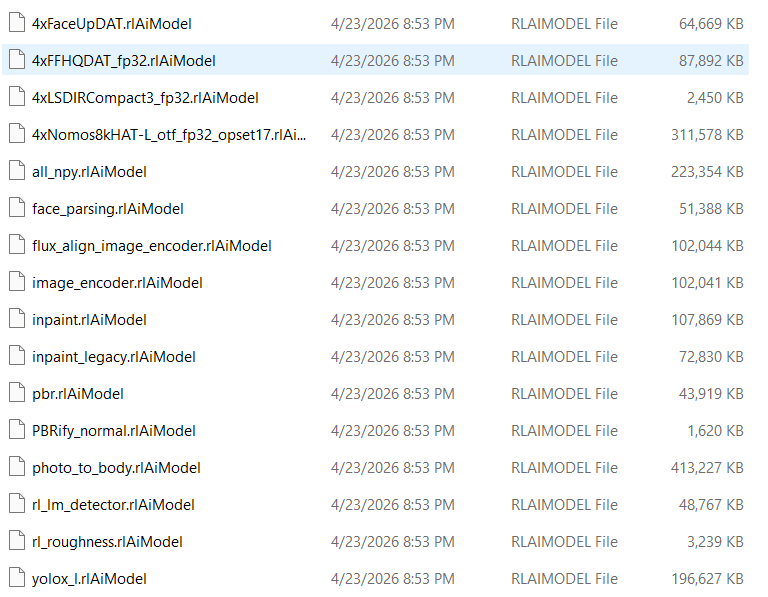
Hi, I am experiencing a persistent installation and initialization failure with Headshot 3 on Character Creator 5.07. Even after completely resetting Reallusion Hub and reinstalling Headshot 3, the plugin does not deploy its required files.
Here are the detailed symptoms:
- CCHeadshot3 folder is never generated
The following directory remains missing after installation:
C:\Users\<UserName>\AppData\Local\Reallusion\Character Creator\5.0\5.0\CCHeadshot3
No plugin files or subfolders are created.
- AIGen folder is created, but contains only**
MemberID.json
Path:
C:\Users\<UserName>\AppData\Local\Reallusion\Character Creator\5.0\5.0\CCHeadshot3\AIGen
Content:
{"MemberID":"xxxxxxxxxxxxxxxx"}
There are no model files, no weights, no configs, and none of the expected AI assets. This indicates that the AI model deployment process fails immediately.
- Headshot 3 always stops at 10%
When loading an image:
- “Loading facial points…” stops at *10%
- Then shows: **“Failed to detect facial landmarks in the reference image.”
This happens with any image, including default test images.
This error occurs because the AI model files are missing.
- What I have already tried (complete reset)
I have already performed all recommended procedures:
- Uninstalled Headshot 3 from Reallusion Hub
- Deleted the entire folder:
C:\Users\<UserName>\AppData\Local\Reallusion\Reallusion Hub
- Deleted any remaining CCHeadshot3 / AIGen folders
- Restarted Windows
- Reinstalled Headshot 3
- Launched CC5 as Administrator
Despite this, CCHeadshot3 is still not generated, and AIGen contains only MemberID.json.
- Environment
- Character Creator 5.07
- Headshot 3.0
- Windows 11
- Reallusion Hub 5.61
- All products are up to date
- Request
It appears that the Headshot 3 installer or model deployment process is failing before extracting the AI model files.
Could you please investigate this issue? If necessary, I can provide logs, screenshots, or run diagnostic builds.
Thank you.