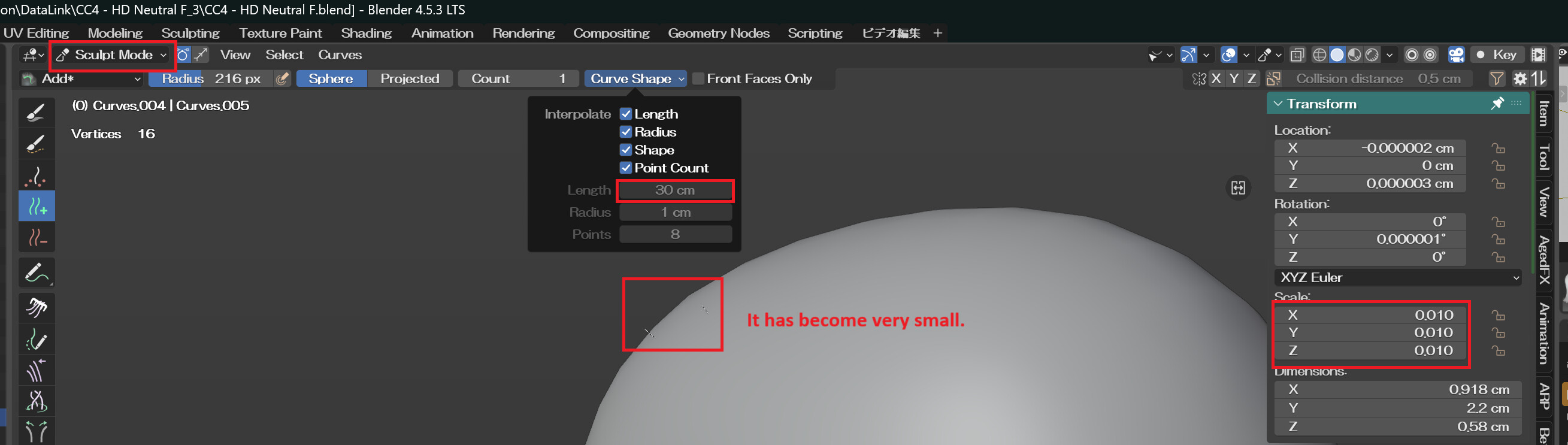
I selected the body and created an empty “hair” object to empty hair.
When I entered sculpt mode and added hair, the hair scale was set to 0.01, so the default hair curve length of 30cm appeared as only 3mm. Is this a bug? Or is this an intentional design feature?
Hi su-ha
The issue is due to unit differences: Blender uses meters, while CC5 uses centimeters. When exporting via the GO B plugin, the character’s armature and child objects (like hair) are scaled to 0.01 to convert centimeters to meters. This makes a 30cm hair curve appear as 3mm (30cm × 0.01 = 0.3cm). The hair’s 1.0 scale is relative to the armature’s 0.01 scale. This isn’t a bug but a deliberate design for unit conversion.
It’s worth noting that the Hair Curve object’s do not actually obey the scale hierarchy, they don’t inherit scale relative to the parent object, they use a global scale.
So, just after adding the empty hair curves, you can safely set the scale to 1.0, and they will work at the correct unit scale, from that point. Or you can Apply Scale to the curve object to reset it into the correct unit scale while preserving existing curve geometry.