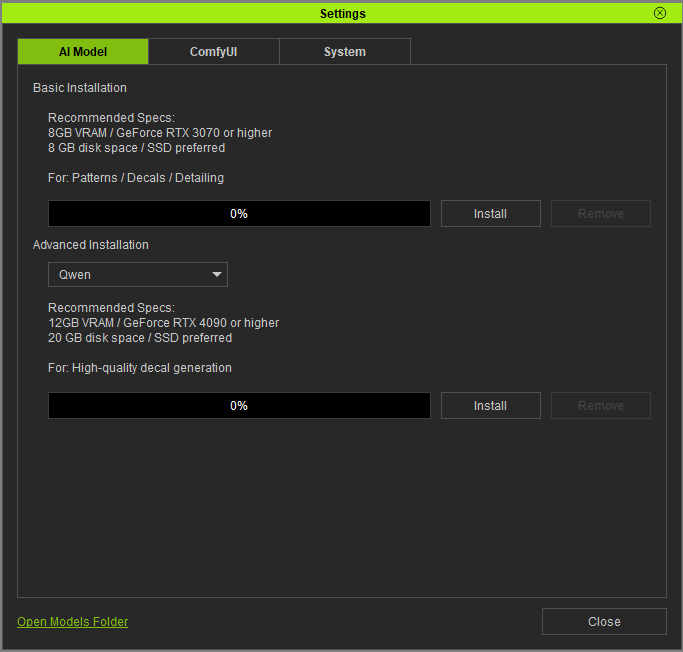
On this page, every time I click “Install,” nothing happens, no matter how long I wait. Why is this? Also, every time I click FashionGen from CC and send a request, it takes about 5 minutes for FashionGen to open. My CPU is an AMD 9950x; GPU is a 4090; and I have 96GB of RAM. Is this normal?
Hi Gian.Z,
Thanks for your message — there are a few things we’d like you to check:
-
Is ComfyUI already installed on your system?
-
Please note that AMD is not supported — if your default setting is AMD, the viewport may appear blank
-
Try turning off your firewall or adding FashionGen to the whitelist
If the default rendering option is set to AMD, the viewport will turn blank. Switching the option to NVIDIA should resolve that.
It’s also possible that the download process is being blocked by your antivirus or firewall. Please try temporarily disabling them and download FashionGen again.
If the issue still occurs, it would really help if you could record your screen and show the steps leading to the problem. You can send the recording to my email at raytsao@reallusion.com, and we’ll review it to help identify the cause.
Thanks for your cooperation — we’ll do our best to assist.
Okay, I tried again using your method, but it still didn’t work. I’ve recorded a video and sent it to your email address. Please check it. Thank you for your support.
Hi Gian.Z,
Thanks for following up — based on your description, we believe there may be two possible causes for this issue.
A. ComfyUI install path mismatch
Please check the paths below:
-
In FashionGen go to:
FashionGen → Settings → Open Models Folder
This should open the model installation path:
\Program Files\Common Files\Reallusion\RLComfyUI\ComfyUI\models
-
Then check the ComfyUI Install Path in the Registry .
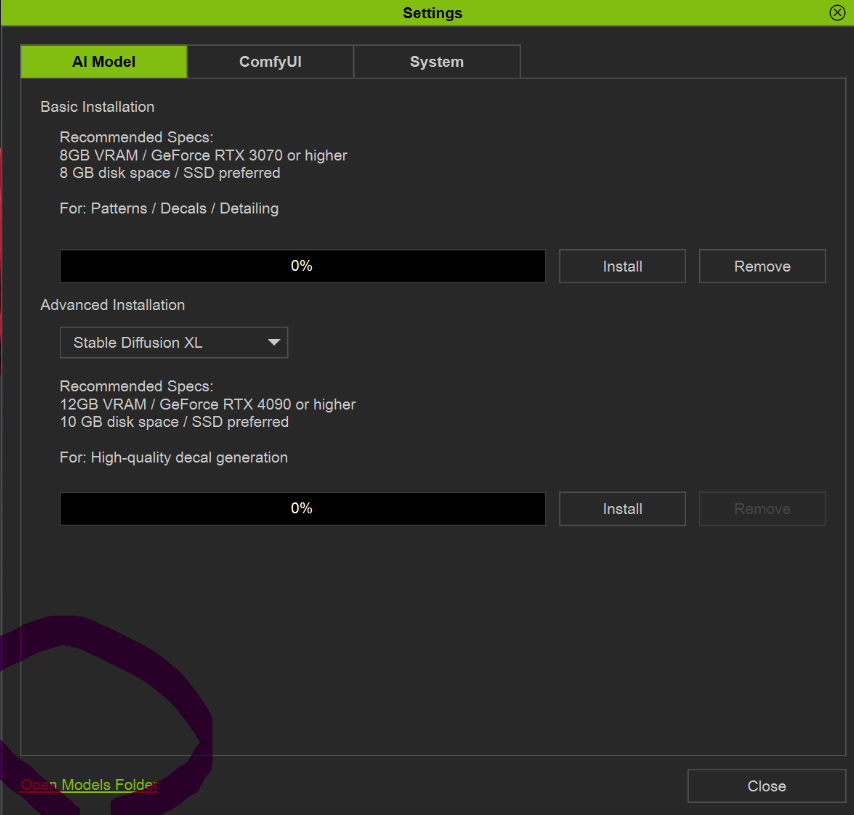
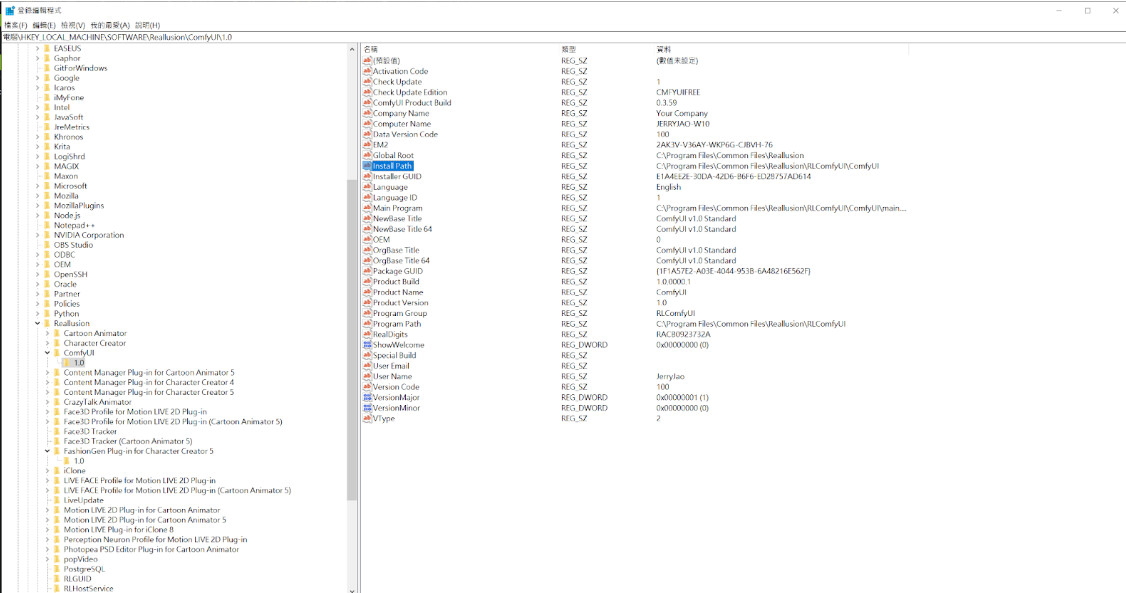
If these two paths are different, the model installation may fail.
In this case, please:
- uninstall ComfyUI via Reallusion Hub
- reinstall ComfyUI
- then try installing the model again
This should align both paths.
B. Internet environment / firewall blocking
Please test whether you can download this model file directly:
(One of the model files)
https://huggingface.co/JCTN/Juggernaut/resolve/0d0416f4741e923bb9c39306a690c168dfa32f95/realisticVisionV60B1_v51HyperVAE.safetensors?download=true
Results:
- Success → Network is fine, please return to Solution A
- Failed → The download may be blocked by firewall / proxy / security tools
If it fails, please follow this guide to check your internet environment and system settings:
Hi, thank you for replying to me message, I have done all the checks according to the prompts you gave, the path is correct, the network is correct, but still I can’t download the model, as in the previous case. Are there other solutions? For example, since I can’t install the offline installation package through the program, is there a way to install it offline? Because my Google Chrome can directly download the test model file you provide. I don’t know how many users of Fashiongen there are, whether other users have encountered this problem, I don’t know if it’s because of geographical problems, Chinese users will have this problem because of the network, because we need a VPN to access the external network, I also connected to a VPN to download your test file, but the program can’t be downloaded. Also, my FashionGen is still white blank when I open it, and I can’t see the clothes sent, is this related to the failure of model installation? All in all, I hope it will be resolved as soon as possible, I have many of your plugins, and I have never had a problem
Hello, I also encountered the issue where FashionGen cannot install the AI model. I have already downloaded ComfyUI, and my computer configuration is shown in the picture. I have tried many times but cannot solve it. I hope you can help me, or perhaps provide a way to download the AI model offline?
你好,你也是中国的小伙伴哈,我这边也是在等待官方给我解决问题的办法,目前我尝试很多方法都没有用,换了vpn,重装了几次,都还是老样子,甚至我发送服装去fashiongen,fashiongen的页面都是空白的,我的显卡是N卡,4090,不是AMD,依然是空白。很难搞。希望他们能重视这个问题。
I would like to consult, there are already other people who have the same problem under this topic, is there a solution for us? I just want this plugin to work properly. But it takes 3 days for each conversation we have to get a response, which is too long. I use all your plugins normally, please check if there are bugs in this plugin, or take another installation plan. Let’s go a little faster.
Hi Gian.Z,
Sorry for the late reply — and thank you again for the information you previously shared.
We noticed that there are some differences between the hardware specifications you provided earlier and the ones you mentioned later. Could you please confirm whether you were testing on a different computer or system environment?
Also, during our internal testing, we haven’t been able to reproduce the white screen issue on our side. To help us better understand the situation, it would be very helpful if you could:
- record a short screen video showing how the issue occurs
- provide your latest and complete hardware specifications
Regarding the download issue, we’re currently testing it — please give us a little more time. Once we receive your updated information, we’ll continue the investigation.
Thank you for your patience and assistance.
Hi Gian.Z,
Thanks for your patience — we have identified the cause of the model download issue and here’s the solution.
Users in China may not be able to download models because HuggingFace is blocked by the GFW. Please follow the steps below:
Step 1:
Download the file “model_list_hfmirror.json”
(https://drive.google.com/file/d/1q8RGtXDCOVKY7s-bLh_yFo8WvpxoUaD0/view?usp=sharing)
Step 2:
Rename the file to model_list.json
Step 3:
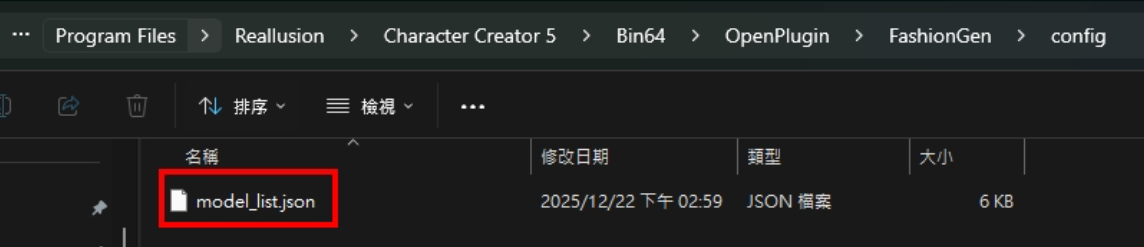
Copy the file to the following folder and replace the existing one:
C:\Program Files\Reallusion\Character Creator 5\Bin64\OpenPlugin\FashionGen\config
(If Character Creator is installed in a different drive or custom path, please locate the corresponding FashionGen\config folder and replace the file there.)
Step 4:
Open FashionGen → Settings → AI Model → Install
The models should now download successfully.
Regarding the FashionGen blank window issue
Please try adding FashionGen to the NVIDIA Control Panel program list to ensure it runs through the NVIDIA GPU.
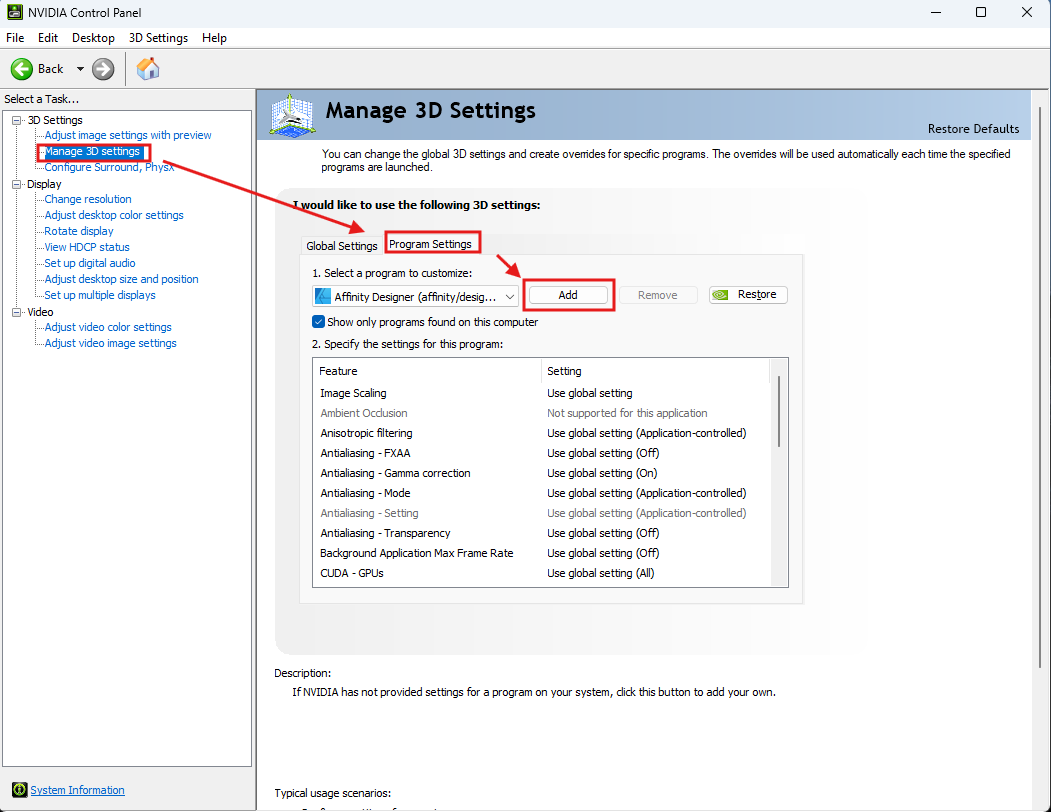
If the screen is still blank after this, please help us by recording your full operation process and sharing the video — this will help us further diagnose the issue.
Thank you again for your cooperation, and we’ll continue to assist.
Still can’t download, why is that? I have already followed the steps one by one.
Hi user7,
Could you please help confirm whether the JSON file you replaced has been successfully updated with the new content?
Also, please check whether there are two JSON files co-existing in the same folder. If the old JSON file is still present, the process will fail — so please make sure only the new JSON file remains.
If convenient, please also provide your hardware specifications, or record your operation process and send the video to my email at raytsao@reallusion.com — this will help us better diagnose the issue.
Thanks again for your assistance.
Hi!
Sorry for the late reply, I now followed the steps indicated, replaced the JSON file, and it finally started downloading, great. Also, a user [User7] below the post had a problem with replacing the JSON file but connecting to a VPN and unable to download, which we have solved via direct message.
My current problem is just opening a blank FashionGen page. I’ll send a full how-to video here.
PS: During my communication with [User7], he was able to send the clothes to FashionGen and show them normal, except for the download problem. It seems that I am an exception to this problem, and I would appreciate it if you could help me find out the reason
https://youtu.be/FMtZ__lbM5I
Hi Gian.Z,
You may try updating your graphics driver to the latest version, and also make sure that Windows is fully updated. In some past cases, certain CC / iClone viewport issues were caused by outdated system or driver versions, and updating them resolved the problem.
After updating the graphics driver, please also double-check the NVIDIA Control Panel settings to make sure the configuration has not been reset.
If the screen is still blank after these steps, we will need your assistance to provide your System Information so that we can continue our investigation.
You can follow the instructions here to generate the System Info report:
Thanks again for the help, I will try to upgrade the graphics card driver later, because this version of the driver will make UE more stable and there will be no problems, so I will try to upgrade and see if fashiongen is normal. Your team’s support is fantastic and reassuring 
1 Like
After updating the graphics card driver, everything is working normally and it can be used now. Thank you very much for your patience in resolving the user’s problem. 