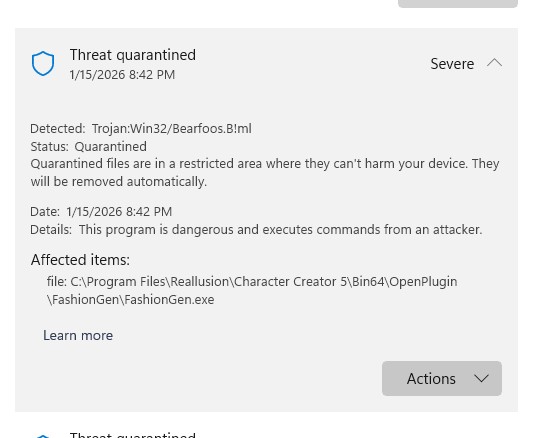
FashionGen works properly until trying to use the AI features. When it tries to launch Comfy UI, Windows Defender pops up to warn of a serious threat and immediately quarantines it - at which point FashionGen can no longer be launched.
Only option was to uninstall both FashionGen and Comfy UI and re-install. FashionGen then works until launch of Comfy UI and same thing happens.
Hi Sophus - yes I could do that but when I googled that particular Trojan, etc., it said not to do that unless you were absolutely positive it was not malware and when you google Comfy UI, it says it could contain malware - so I am nervous to do that although, you are probably right.
Hi Sungod - I am on Windows 11. I installed Comfy UI two different ways with same result. One is I installed it first from the Hub, and then I installed FashionGen. The other way after uninstalling was just to install FashionGen, which then automatically installs Comfy UI.
I should also mention that I was able to use FashionGen with Comfy UI a few days ago - I don’t know why it suddenly started detecting this malware yesterday. I don’t recall any updates since it worked that might have caused this.
We believe this issue may be related to how your antivirus software is handling the application.
If FashionGen was downloaded from the official Reallusion website or via Reallusion Hub , the files have already been reviewed and verified by our team and do not contain any viruses.
Please try adding FashionGen to your antivirus whitelist — this should resolve the issue.
Thank you for your understanding. If the problem persists, feel free to let us know.
So I just got around to dealing with this now. I re-installed FashionGen and Comfy UI from the Reallusion Hub. I launched a product in Fashion Gen and then selected the AI and “Generate Pattern”. The message said it takes 30 seconds for the first connection. After approximately 90 seconds, a message popped up “Cannot connect to the Comfy UI server”.
I closed the program and re-started and got the same message. Any suggestion now as to why it can’t connect?