Hi there,
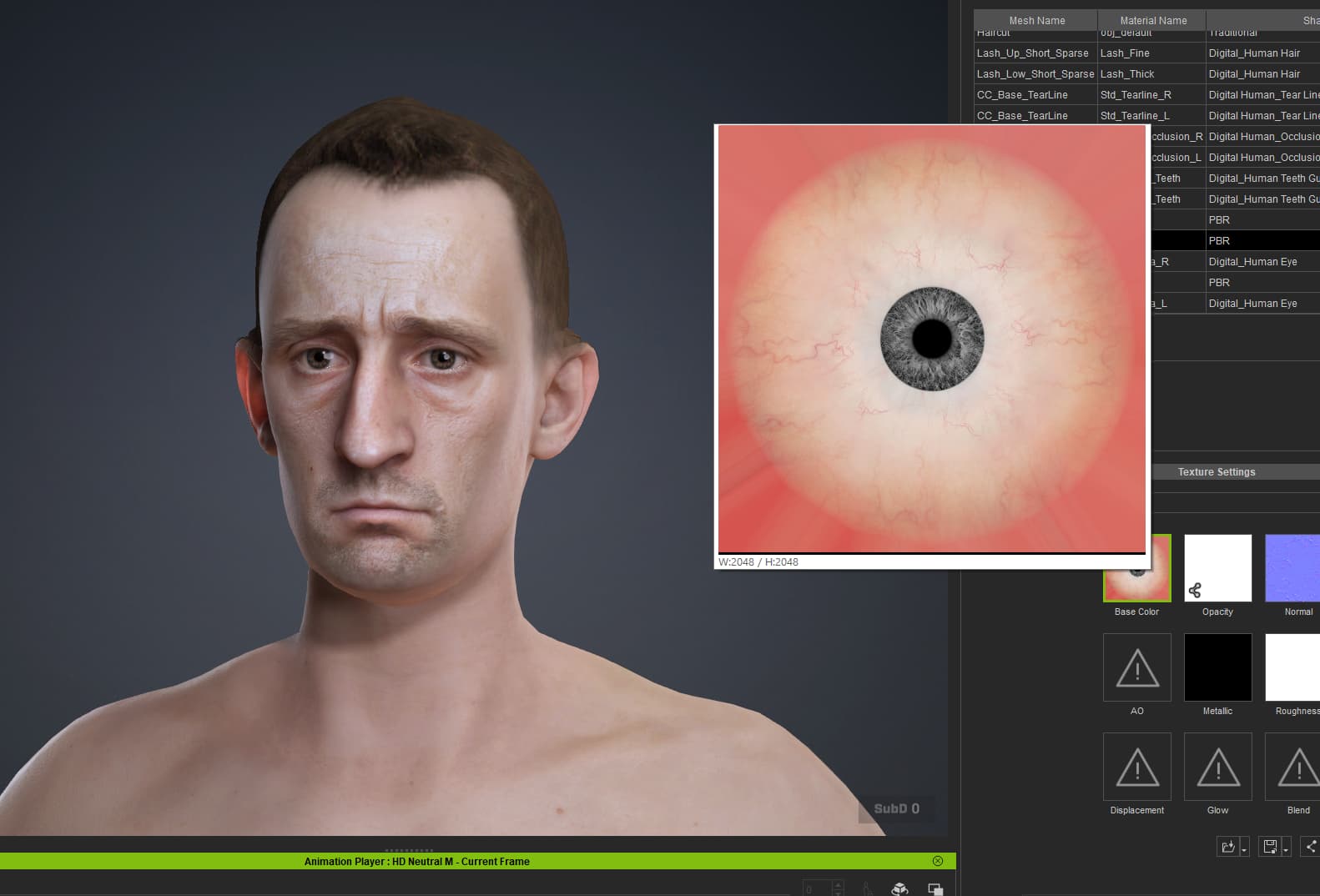
When generating a character from an image using Headshot 3 the characters eyes appear correctly in the viewport, but the generated texture (and also the exported texture) is completely different size and colour (Looks like a default texture?)
Any ideas why?
Hi,
It looks like the detection is not 100% precise, but you can manually change the color in the Colors section at the bottom.
Nah I dont think that’s the issue, the software has correctly detected the eye and applied the eye to the live model in the viewport, however it isnt updated in the texture panel, and it doesnt export the correct texture either. You can see in the image that the eye represented in the viewport is completely different to the eye texture on the right hand side panel
Not only that, adjusting the iris scale in the morph tab has completely no effect on the texture in the texture tab. Whenever I generate a character using Headshot 3 this random default grey texture is generated in the texture tab.
When I optimise the model then the random default texture is applied to the model in the viewport. It feels like to me that the eye texture is never being updated with the generated texture from Headshot 3
Did you fix it? For the iris scale that needs to be edited within the Headshot 3 plugin rather than using the defult adjustment parameters in the modify pannel.
Nah, it’s a bug and I have no control over it. Adjusting the parameters in the headshot plugin change the iris just fine in the viewport, however the exported texture is still a random, incorrect default looking texture that bares no resemblance to the eye represented in the CC viewport
Hi richard.parry198,
In the eye material settings, the Textures in Texture Settings serves as the base texture. However, in Digital Human Eye shader, there are additional parameters that can be blended with the base texture, such as Iris Color, which also affects the final appearance. Similarly, the iris size can be adjusted using parameters such as Iris UV Radius.
As a result, the appearance in the viewport may differ from the original texture.
For more details about the Digital Human Eye settings, please refer to the user manual.
Then why when I export the character out of CC5 are the exported textures the base texture. I simply cannot get the software to export the generated texture from Headshot 3. The eyes controlled and generated by Headshot 3 are never available for me to see or export. This is clearly a bug. When I export the character it should look the same as the viewport however the eyes ALWAYS are the default base texture and the generated Headshot 3 textures are lost.
Even as a test I can make the Headshot 3 eyes Irises HUGE and the exported textures are always default iris size and colour.
I know 3d software inside and out and I am not setting this up wrong, it is clearly something wrong with CC5
@richard.parry198 Can you record and share a video of each step you take?
Hi richard.parry198,
To further investigate and replicate the issue you are experiencing, could you please kindly send us a screen recording of your workflow along with your working files?
You may send them to winnerhung@reallusion.com or share them via a Drive link.
Thanks!