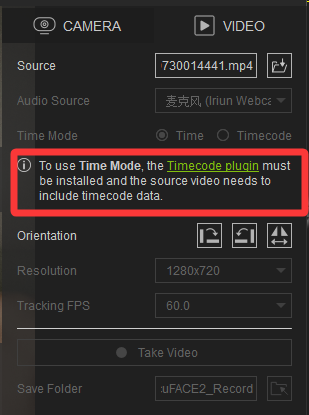
To use Time Mode,the Timecode plugin must be installed and the source video needs to include timecode data.
Does this prompt mean that installing the Timecode plugin is mandatory in order to use AccuFACE2?
To use Time Mode,the Timecode plugin must be installed and the source video needs to include timecode data.
Does this prompt mean that installing the Timecode plugin is mandatory in order to use AccuFACE2?
Hi gaweiwei,
Thank you for your question. This statement means that if your video contains timecode information, you will need to have the timecode plugin installed to use Time Mode.
If you are only using AccuFACE 2, it won’t affect anything at all.
Please feel free to ask if you have any other questions. Thanks!
I can’t load videos created by Motion Live, nor the demo into AccuFACE2!!! Two viruses were attached to the recommended codex download. Can Reallusion fix this within the software? I can load the videos into The Video Mocap plugin.
Hi pebutlerpe,
I’d like to check your workflow with you. Could you provide a video showing your operations, or the video source you fed into AccuFACE? You can send it directly to my email: raytsao@reallusion.com
I’ll have our team inspect it to see if there’s any issue. Thanks!
Good news is it’s not mandatory across the board — that warning is scoped specifically to Time Mode, so if you switch to the Timecode option instead (or just stick with regular Time Mode without needing frame-accurate sync), you can run AccuFACE2 without ever touching the Timecode plugin. It only becomes a requirement once you actually need that precise timecode data embedded in your source video.
I’m testing AccuFACE 2 with a prerecorded video in iClone/Motion LIVE, and I’m getting the following message:
“To use Time Mode, the Timecode plugin must be installed and the source video needs to include timecode data.”
The Time / Timecode options are greyed out.
I initially had Full-Frame Recording (Timecode) enabled, but I have also tested with it completely disabled. The warning remains either way.
I have also tested with a video recorded directly from AccuFACE 2 itself, rather than an externally recorded MP4, and the same warning appears.
However, AccuFACE 2 is connected and working correctly : the video plays, facial tracking works, and the CC5 character responds to the facial performance in real time. So the warning does not prevent the actual facial mocap from working.
My question is therefore: Is this warning expected when using AccuFACE 2 with video, or is it a UI/implementation issue?
If the Timecode plugin is not required for the basic video-to-facial-mocap workflow, perhaps the warning should not be displayed, or the Time Mode controls should not be presented as unavailable.
I’m reporting this because it could easily lead users to believe that the Timecode plugin is mandatory for AccuFACE 2 video capture when, in my testing, the actual facial tracking works without it.
Thanks.
Hi borgman,
Thank you for your reply, and your test is spot on!
Whether the Timecode plugin is installed or not does not affect the use of Full Frame Record. You must meet all the following conditions simultaneously for AccuFACE to record using timecode information:
Enable Full Frame Record
The video source contains timecode data
The Timecode plugin is purchased and installed
If any of these conditions are not met, it will simply record every frame based on the actual frame rate of the video.
Hope this clarifies your question!