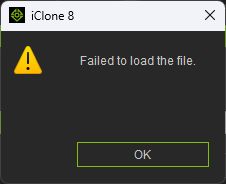
I was working on my latest film, and I saved the project I had been working on. When I tried to load it again, I get the error “Failed to load the file.”
Thinking I may have corrupted the project in some way (no idea how) I tried to load an existing “good” project and saved it again without making any changes. When I try to load it, I get the same error!
This is serious for me (and anyone who might be getting the same error.) I cannot use iClone until this is fixed!
I have the latest version of iClone (8.63.4627.1) which was updated yesterday.
Character Creator was also updated today (don’t know if that could be the cause, but you never know with these inter-related pieces of software.)
I have tried rebooting, but that did not change anything. I’d rather not have to re-install iClone, but if I have to I will.
Hopefully you didn’t save over your backup copy and instead saved to a new file which is something you should always do. Never save over an existing file.
As you have contacted Support they will hopefully be able to help you get your project working again. In the meantime, try going into Preferences (CTRL+P) and change your real-time graphical settings to the Minimal. Then change the Max Texture Size to say 512 x 512.
Now try to open your project again. If the file is not corrupted then it may load.
Thanks Peter, but I tried that (Minimal sets texture size to 1x1 itself) but it still won’t load.
btw, I constantly overwrite the same file (why else is there a CTRL+S function?) I generally only ever create backup files if I change something I’m not sure I want to keep. I don’t normally worry about iClone betraying me like it did today. Might have to reassess that in future.
Also, I loaded an existing “good” file, deleted everything from the Scene Manager and saved it (as a new project). And it throws the same error when trying to load it. Something is messed up.
Hopefully it’s just me, and maybe if I reinstall iClone it will fix it (won’t do that until advised). Guessing if it’s a bigger issue, you’d be hearing a lot more people complaining about it.
I worked on my project all afternoon, and after saving and closing it, I decided to reopen it to check something. I’m shocked to see that all my saves from today are impossible to open, just like the message above…
This is why I am still on 8.54 – even though I would like to use the new mocap feature in 8.63, I keep hearing horror stories about users losing their work after each new upgrade since iC8.6/CC4.6/CC5 “integration” (I’m not using CC5). Hopefully RL will work through these issues and release a stable product soon…
Reallusion has already released version 8.63.4631.1 to fix this issue.
Please update via the Hub (if you don’t receive the update notification, please run Refresh in Reallusion Hub.) — the project should open normally after the update. We’re very sorry for the issue.
Fixed: Projects with Burn-in Data > Scene/Take/… enabled could not be reopened after being saved.
Thank you, that seems to have fixed the problem for me. But please, in future. make sure to test the product throughly before releasing it to the unsuspecting public. We are delicate things and like our software to be stable and trustworthy. You understand…?
The hotfix mentioned by Joanne fixed the project loading bug that was the original issue being reported. However, projects can still fail occasionally due a couple of reasons.
One reason can be if the file can become corrupted in some way. the most common reason for this is when the saving process of the project is interrupted. This is why is is vital to aways have backups.
Another reason can be the size of the project has grown to a size that iClone can’t open with the available system resources. This is why I advised in an earlier post to try lowering your real-time graphics settings to the minimum to see if the project will now load.
However, if the project is not large, then there may be another project specific issue that needs looking at. In this case, please contact Support or use the Feedback Tracker and provide a download link to the project so it can be tested. Thanks.
Hi,
Could you please provide your project for testing?
you can provide us the project via Feedback tracker, Support Ticket or the private message.
Thank you for helping us with the development.