Hi everyone,
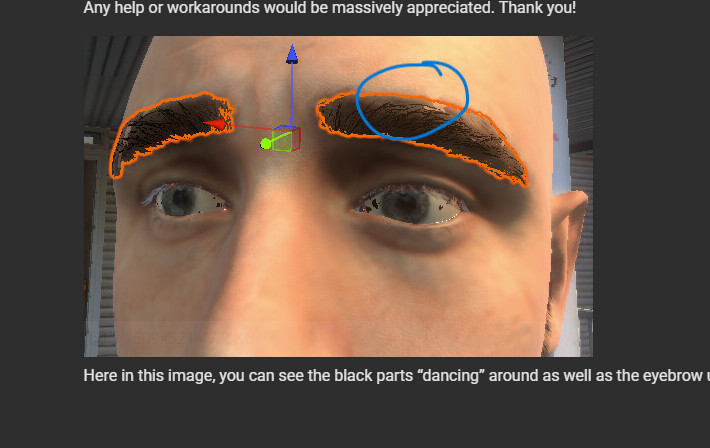
I am bringing Character Creator 5 models into a Unity VR project using the Universal Render Pipeline (URP). I am running into a severe visual issue with the facial meshes—specifically the eyes and the eyebrows—where they constantly vibrate, shimmer, and Z-fight against each other.
This issue happens both in the active VR headset and right inside the Unity Scene View, even when the editor is completely paused and no scripts or Look-At targets are running. The moment the camera shifts at all, the meshes start fighting for depth dominance.
Here is what I have already tested to rule out common culprits:
- Shaders: Toggling between the custom Reallusion Refractive/Parallax shaders and standard Unity URP/Lit shaders.
- Animation Compression: Turned animation compression entirely “Off” on the source FBX asset and forced Resample Curves, which ruled out low-keyframe interpolation jaggedness.
- Hierarchy & Scale: The parent transforms are all cleanly set to (1, 1, 1) and testing environments are positioned near the world origin (0, 0, 0) to avoid floating-point precision loss.
- Camera Depth: Checked camera clipping planes, but because it happens directly in the Scene View camera, it doesn’t appear to be isolated to the VR rig camera.
It seems like the eyeball sub-meshes or vertex displacements are fighting directly with the surrounding eyelid/brow geometry or facial blendshapes during camera movement.
Has anyone else encountered this persistent micro-jitter with CC5 characters in Unity? Is there an updated Auto-Setup script or a specific mesh export workflow from CC5 to completely lock these face accessories solid?
Any help or workarounds would be massively appreciated. Thank you!
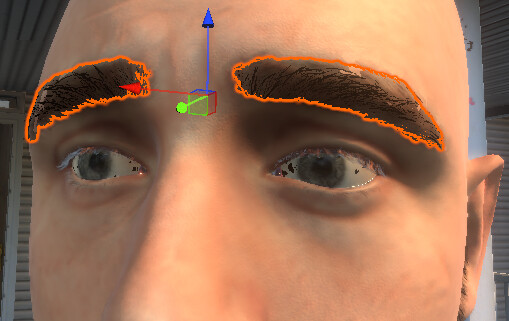
Here in this image, you can see the black parts “dancing” around as well as the eyebrow underlayer.