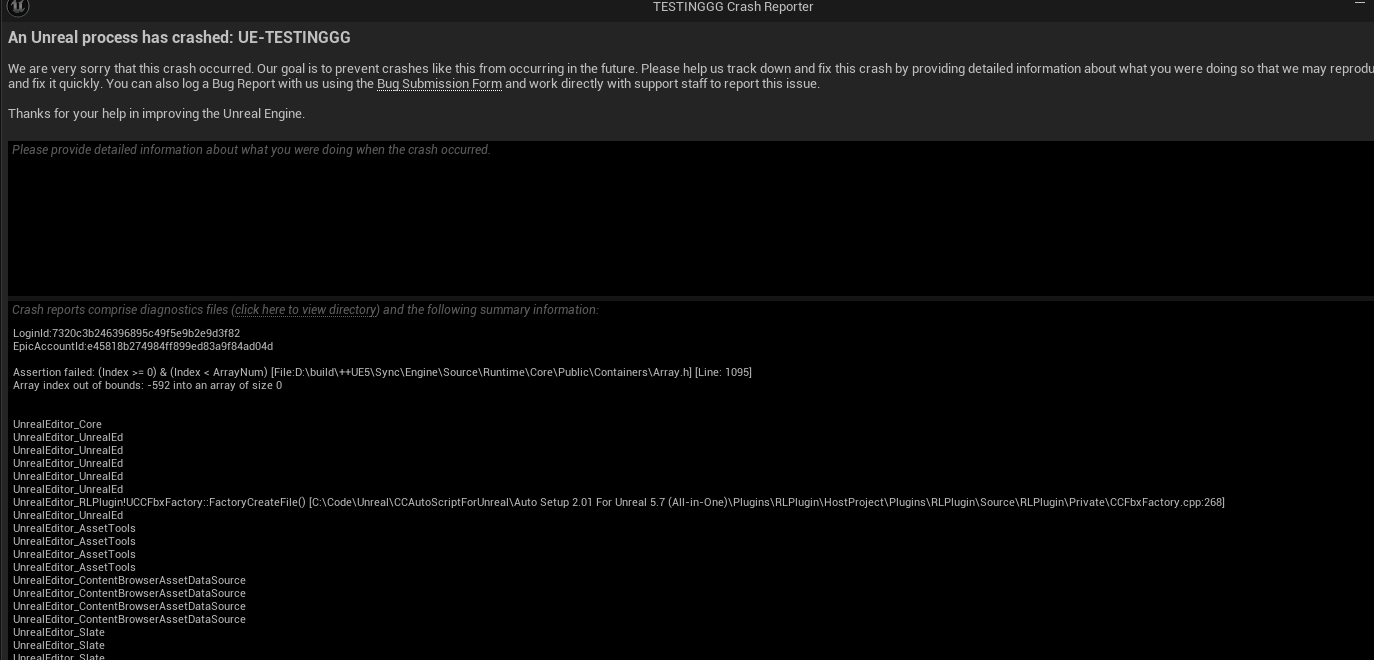
Hi, We’re running into an issue where no CC4/CC5 characters can be imported into Unreal anymore, even in blank projects and on multiple machines.
How it started:
- One character (Sloane) was mapped to the wrong skeleton.
- When that other character was deleted, Sloane’s skeleton was deleted too.
- After creating a new skeleton, all her morph curves were gone.
- Reimporting is the only way to restore curves.
Now every CC character crashes Unreal during import. We’ll import, it’ll take a while and then take superrrr long for the import settings to show it’ll get to 80% in the import then it crashes. everytime, we tested this at least 10 times.
We get this error in the Crash log:
Code: Assertion failed: Array index out of bounds
File: CCFbxFactory.cpp
we tried:
- Previous AutoSetup version
- Latest AutoSetup version
- Multiple machines
- Blank projects
- Multiple characters
All crash the same way and if we remove all-in-one, we risk breaking the other characters all ready working and mapping in scene. Using the importer separately still affects it.
It looks like the crash is happening inside the AutoSetup importer. Is anyone else seeing this?
I guess you might want to include the UE version information you used and maybe attached the FBX file as well. The screenshot does not show any useful log to me. (I am not from reallusion, just suggestion)
Hi hx.domain.0,
To help us troubleshoot, could you please send a screen recording of your workflow along with the FBX file to winnerhung@reallusion.com? We will try to replicate the issue on our end. Also please note your UE information.
Thanks,
Hi, I sent over those files.
Thanks so much!
Hi @hx.domain.0,
Thank you, we have received your files.
We are currently testing them, and we will keep you updated once we have any further feedback.
Thanks so much! Please let me know if anymore files are needed!
Hi @hx.domain.0,
Could you please send over the .json file that accompanies the FBX? We need it to run the Autosetup correctly.
Also, if possible, could you share the original CC character you used for this project?
Thanks!
Yes, I’ll do that asap. Also I’m attaching a new screen record I noticed that the import settings and the crash aren’t showing in the one I sent.
@Winner_RL I have sent an updated video capture of the process along with the new zipped folder containing the fbx and the json file. Apologies about the mix-up.
Thank you !
Hi @hx.domain.0,
No worries! We downloaded the files, and we will have it tested. Will keep you posted with anything new.
Regards
1 Like
I am having the same problem. I can’t import any characters into unreal, i get the Exception access violation error 544. I’ve turned in a ticket but al lthey told me to do was uncheck two boxes, which were never checked to begin with. I hope you get more support than i did!
Hi hx.domain.0,
We tried to replicate the issue by opening your files, but we were not able to reproduce the crash successfully on our end.
Would you be able to share your PC specifications with us?
Thanks!
Hi spalkowetz,
Would you kindly please share your working video and files to winnerhung@reallusion.com or send us a drive link?
Thanks!
Hello! I made a meticulous video showing exactly How i created a brand new project with NO CC5 plugins, how i installed 2.02 plugins and How i created a brand new kevin project and how i tried to import it. Then i get a response that says “um, do you think you’re combining auto setup files?” Did they even watch my video? This is so frustrating.
I’ve completely uninstalled Unreal and ALL Versions…and that wasn’t fun. I deleted all program directory folder of Unreal and reinstalled 5.5. installed 2.02 and got the same CRASH. There is something really wrong here and I need your team to look into this, please!!! This is unusable!
1 Like
Hi,
Thanks for the follow‑up. This crash is occurring across multiple Windows 11 systems, not just mine. I also tested by connecting to a teammate’s PC through Parsec, and the same crash happens there as well.
We’ve imported CC5 characters into multiple Unreal projects before without any issues, so this behavior is new.
Could you clarify which specific system specifications you need? CPU, GPU, OS version, Unreal version, or something more detailed?
Best regards,
Niyana
Agreed. This issue wasn’t present before and is unfortunately affecting our entire production pipeline! New and old characters and empty projects don’t work.
Also engine version is 5.7, Auto-setup version is 2.02
Hey there!
I just received a workaround from Reallusion’s tech support. I dont’ want to steal their thunder, but i’m betting you’re sweating it like i was. When you drag in the FBX character file, uncheck the two boxes in the auto setup. When the FBX importer pops up, Import All. Once it imports, Right click on the character’s skeletal mesh, and at the very bottom of a pop up, click on RUN UNREAL AUTO SETUP. Then it completes the setup. Good lLuck! and thank you Rampa and Reallusion tech support!
3 Likes
Hi spalkowetz,
Glad to know our TS provided a resolution for your issue!
Regards