I have another problem with the CC GoZ Plus feature.
After updating Character Creator to version 5.07, CC GoZ Plus is not working.
After uploading CC3+ Neutral Base and trying to send it to ZBrush 2026.1.2, a message appears, see the attached screenshot.
I tried reinstalling both ZBrush and Character Creator, but to no avail.

Hi,
It seems like the registry path of newest Zbrush had " \ " changed to " / ".
Could you check the registry and take a screenshot for us to confirm?
If this is the case, you can also manually change it back while we work on the fix.
Thanks!
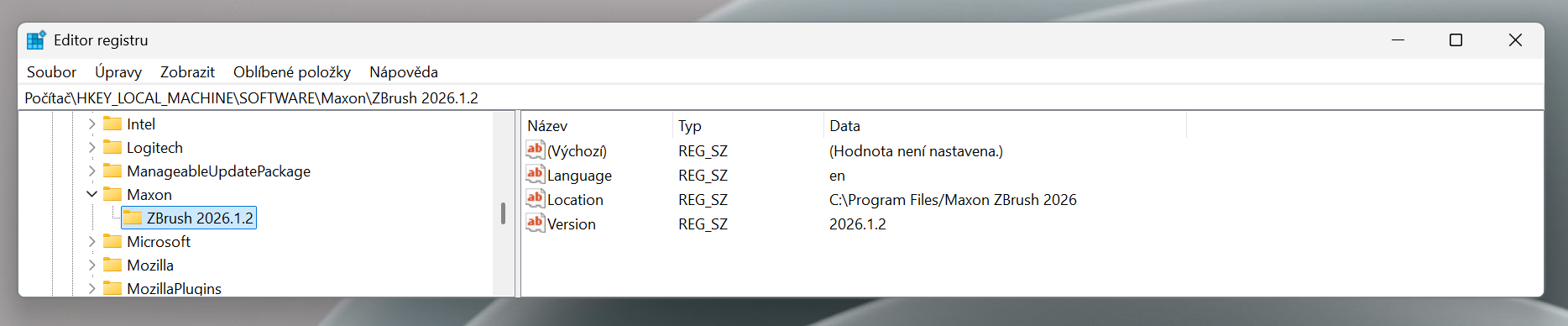
Thank you for the info, seems like it’s indeed caused by the location format change.
Could you try editing the location to change the single " / " into " \ " and try again?
So this didn’t help, the situation is the same.
However, after consulting directly with technical support, I found out that the CCGoZ plugin is not installed at all in the ZBrush directory and I need to manually copy it from the Reallusion directory.
After this manual installation, everything works.
1 Like
Ah, I see. Thanks for the clarification!
Hi info_660394 Same problem since the last ZBrush update.
But in my case, seems that I have GoZ on the right folder also.
“C:\Users\Public\Pixologic\GoZApps” And yet the situation is the same.
¿Is this the folder were you copy the GoZ manually? If not, could you tell please the folder? Thanks
Hi diegoev,
Could you please provide more details and screen shot about the issue you’re experiencing? We may be able to help you identify the cause and find a solution.
Thanks!