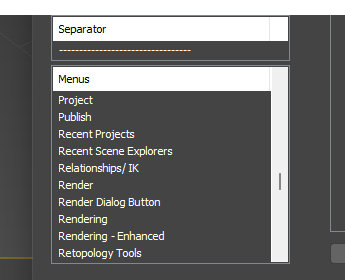
There are 3 cc plugins for max. 2023, 2024, and 2025. I currently have 2024 and 2026 on my computer. I downloaded the 2024 plugin that should have placed a reallusion button on my toolbar but it does not. I checked all max 5 UI’s and it appears nowhere. But my real concern is that there is no 2026 cc plugin for max. I also followed the instructions to customize the 3ds max UI, find the plugin in the menus folder and drag it to the menus bar but the folder does not exist in the menus selection… as you can see in this attached jpg. Any ideas?
I resolved this problem by downloading Max 2025 since it wasn’t working for 2024. This did the trick. I now show reallusion in my menu bar. Now all i need is the “not yet made” 2026 version. I look forward to that when it happens.
1 Like
I encountered the same problem with Max 2023. Go to customize User Interface → Menu tab → Create New Menu (top right) and name it Reallusion. Then Reallusionmenu will appear in the bottom left window. Drag the Reallusion entry to the right window below the last entry. On the left (All Commands) search for CC Auto Setup and drag it to the right into the Reallusion menu.
1 Like
THIS WORKED! I followed this and boom