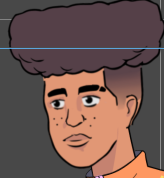
hello! i am having issues with my character’s facial features moving around when i apply motions (3d or 2d) to them. is anyone able to explain why this happens?

1 Like
That may be because the 2D and 3D motion also contain Facial Clip and Facial Motion, which can be deleted after applying the 2D or 3D motion.

Image here is an example of a 2D motion; applying it also gave the actor Facial Clip and Motion as well. Deleting them has the head and face return to Neutral.
hey natural glitch. i tried your recommendation and still the facial features wont return to normal.
Hmm…
In the Face Key Editor, on the Template tab, under Happy, there’s a button for Neutral.
In the 2D Motion Key Editor, you can select the neck and head (or any part) and press Reset.
That’s all the suggestions I have.