I am not able to adjust and correct motions once I apply a motion from a video mocap. I go to edit the motion layer, and try to rotate or adjust positions of overlapping ect… and the part I am trying to adjust just springs back into place and doesn’t allow me to make adjustments. I have turned spring effects off, made sure the layer is not locked, deleted and reapplied the motion. I am out of ideas and frustrated feeling I have wasted money on this video mocap. Anyone know what I am missing?
Hi webmaster_883758,
It looks like the Video Mocap keyframes might not have been fully deleted.
You can check out this specific tutorial for a fix: Reallusion Courses - Free Online Tutorials for 2D & 3D Animations
For more related guides, you can also browse through our tutorial library here: Reallusion Courses - Free Online Tutorials for 2D & 3D Animations
Let us know if this helps!
I tried this a couple different ways with deleting the keyframes and it doesn’t make a difference. When I go to edit motion layer, when I try to adjust the wrist and hand position it springs right back to where it started. it adds keyframes but nothing changes in the animation.
This issue might occur if you are using the Loop feature, as looped frames reference the original motion source.

You will need to Flatten the motion clip to edit specific frames.
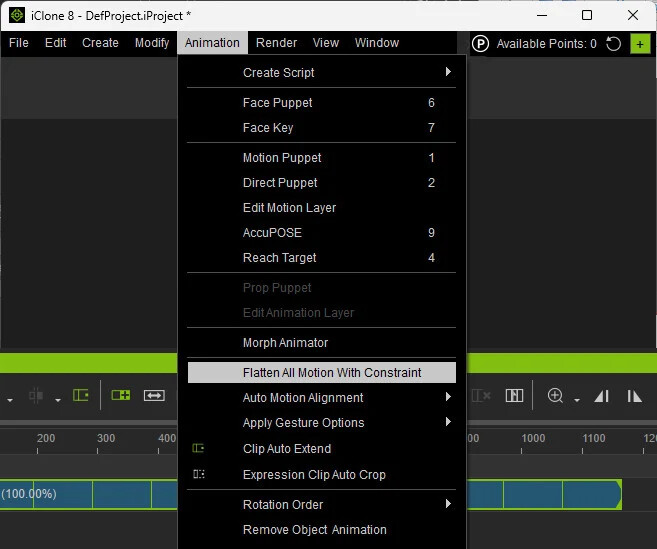

If you are not using Loop, please send your project file, iClone version, and hardware specs to raytsao@reallusion.com. Our team will look into this for you.
Thank you for your assistance!
Can’t thank you enough, that seems have to corrected the issue. I wasn’t even aware loop was on.
1 Like