Hi,
I’m using Character Creator 5 and Unreal Engine 5.
My goal is very simple: I want to create a few custom facial expressions in CC5 using the Facial Profile Editor, then export only those custom expressions as morph targets to Unreal.
For example:
- AAATest
- Smile_Custom
- Angry_Custom
I do not need lip sync, visemes, facial animation, Live Link, wrinkle controls, or the full CC5 HD facial profile in my game.
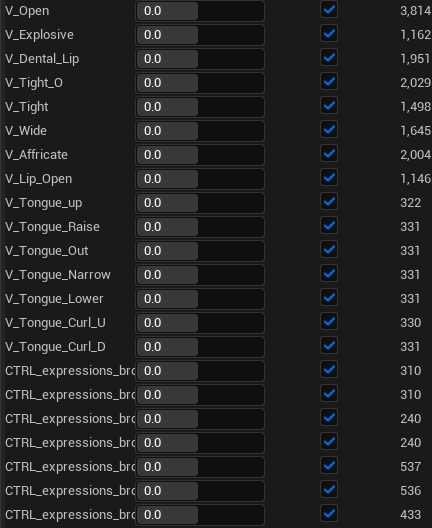
However, when I export the character from CC5 to Unreal with morph targets enabled, Unreal imports many default morph targets such as:
- V_Open
- V_Explosive
- V_Dental_Lip
- V_Tongue_*
- C_* corrective morphs
- CTRL_expressions_*
My custom morph target does import and works, but I only need the custom morphs. The default facial profile morphs greatly increase the amount of data, and most of them are unnecessary for my project.
So my questions are:
- Is there an official way in CC5 to export only selected/custom facial morph targets?
- Can I exclude visemes, corrective morphs, and CTRL expression morphs during FBX export?
- If this is not possible, what is the recommended workflow for a game character that only needs a few custom facial expression morphs?
- Is the intended workflow to export the full facial profile and then manually delete unused morph targets in Unreal?
Current workflow:
- CC5 Facial Profile Editor
- Custom expression slider created successfully
- FBX Export preset: Unreal UE5 Skeleton
- FBX Options: Mesh
- Unreal Import: Import Morph Targets ON
The custom morph appears in Unreal’s Morph Target Previewer, but many additional CC facial morphs are also imported.
I would appreciate any clarification on the recommended workflow.
Thanks!