I use Character Creator 5 with Headshot 3 and place the landmark points
manually for every model. That is by far the slowest part of my workflow,
so I am looking for a way to automate it.
Can landmark positions be imported from a file, or set via the Python API,
instead of being placed by hand in the UI?
Does the Python API expose any Headshot functionality at all?
Is there any batch or headless way to generate head models?
Yes to all three. However, Headshot 3 automation uses an undocumented interface (RLPy2.Headshot3) rather than the public RLPy API. It is unsupported, and its function signatures are specific to your current build, but it does work.
Hi,
To add to @Winner_RL’s reply, you can take a look at the scripts in Character Creator 5\Bin64\OpenPlugin\HeadShot3Kit\scripts—specifically, BatchAutoHead.py, ExportLandMark.py, and RunStage2.py. Also, one thing to point out: With these examples, you should find your way to batch process the heads, but it’s not truly headless – CC5 has to be running with the Headshot plugin loaded.
Yes please — a sample script would be very welcome.
Two follow-ups:
Is there a way to set landmarks, or only read them? ExportLandMark.py
uses GetLandmarks(), but I could not find a setter. Feeding in landmark
positions from an external detector is the part that matters most for
my workflow.
I ran ExportLandMark.py and it produced an empty CSV. The file was
created, so the script itself ran, but GetLandmarks() appears to have
returned nothing. What state does the session need to be in for it to
return data? I had a head already generated at that point. Should the
script be run while the landmark editing step is still open?
One small note: my install has BatchGenHead.py rather than BatchAutoHead.py.
The folder contains BatchGenHead.py, BatchGenHeadforBaby.py,
ExportLandMark.py, manual_run.py, RunStage2.py and RunStage2Full.py.
I am on Character Creator 5, product version 5.13.2031.1.
Filename: you’re right, it’s BatchGenHead.py in current builds, not BatchAutoHead.py — that was outdated on my end, sorry for the confusion.
1. Can landmarks be set, not just read?
Yes. There’s no SetLandmarks(), but RefineMesh() does the job:
hs_inf = RLPy2.Headshot3.GetInterface()
result = hs_inf.RefineMesh(front_landmarks, side_landmarks, enable_parts)
front_landmarks/side_landmarks are RLPy2.RArrayListRVector2f built from RLPy2.RVector2f(x, y) points (same format GetLandmarks() returns). enable_parts is a 7-bool array; index 5 is “fit side view.”
Warning: setting enable_parts[5] = True while your side landmarks array is empty (no side photo used) crashes Character Creator outright — not a clean failure. RunStage2.py/RunStage2Full.py already guard against this by forcing that index to False when there’s no side CSV — keep that guard if you write your own version.
2. Why did ExportLandMark.py produce an empty CSV?
GetLandmarks(True) returns real data once an avatar has been generated through Headshot3 in the current session via Headshot3.GetInterface().CenerateCharacter(...) — note that’s the actual method name, “CenerateCharacter” (Our typo). An empty result means the currently-loaded avatar was never generated through Headshot3 (e.g. a plain/imported avatar, or Headshot3 state got reset). Separately, a missing SideLandmarks.csv is expected whenever no side photo was used — the export script only writes it when there’s actual side landmark data.
If you can share your exact repro steps (was the avatar generated in the same session you ran the export in, or loaded from a prior save?) that’d help narrow down the empty-front-CSV case specifically.
To answer your question: the avatar was not generated with
CenerateCharacter. In the same session I imported an OBJ head mesh and
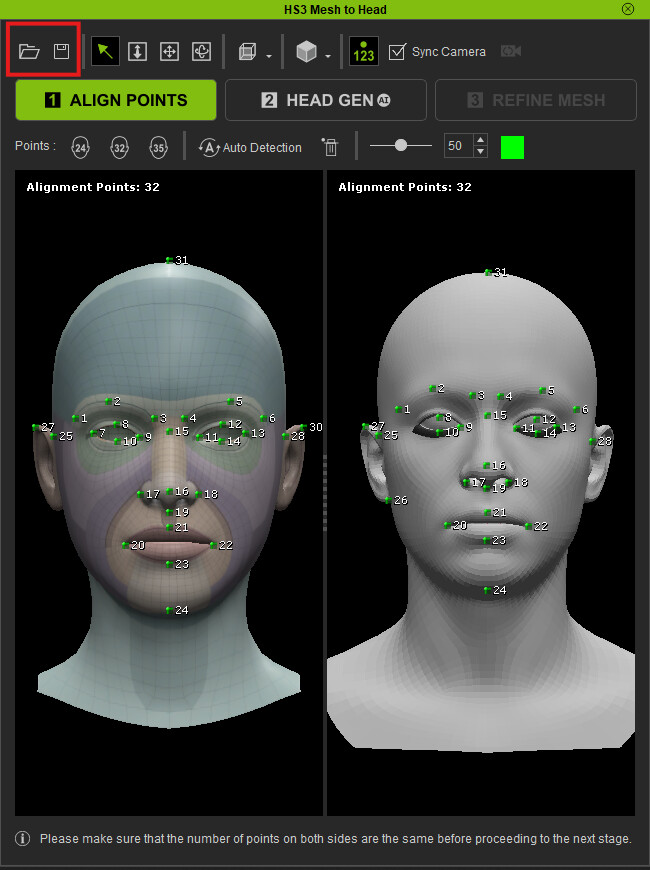
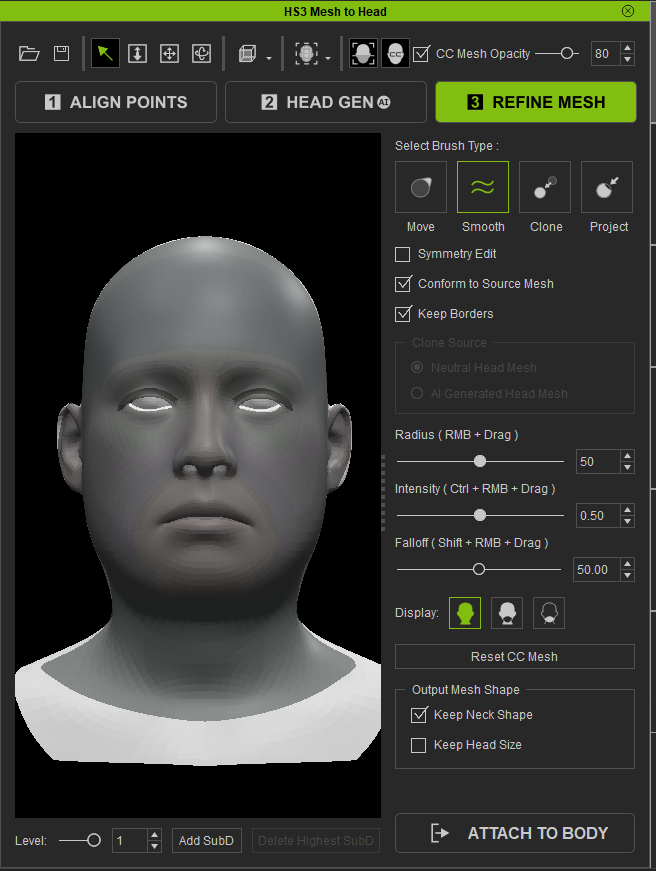
used the HS3 “Mesh to Head” panel (ALIGN POINTS, HEAD GEN, REFINE MESH).
So the empty result is expected.
That brings me back to the question from my last post: is there any way
to drive the Mesh to Head workflow from Python? For example, setting the
alignment points, or running HEAD GEN / REFINE MESH on an imported mesh.
Our input meshes always share the same topology, so if the points could
be set by script, this step could be fully automated.
Ah, if this is Mesh to Head we’re talking about, then unfortunately it is not scriptable from Python yet.
However, There’s a -headshot command line that can bring in a mesh to the hs3 interface. Something like: & "C:\Program Files\Reallusion\Character Creator 5\Bin64\CharacterCreator.exe" -headshot "path\to\Your.obj" -app "x" -ver "1".
And if your meshes share the same topology, you can also get it to load the alignment points config at the same time. You can save/load the config ini here in case you missed it.
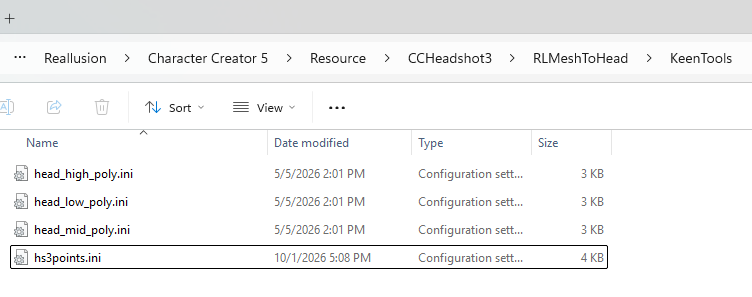
Once the ini is created, add a MeshVertCount = <VertCountToYourModel> line under the [Target] section. And drop the ini into C:\Program Files\Reallusion\Character Creator 5\Resource\CCHeadshot3\RLMeshToHead\KeenTools\ Give it a unique name. Don’t overwrite the presets in there.
With this setup, running the command line will bring you to the refine mesh stage. Not really fully automated, but at least you get to skip the alignment points. We’re still extending the API, so keep an eye on future updates.