Hi Victor, getting a new error on this version (2.2.3) with Unity 6.3 sometimes.
Invalid editor window of type: Reallusion.Import.UnityLinkManagerWindow, title: Reallusion.Import.UnityLinkManagerWindow
Other times it’s fine, wasn’t paying attention to what may have triggered it.
Also when i upgraded this project to unity 6.3 and the plug in to 2.2.3 (from 2.1.1) it kept reloading the plugin when i’d open the importer window. It’d pop up that overlay about the version, close it, and reload, and repeat. I deleted some old CC4 characters which helped stopp the problem, not sure what in those old exported characters would cause it to do that.
Had urgent updates to do for the Blender add-on so didn’t have much time until now to look at this.
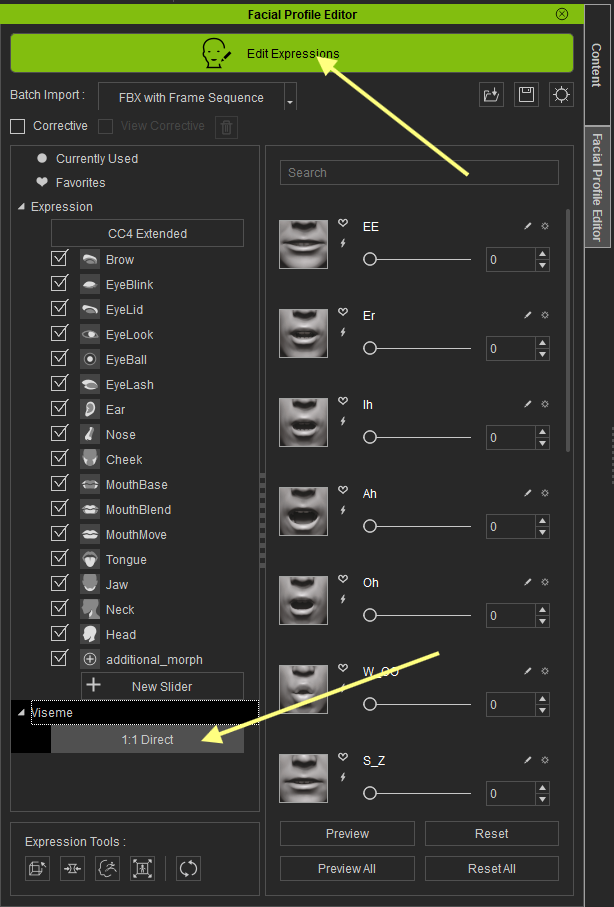
Were the custom blendshapes set up to work in CC5? As that’s what exports the expression bone data, without that data it can’t drive the bones from the blendshapes.
But … The 1:1 direct visemes are already set up for those shapes:
I figured out why mine was resetting though, when you re-open Unity it re-orders the order of scripts so if anyone else is using uLipSync and is having this issue FYI you need to do the following for it to work even after restarting Unity:
Go to Edit > Project Settings > Script Execution Order.
Click the plus (+) icon and add uLipSyncBlendShape.
Click the plus (+) icon and add Reallusion.Runtime.BoneDriver.
Drag them so that uLipSyncBlendShape is ABOVE BoneDriver.