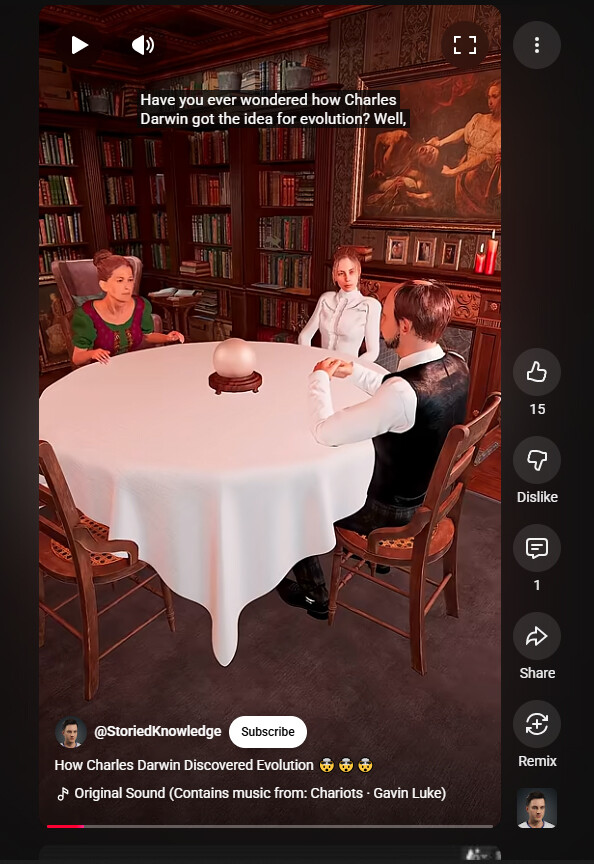
I use CC4 for characters and IC8 for animation, but that’s not the problem.
For some reason my videos just come out kind of blurry and bad. See here, for example: https://youtube.com/shorts/PdfW0MfDte0?si=equ2zA7OQ0aWwtzU
At first, I thought maybe it was something to do with DOF being slightly off but I always try to tweak it so that everything looks crisp in the viewport. Nevertheless, it almost always just looks kinda “bad” once rendered out.
The videos are rendered in 1080x1920 in unreal and finished the same with da vinci resolve. I use an ACES transform.
I want it to look more clear and crisp like the videos on this channel: https://youtube.com/shorts/c7blZoi8XKE?si=EAiuPi_dkZFeGuQC
I don’t see anything wrong its nice and clear with no blur, maybe you’ve made corrections since posting.
If you’re still working on this video can I suggest less camera circling and more close ups and mid body captures, imho giving a better production.
Hi Deanimation, thanks for the feedback.
You don’t think the video looks kind blurry or off? It does to me and even my wife and son think so.
I’m comparing myself to channels like Zack D Films and others. I’m not sure if you’re familiar with these types of channels but something about my videos just looks off/different.
I’m not a fan of the camera work either. I’m trying to emulate Zack D Films in camera work which uses a lot of movement. I think they do it for video retention because it helps people with short attention spans. I’m not saying I’ve captured their method perfectly or anything, just explaining the reasoning behind the excessive movement.
I’ve taken a screen shot to show you what I see, no blur or bad.
Yeah, it does look ok in your screenshot. 
Camerawork draws too much attention towards itself. I was pretty annoyed at it and I stopped watching around halfway. I’m not familiar with Zack D, but well composed shots and tight editing will help keep retention regardless.
The blur might be the motion blur. The camera I use for unreal engine has it on and I can adjust it depending on what I specifically need by shutter angle. I believe the default camera for unreal engine has it adjusted by shutter speed.
Zack D Films is the 38th most viewed YouTube channel of all time. They do animations and use Reallusion software.
A number of other channels have copied their formula and they all do really big views as well, except my own channel, of course.
I would certainly prefer to do camera work as you suggest, which is more my own preference as well. I can try it that way and see if it makes any difference. There are probably more fundamental reasons why my channel isn’t doing as well as the others.
Apart from agreeing that the camera swoops and circles are a bit too much, I don’t see a lot wrong with the focus apart from everything, even the background looks in perfect focus with little DOF. Maybe with less in focus in the background the forground would stand out a little more.
On another note I liked and understood your animation/story but actually lost brain cells trying to watch the other one.
I think we should always do this for ourselves and not for clicks and likes as they can be bought.