few weeks ago I animated an actor and rendered her walking along, then I put in animator 5, a home made short video, I then took my rendered actor and put her in the home made video, she walked across the screen with no background.( you will have to excuse me cuz I am 80) but now I cant remember how I did it. whenever I bring up my rendered actor again, she has a backgroung. can any one tell me how I did it so I can do it again ? please?
Hi Vicki
It sounds as though you have saved your actor as part of a complete project rather than just the actor by itself.
When you save as a project it will contain everything in your scene including actors, props, animations etc.
If you just want the actor by itself then you can just select it in your scene so it is highlighted and then click “Save” at the bottom of Content Manager. You will then see the save box as shown below where you can choose to save it as an Actor.
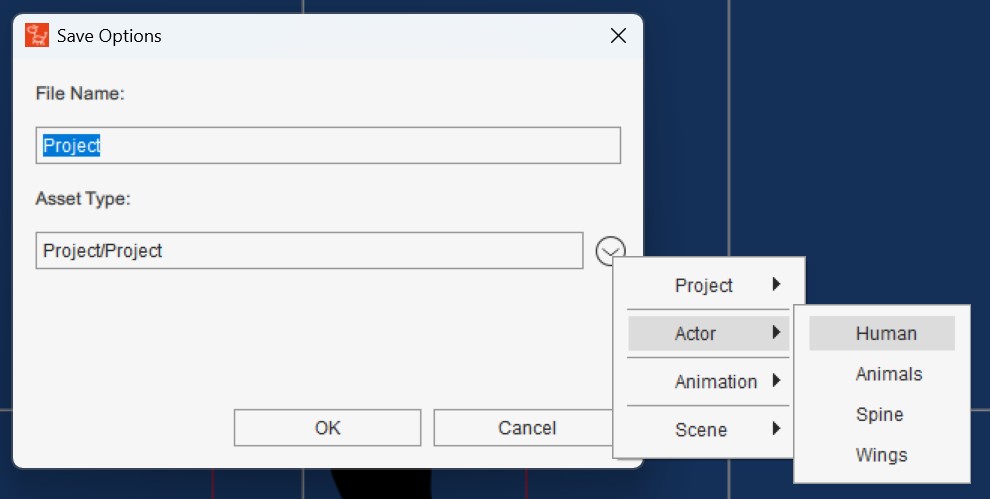
thankyou peter, but I did save it as an actor,I will try and explain, sorry, I brought the actor i as a project, no back ground, I then put ready made animation on to her, so she could walk across the screen. then I rendered her as a video, in mov transparent video, then I saved her into my videos.
I then put a short home made video as a prop, then went to my little video of my actor that was rendered, and dragged her on top of my home made video.
the first time i did this it worked well, but then I forgot how i did it, and now when I try, she no longer has a transparent back ground. hope this is a bit clearer…  thanks peter
Hey Vicki. I did also reply to this on my Facebook page, but thought Id catch you here as well. So you have the walking girl as a saved MOV file with a transparent background, correct? And you want to overlay that on toyur video footage. One way you could do this is with CapCUt. You can just layer your MOV walking right on top of the video background and then save it all as a video.
Thanks garry, i will give it a try and let you know i havent got capcut, didnt need any other program last tome:rofl:
1 Like
Hi Vicki
Thanks for explaining more.
If your character is saved as an Actor then there shouldn’t be any transparent background issues.
Test this by starting a new project and simply load your character.
Once you have confirmed there is no issue with the character, please try the following.
- Start a new project.
- Right Click (NOT Left Click) and drag your video into your viewport. Then select “Prop” when prompted.
- Adjust the size of the video prop to fill your scene.
- Now Drag your character into the viewport from Content Manager (or double click the thumbnail)
- Finally switch to 3D View from the top toolbar, and just the positioning of your character so it is in front of the video.
- You should now be ready to apply animation to your character as you did before.

I hope this helps.
thankyou peter, all good!