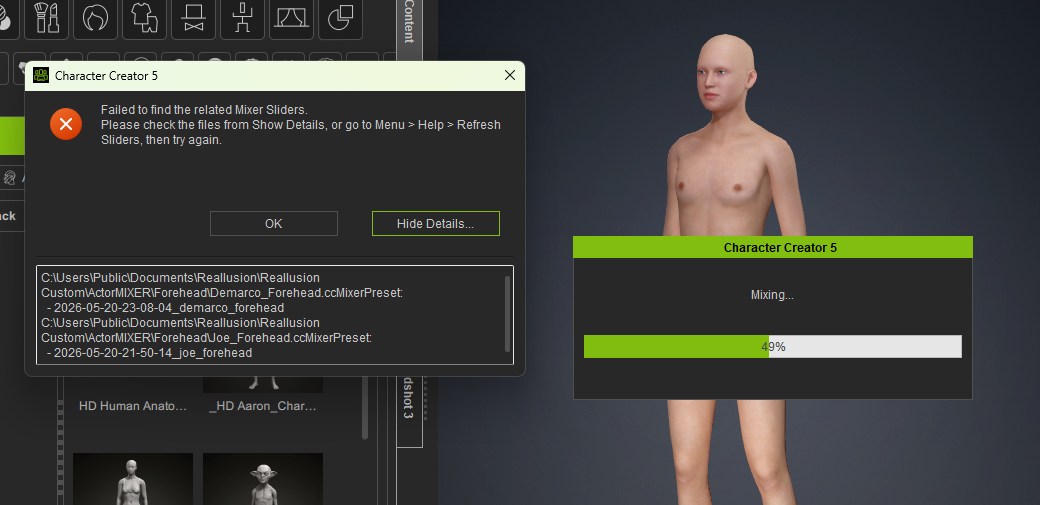
I keep receiving the following error message in Character Creator 5 when trying to use Random Face with ActorMixer :
“Failed to find related Mixer Sliders.”
I followed the recommended instructions to Refresh the Sliders , but this did not resolve the problem. I also closed and restarted CC5, but the same error continues to occur.
I found a forum topic from back in March describing what appears to be the same issue involving the Caricature Pack , but I have not been able to find a solution that works in my case.
When the error message appears, I used the information in the pop-up to locate the files it says are affected. I verified that the files are present and appear to be in the correct locations.
At this point, CC5 seems to recognize where the files are located, but ActorMixer is still unable to find or associate the related Mixer Sliders.
Is there another way to rebuild or refresh the ActorMixer slider associations, or could this be an issue with CC5 itself?
Any idea how to solve this problem.
Hi, just wanted to mention that I have the same problem; ‘refresh the sliders’ doesn’t seem to work. In my case, the pop-up doesn’t show a file path.
I hope the issue is taken seriously, if more people have the same issue. I hope you’re helped soon!
1 Like
Info,
I sent a ticket to the support they responded but I have not had a chance to act on it. I’ll comment when I do.
1 Like
Hi blackhawk,
It seems that one or more slider files may be missing.
Could you please open the Slider folder and check whether the required slider is available? Please check both the Template and Custom folders, as we are unsure whether the slider was created by you or installed as part of a content pack.
Random Face requires not only the preset but also the corresponding slider data.
If the slider is missing:
-
If it is a custom slider, please make sure it has been saved in the correct Slider folder.
-
If it came from a content pack, please reinstall the pack and then refresh Smart Gallery.
Please let us know whether you can find the slider in either folder.
C:\Users\Public\Documents\Reallusion\Reallusion Custom\Actor\Avatar Control
C:\Users\Public\Documents\Reallusion\Reallusion Templates\Actor\Avatar Control
Thanks