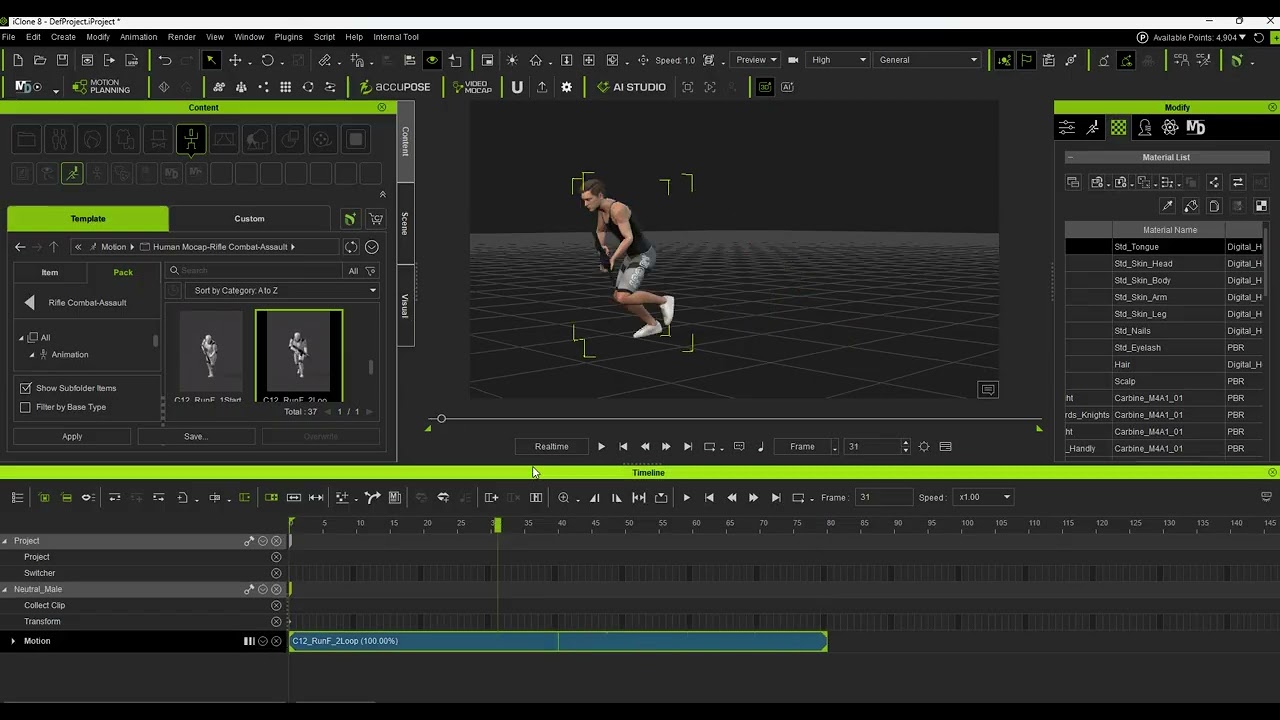
I am experiencing an issue with motion clips in iClone when extending them using the loop function in the Timeline.
When I enable the “Loop” tool and drag the edge of a running animation clip to extend it, iClone correctly creates the loop division lines. However, whenever the play head reaches these specific loop lines during playback, there is a noticeable small lag, hitch, or stutter in the character’s animation before it continues to the next cycle.
(upload://b4SoIxgRkaQGzP0jLdAE61KAysC.png)
Are those clips from Reallusion or custom made?
Generally quirks between loops happen due to first and last frames mismatch.
A couple of clips from RL (like Walk Relaxed_2Loop for instance) have that issue.
Those can be somewhat fixed by matching a beginning and end frames.
Hello, the animation is from Reallusion’s Rifle Combat Assault Pack. It’s only one second long, so it needs to be looped to cover longer distances. It’s disapointing that such a simple animation, which is advertised as loopable by Reallusion, doesn’t work properly when Looped
If you remove one frame from the beginning of the clip, and one frame from the end of the clip, it will loop smoothly.
The easiest way is to use the resize tool. Then drag the beginning of the clip 1 frame forward, and the end of the clip one frame back. Zoom in to get a better view. If you hold Alt and roll your mouse wheel, with the cursor in the timeline, it zooms the view.
Thank you for sharing your feedback about one of our earlier motion packs. We’ve continued improving our animation tools, including their looping features, and we’ll review this issue with our team. Thanks to Rampa for the helpful tip as well.
In the meantime, could you clarify what you mean by “not working properly”? Were you able to loop the run animation, and did your character move forward as expected? If possible, could you share a screen recording so we can better understand the issue? You can email the video to winnerhung@reallusion.com or send us a link to it.
Hello, i mean that whenever the play head reaches these specific loop lines during playback, there is a noticeable small lag, hitch, or stutter in the character’s animation before it continues to the next cycle. I tried the solution suggested by Rampa and removed the first and last frames. It works smoothly now, but it would be helpful if the team could fix this issue, as the animation is used frequently and shouldn’t require this workaround.
It’s a loop animation by Reallusion, and I thought it would work out of the box as a proper loop.
Got it. This was one of our earlier motion packs, and we’ve since improved our looping tools. I understand you may experience some frame lag, and we’ve shared your feedback about this content pack with our team.
In the meantime, you can try our loop tool, which was developed after this pack was released. You can add this to Rampa’s suggestion. Please see the reference video below
Just letting you know. Some of the loop motions which come default with iClone (Walk Relaxed_2Loop for example) also quirky when looped. Problem here is slightly different. The first and last frames do not match (some loop motions more obvious, some less). I usually fix it by removing 5-6 frames at the end and copying first frame to the end in full frames sample. But would be nice to have that permanently fixed as well.
Just to confirm, is this from the Free Resource Animation pack? We’ve received your feedback and will share it with our content team. These resources are updated gradually, so some animations may be newer while others are older. We’ll ask the team to review and update them as soon as possible.
For it to loop smoothly, don’t you need the last frame to be the frame before the first frame? That is how I cut it. Otherwise you will basically get two first frames in a row.
I attach a video link for anyone who wants to clearly understand the problem. The glitch at the boundaries of the animation loop is visible on the charecter in Iclone as well as in UE5 (rendered video) i attached below.
Technically yes, but if walk in-place loop merges abruptly (missing a few frames before first frame), it has to be smoothed first matching first and last frames. Then last frame can be cut.
The idea is to make the first and last frames match so the animation loops seamlessly. I think you had the right approach: match the frames, then use the Loop tool.
We’ve discussed this internally and plan to update these motion clips soon. Once they’re updated, you should only need to use the Loop tool.
We’ve updated the male and female loop motions in this Embed Animation . The first and last frames now match, so the motions should loop correctly.
While investigating, we found a possible issue with the iC7 version: two keys were placed on the same frame. This looked fine in iC7, but the keys and looping behaved differently in iC8. We’ve created an updated iC8 version of the motions.